
Columns and Grouping
Columns Manager controls which work item fields, metric columns, status groups, and assignee groups appear in the table.
Column settings can be saved as part of a saved report, so a recurring report can reopen with the same visible fields, status order, and group columns.
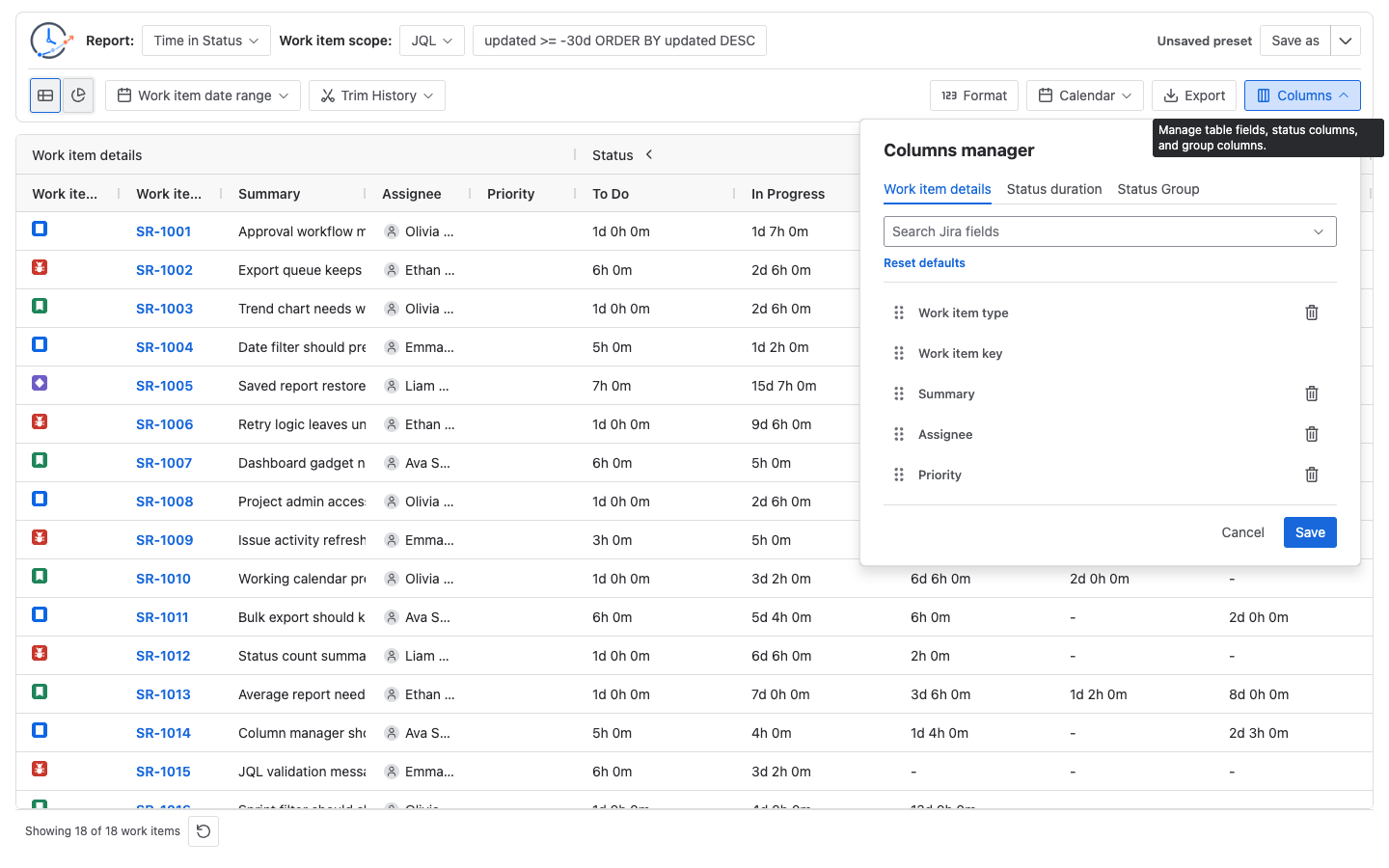
Open Columns Manager
Open Columns from the main report toolbar to customize the table.
Columns Manager includes these areas, depending on the selected report type:
- Work item details: choose and reorder work item fields. Work item key stays selected.
- Status duration: choose and reorder status, assignee, or transition metric columns.
- Status Group: create grouped status columns for supported status-based reports.
- Assignee Group: appears for Time in Assignee and lets you group assignees.
Columns Manager can search Jira fields for work item detail columns. Status and assignee group member searches use Jira status or user search results. If Jira permissions or API access prevent a search result from loading, the field or member may not be available in the picker.
Work item detail fields
Default visible fields include Work item type, Work item key, Summary, Assignee, and Priority. The built-in fields also include Current status, Reporter, Created, Updated, and Resolved.
Work item key is locked because it is the main link back to Jira. Other fields can be removed, reordered, or supplemented with additional Jira fields from Columns Manager.
Metric columns
Report metric columns are dynamic. A column appears when the selected report data has a value for it and the column is selected for display.
- Time in Status uses status duration columns.
- Average Time in Status uses average status duration columns.
- Time in Assignee uses assignee duration columns.
- Status Count uses status entry count columns.
- Status Entry Date uses first status-entry date columns.
- Transition Count uses from-status to to-status transition columns.
If a workflow status, assignee, or transition does not appear, check whether the selected data contains relevant history and whether the column is selected in Columns Manager.
Status groups
Status groups combine multiple workflow statuses into one reporting stage. They are useful when a workflow has several statuses that should be read together, such as In Progress and Blocked as one active-work stage.
Status group columns are available for Time in Status, Average Time in Status, and Status Count. They are not shown for Status Entry Date or Transition Count in the current table.
For duration reports, a status group sums the duration from the selected statuses. For Status Count, a status group sums the entry counts from the selected statuses.
The status-group design and validation Guide shows how to publish a cross-workflow mapping, keep base columns visible, and reconcile every grouped result.
The cross-team Average Time in Status guide shows how to reuse one Status Group and calendar definition across grouped team rows.
Assignee groups
Time in Assignee changes the metric dimension from status to assignee. In that report, the duration columns represent assignees, and the group tab becomes Assignee Group.
Use assignee groups when you want to combine people into a reporting group, such as a support team or review team. Assignee groups behave like status groups, but their members are Jira users instead of statuses.
Save column choices
Column settings can be saved as part of a saved report. This lets the same report reopen with the same visible fields, metric columns, status order, assignee order, and supported group columns.
Saved column choices do not freeze Jira data. If statuses, assignees, fields, workflows, permissions, or issue histories change later, a restored saved report can still show different columns or values.
Common troubleshooting
- A status column is missing: no current row has a calculated value for that status, or the column was hidden in Columns Manager.
- A group column is missing: the selected report type may not support group columns, or the group has no selected members.
- A Jira field is unavailable: the field may not be returned by Jira for the current site, data, user, or app context.
- Export does not include a hidden column: export follows the current table configuration and visible result state.