
How to Create Status Groups in Jira Time in Status Reports
Design, configure, and validate Jira status groups without losing the base-status evidence behind each grouped duration.
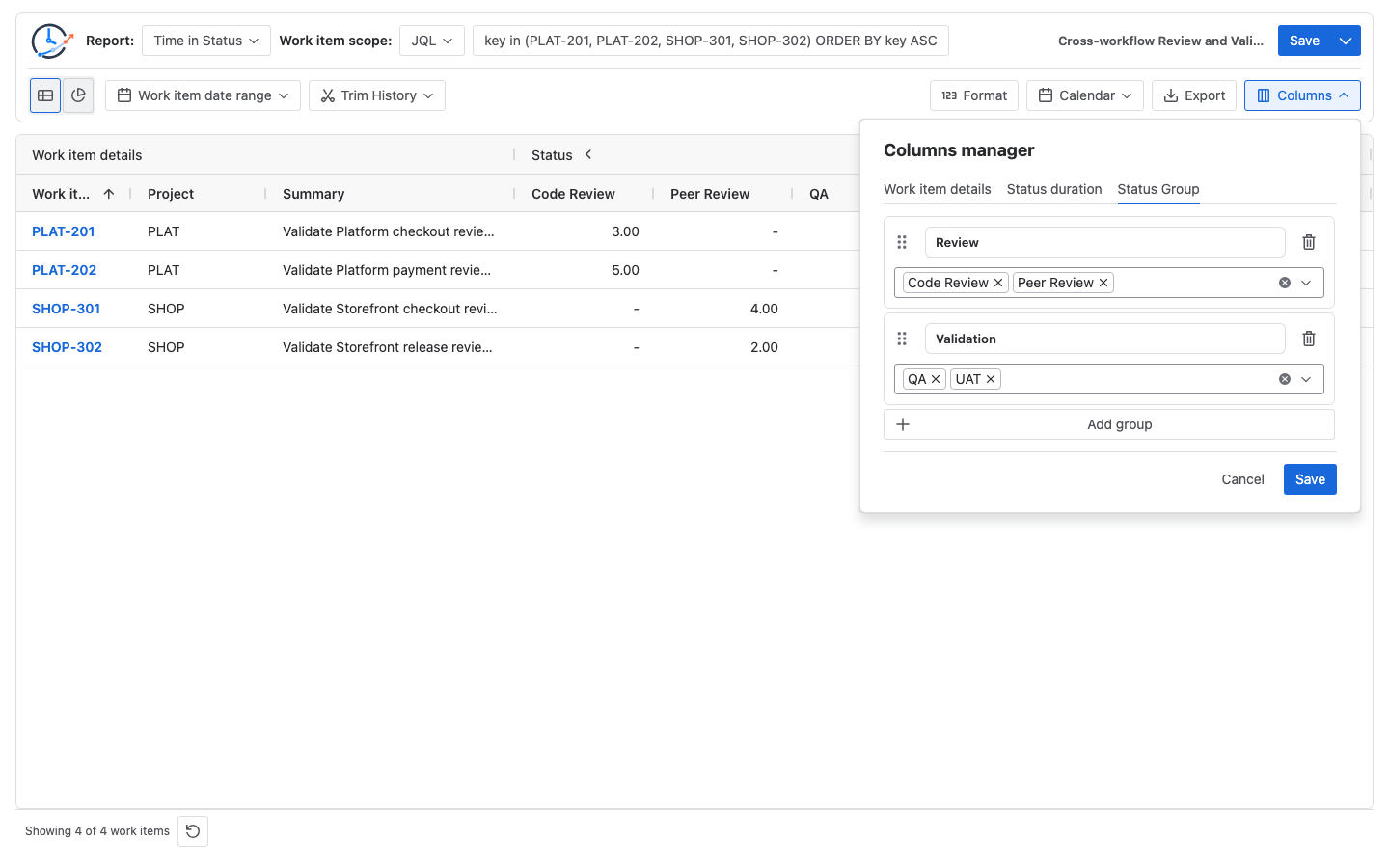
To create useful Jira status groups, define the analytical stage before configuring the report. Map each included Jira status to a named group, record intentional omissions, and keep the base status columns visible for acceptance. Status Groups are available in Time in Status, Average Time in Status, and Status Count; Status Entry Date and Transition Count do not show them, while Time in Assignee uses Assignee Group instead. Unmapped statuses remain outside every group. In this Time in Status example, Code Review + Peer Review = Review and QA + UAT = Validation.
A Status Group is an analytical mapping, not a Jira workflow change
Atlassian defines a Jira workflow as a set of statuses and transitions through which a work item moves. Those Jira statuses remain the source history. Creating a Status Group in StatusPath Reports does not rename a Jira status, add a transition, or edit a workflow.
For company-managed boards, Atlassian also documents that administrators can map multiple Jira statuses to one board column. A Jira board column and a StatusPath Status Group can use similar stage names, but they are separate definitions on separate surfaces. StatusPath does not read or inherit a board-column mapping when it builds a Status Group, and it does not write the group back to Jira. Record both when a report is expected to align with a board.
This Guide owns the mapping design and validation method. Columns and Grouping owns the current Columns Manager controls.
Real Jira scenario: one mapping across two workflows
A PMO maintains one shared reporting-stage definition across a Platform project and a Storefront project. The workflows use different detailed status names:
| Project workflow | Review-stage status | Validation-stage status |
|---|---|---|
| Platform | Code Review | QA |
| Storefront | Peer Review | UAT |
The reporting contract is:
| Status Group | Included Jira statuses | Definition | Intentionally excluded |
|---|---|---|---|
| Review | Code Review, Peer Review | Time in a project-specific review stage | In Progress, Blocked |
| Validation | QA, UAT | Time in a project-specific validation stage | Waiting for QA, Done |
The omissions are deliberate. Review + Validation is not the complete workflow lifecycle. Unmapped statuses do not automatically join either group. If the organization later decides that Waiting for QA belongs in Validation, that is a versioned definition change, not a harmless label edit.
Use the Jira Workflow Reporting Guide to keep the population, selection window, history window, metric, Calendar, and output definition beside this mapping.
Use one fixed report configuration for the acceptance check:
| Setting | Value |
|---|---|
| Report | Time in Status |
| Work-item scope | key in (PLAT-201, PLAT-202, SHOP-301, SHOP-302) ORDER BY key ASC |
| Work item date range | Empty |
| Trim History | Off |
| Calendar | Always / elapsed time |
| Format | Decimal Hours |
| Visible base columns | Code Review, Peer Review, QA, UAT |
| Status Groups | Review; Validation |
Elapsed time is used for this acceptance fixture so every displayed hour is the timestamp difference. A business Calendar requires the same reconciliation with only counted working intervals.
Reconcile every grouped value with the base columns
The relevant Jira History intervals are:
PLAT-201: Code Review2026-07-20 09:00Z → 12:00Zand QA12:00Z → 14:00Z.PLAT-202: Code Review2026-07-20 09:00Z → 14:00Zand QA14:00Z → 15:00Z.SHOP-301: Peer Review2026-07-20 09:00Z → 13:00Zand UAT13:00Z → 16:00Z.SHOP-302: Peer Review2026-07-20 09:00Z → 11:00Zand UAT11:00Z → 15:00Z.
With elapsed time, the expected table is:
| Work item | Code Review | Peer Review | QA | UAT | Review calculation | Validation calculation |
|---|---|---|---|---|---|---|
PLAT-201 | 3h | — | 2h | — | 3h + no contribution = 3h | 2h + no contribution = 2h |
PLAT-202 | 5h | — | 1h | — | 5h + no contribution = 5h | 1h + no contribution = 1h |
SHOP-301 | — | 4h | — | 3h | no contribution + 4h = 4h | no contribution + 3h = 3h |
SHOP-302 | — | 2h | — | 4h | no contribution + 2h = 2h | no contribution + 4h = 4h |
| Column total | 8h | 6h | 3h | 7h | 14h | 10h |
A dash preserves the absence of a base-status contribution; it is not evidence of a recorded zero-duration visit. For reconciliation, the group simply has no duration to add from that member.
The column controls are:
Review group     = Code Review total + Peer Review total
                 = 8h + 6h
                 = 14h

Validation group = QA total + UAT total
                 = 3h + 7h
                 = 10h

Included base-status total = 8h + 6h + 3h + 7h = 24h
Grouped-stage total        = 14h + 10h = 24h
The final equality is valid because these four included base statuses form a complete, mutually exclusive partition across the two groups. Unmapped statuses contribute to no group. If one status is added to both groups, its duration appears in both and the two group totals must not be added. The 24h = 24h control does not mean the groups cover To Do, In Progress, Blocked, Done, or any other omitted lifecycle stage.
Build a mapping that remains reviewable
- Write the reporting question. Use a bounded question such as “How much selected workflow time is spent in review and validation?” Do not start with a convenient group name.
- Inventory the exact Jira statuses. Record each status name, status ID when available, project or workflow, and intended analytical stage. If labels were renamed, localized, or duplicated, follow the status-identity reconciliation Guide before grouping them.
- Set inclusion rules. Mark every source status as included once, intentionally omitted, or pending review. A status must not disappear merely because its name is unfamiliar.
- Freeze the calculation inputs. Keep the work-item scope, Work item date range, Trim History, Calendar, Format, and report time unchanged while validating the mapping.
- Create the two Status Groups. In Columns Manager, add Code Review and Peer Review to Review, then QA and UAT to Validation. Keep all four base columns visible.
- Check rows and totals. Recalculate at least one work item from Jira History, then prove
8h + 6h = 14hand3h + 7h = 10hacross the complete controlled scope. - Test other report types separately. A duration reconciliation does not automatically validate an average denominator or an entry count.
- Save the definition with the report. Record the mapping owner, version, review date, source workflows, and acceptance rows. Saved Reports can preserve the supported configuration, but they query current Jira data when rerun rather than freezing these results.
Know the released report boundaries
Status Groups currently have these report-type boundaries:
| Report type | Status Group behavior |
|---|---|
| Time in Status | For each work item, sums the duration cells for the selected member statuses |
| Average Time in Status | The table, duration filter, sort, and export sum the member statuses’ already displayed average values; this is not a per-work-item merged-stage average when member denominators differ |
| Time in Assignee | Uses Assignee Group with Jira users as members, not Status Group |
| Status Count | Sums the member statuses’ entryCount values; it does not deduplicate visits to the broader business stage |
| Status Entry Date | Status Groups are not shown in the current table |
| Transition Count | Status Groups are not shown; retain exact From → To directions |
For Average Time in Status, the released group value is a display aggregation: it adds the already calculated average shown for each member status. The current table, duration filter, sort, and export all use that same sum. If Code Review and Peer Review have different contributing work-item populations, their displayed average sum is not the average of a per-work-item merged Review stage. Keep the member denominators and base values beside any interpretation. Use Report Types to keep duration, average, entry-count, entry-date, and transition questions separate.
For this scenario, each of the four work items enters exactly one Review member and exactly one Validation member once:
Review Status Count     = 2 Code Review entries + 2 Peer Review entries = 4
Validation Status Count = 2 QA entries + 2 UAT entries = 4
These are status-entry events, not hours and not deduplicated stage visits. Re-entering Code Review increases the Review Status Count. A work item that enters Code Review and then moves directly to Peer Review contributes one entry to each member, so the grouped sum is two even if the business treats the sequence as one continuous Review-stage visit.
Common mistakes
Treating a Jira board column as the report definition
Board columns can map several statuses for board presentation and completion behavior. Preserve the separate StatusPath mapping used for this report.
Hiding the base columns before acceptance
A grouped value without its source columns is difficult to challenge. Keep the members visible until representative rows and totals reconcile.
Reading an Average Status Group as a merged-stage average
The current group cell adds the displayed averages of its member statuses. When their contributor counts differ, that sum does not equal a per-work-item merged Review average. Inspect the member denominators instead of assigning a merged-stage interpretation.
Adding one status to multiple analytical stages
If a mapping overlaps, adding the group totals can count the same duration twice. Use a mutually exclusive mapping for additive summaries, or label overlapping groups as separate questions that must not be totaled.
Treating an omitted status as zero
Omission means the stage definition excludes that status. It does not prove that selected work items spent zero time there.
Using a broad group to diagnose a specific delay
Review can support a broad stage summary, but it cannot show whether Code Review or Peer Review drove the result. Return to the base columns and Jira History before proposing a workflow change.
The QA and testing bottleneck Guide shows why Waiting for QA, active Testing, and retest paths should remain separate during diagnosis even when a broader group is useful later.
Expecting Status Entry Date or Transition Count to use the same group
The current table does not show Status Groups for those reports. Keep exact status identities for milestone dates and exact directional pairs for transitions.
Frequently asked questions
Is a Status Group the same as a Jira board column?
No. Both can organize several statuses under a stage label, but a board-column mapping belongs to a Jira board while a Status Group belongs to the StatusPath report configuration. StatusPath neither reads nor inherits the board mapping, and it does not write the Status Group back to Jira. Document both when they are expected to align.
Can one Status Group include statuses from different Jira workflows?
It can combine selected statuses available to the report, as Review does here. First verify each status identity, workflow meaning, and base-column result; matching or similar labels alone do not prove equivalent boundaries.
Does 14 hours of Review mean 14 hours of active reviewer work?
No. It is status occupancy under the selected scope, history window, and Calendar. It can include queueing, waiting, automation, discussion, and other time represented by those statuses.
Should the base status columns stay visible forever?
They should remain visible during acceptance and periodic audits. A recurring summary can emphasize group columns after validation, but keep the mapping and representative base evidence with the report definition.
Does the same Status Group mean the same thing in every report?
No. Time in Status sums member durations for each work item. The current Average Time in Status group display sums the member statuses’ displayed averages. Status Count sums member entryCount values. Time in Assignee uses an Assignee Group and cannot reuse status members. Validate each metric independently.
Related Guides
- How to Calculate Time in Status in Jira Cloud
- How to Calculate Jira Active Workflow Time Excluding On Hold
- Jira Renamed and Localized Statuses in Workflow Reports
- Why a Jira Status Column Is Missing from a Time in Status Report
- How to Compare Average Time in Status Across Jira Teams
Publish the mapping with the metric
A Status Group is trustworthy when its purpose, members, omissions, owner, version, report type, and base-column reconciliation travel with the result. Keep the detailed statuses available for diagnosis, and do not give an Average group sum a per-work-item merged-stage interpretation.
Try StatusPath Reports on the Atlassian Marketplace to configure the Review and Validation mappings, reconcile Time in Status members with Jira History, verify Status Count as member-entry totals, and save the reviewed report definition. Use Assignee Group—not Status Group—for Time in Assignee.