
Why a Jira Status Column Is Missing from a Time in Status Report
Diagnose a missing Jira status column by checking report scope, actual status history, Trim History, Columns Manager visibility, and table filters.
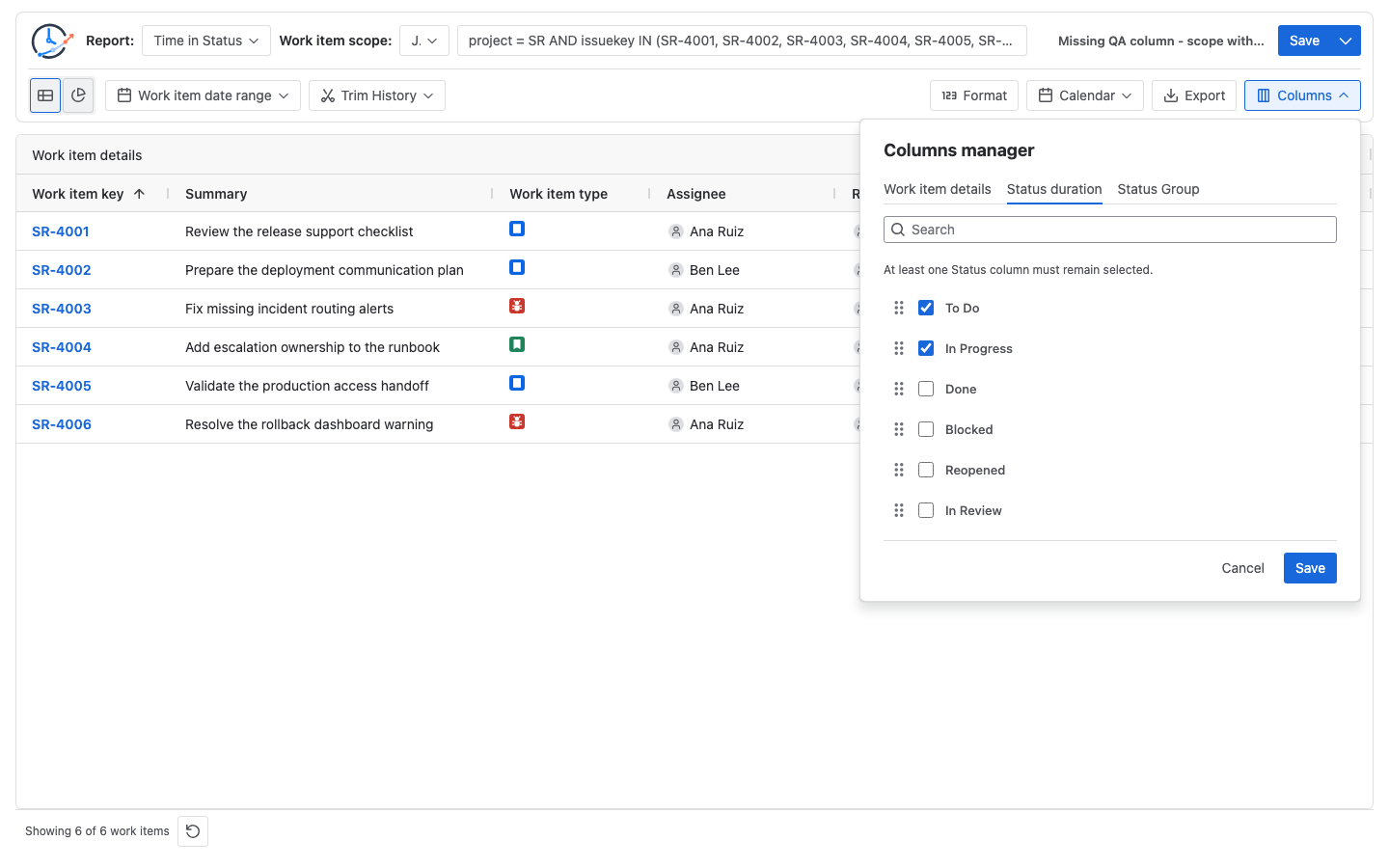
A Jira status column can be missing even though the status exists in the workflow because StatusPath discovers dynamic metric columns from qualifying history when a report source runs, then applies column visibility. On a fresh source result, if no selected work item has a calculated QA interval, QA is unavailable to add. A previously discovered or saved QA column may instead remain with dashes. If QA exists in Columns but is unchecked, show it there.
A workflow status is not automatically a report column
Atlassian defines statuses as steps in a team’s workflow. A workflow containing QA proves that the step is configured; it does not prove that a work item in the current report population entered QA during the calculated history window.
StatusPath Time in Status columns are dynamic. A report source discovers a status column when its calculated data contains a value for that status. A previously discovered or saved column choice can remain visible even when a later run gives every current row a dash. Table view documentation describes result-driven columns, Columns Manager visibility, horizontal scrolling, filtering, and the difference between a missing value and a real zero. For the interval calculation itself, use the Time in Status calculation guide.
First identify which symptom you actually have:
| Symptom | What it means in the current table | First check |
|---|---|---|
| No QA header and no QA option in Columns Manager | The report source did not discover a qualifying QA duration record | Population, Work item date range, Trim History, and Jira History |
| QA is listed in Columns Manager but unchecked | The dynamic column exists but is hidden by column configuration | Select QA and save the column setup |
QA header exists, but every row shows - | A saved or previously discovered column remains, but the current rows have no QA value | Current population, date controls, Trim History, and saved setup |
QA header exists, but one row shows - | That work item has no recorded QA interval in the calculated window | Check that work item’s History; do not replace the dash with a duration |
| QA header exists, but the expected QA work item is not visible | A grid filter can be hiding the evidence row; the table may also be scrolled away from it | Clear table filters and inspect the full table |
Real Jira scenario: two scopes around three QA transitions
A release manager knows the project workflow contains QA, but a six-item release report has no QA column. The controlled report uses:
| Setting | Value |
|---|---|
| Report | Time in Status |
| Calendar | Configured 24×7 calendar named All time (UTC) |
| Format | Decimal Hours |
| Work item date range | Empty |
| Trim History | Off; calculate complete history |
| Fixed report time | July 20, 2026 at 22:00 UTC |
All time (UTC) is the named calendar configured for this reproducible report; it is not a claim about the default calendar in every installation.
The narrow JQL scope is:
project = SR
AND issuekey IN (SR-4001, SR-4002, SR-4003, SR-4004, SR-4005, SR-4006)
ORDER BY issuekey ASC
None of those six work items entered QA:
| Work item | Relevant status history in UTC | QA duration record |
|---|---|---|
SR-4001 | To Do 07:00 → In Progress 08:00 → Done 13:00 | None |
SR-4002 | To Do 07:00 → In Progress 09:00 → Done 13:00 | None |
SR-4003 | To Do 06:00 → In Progress 07:00 → Blocked 13:00 → Reopened 15:00 → In Progress 16:00 → Done 18:00 | None |
SR-4004 | To Do 08:00 → In Progress 09:00 → In Review 16:00 → Done 18:00 | None |
SR-4005 | To Do 07:00 → In Progress 09:00 → Ready for Release 14:00 → Done 16:00 | None |
SR-4006 | To Do 08:00 → In Progress 09:00 → In Review 13:00 → Done 16:00 | None |
The manager then expands only the work-item population:
project = SR
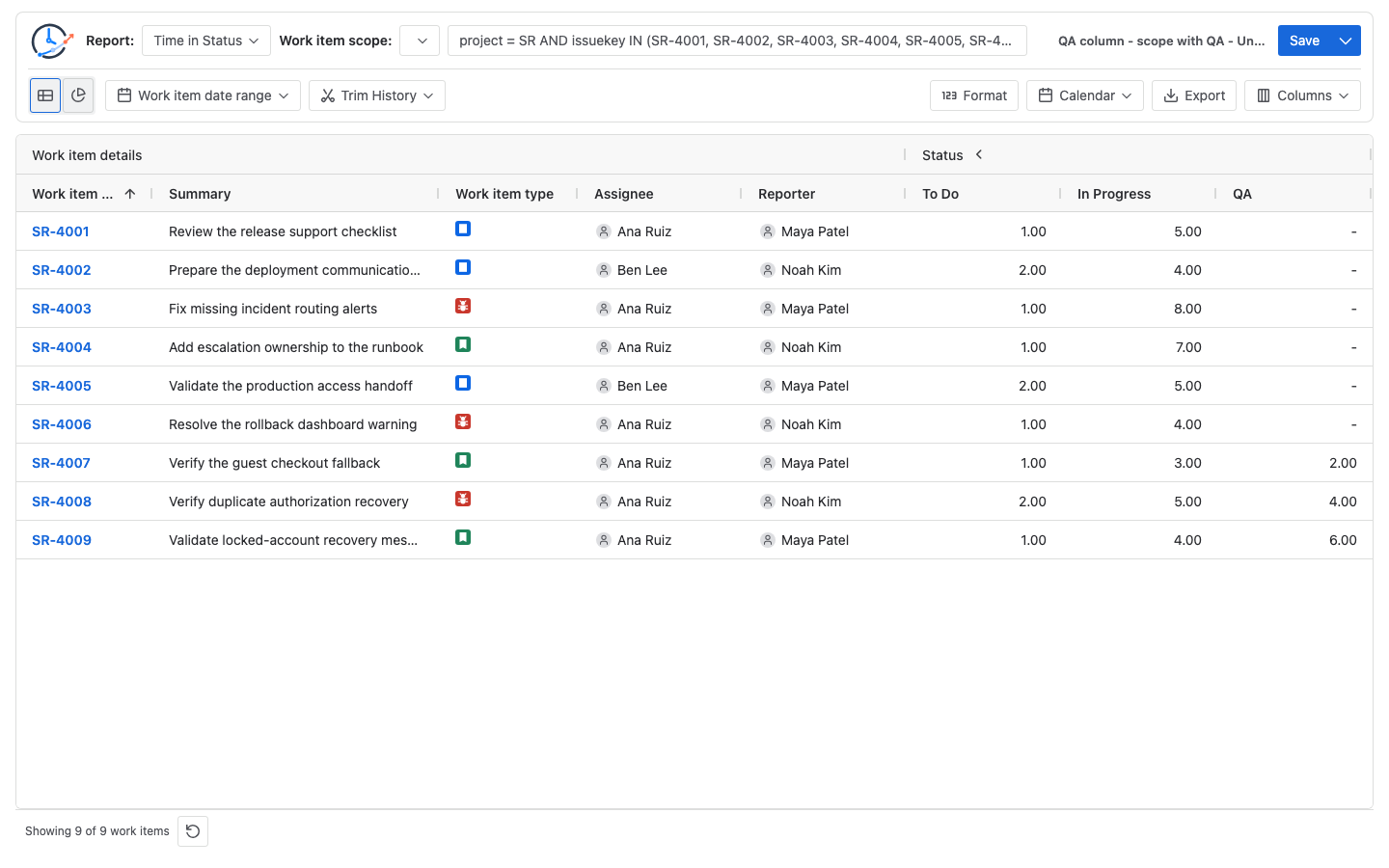
AND issuekey IN (SR-4001, SR-4002, SR-4003, SR-4004, SR-4005, SR-4006, SR-4007, SR-4008, SR-4009)
ORDER BY issuekey ASCSR-4007, SR-4008, and SR-4009 supply the missing evidence:
| Work item | Entered QA | Entered Done | QA duration |
|---|---|---|---|
SR-4007 | 2026-07-20 12:00 UTC | 2026-07-20 14:00 UTC | 2h |
SR-4008 | 2026-07-20 14:00 UTC | 2026-07-20 18:00 UTC | 4h |
SR-4009 | 2026-07-20 14:00 UTC | 2026-07-20 20:00 UTC | 6h |
Atlassian documents that a work item’s Activity → History records field edits and movements through its workflow. That History view is the source evidence for each QA entry and exit timestamp.
Manually verify the missing and restored states
For the narrow scope, the QA contributor count is zero:
QA contributors = 0 of 6
QA duration records = none
The business-level sum across those six histories is zero hours, but the table does not invent an empty QA = 0.00 column. There is no QA duration record from which to generate that dynamic column.
For the expanded scope:
SR-4007 QA duration = 2026-07-20 14:00 - 2026-07-20 12:00
                    = 2 hours
SR-4008 QA duration = 4 hours
SR-4009 QA duration = 6 hours
QA contributors     = 3 of 9
QA total             = 2h + 4h + 6h = 12.00 hours
The expected table is therefore:
| Work item | QA |
|---|---|
SR-4001 | - |
SR-4002 | - |
SR-4003 | - |
SR-4004 | - |
SR-4005 | - |
SR-4006 | - |
SR-4007 | 2.00 |
SR-4008 | 4.00 |
SR-4009 | 6.00 |
The dashes are missing per-row values, not six numeric zeros. The whole QA column and an individual blank cell are different states.
Diagnose a missing status column in a fixed order
1. Confirm the exact status label
Open one known work item and copy the status name from Jira History. Do not assume QA, In QA, Quality Assurance, and Testing are interchangeable. Atlassian notes that status renaming updates workflows that use the status and can affect how reports are displayed. This check is about finding the expected label; cross-project status identity and localization require a separate review.
2. Prove the work-item population in Jira
Run the exact Project, saved Filter, JQL, Sprint, or Epic population as the same user. For this scenario, compare the two explicit-key queries and confirm that only the expanded query includes SR-4007, SR-4008, and SR-4009.
JQL can also find accessible work items that have a QA change:
project = SR
AND status CHANGED TO "QA"
ORDER BY issuekey ASC
Atlassian’s JQL operator reference documents CHANGED with predicates including TO, FROM, BEFORE, AFTER, and DURING. Use this query to find evidence work items, not to calculate duration.
3. Check Work item date range separately
Work item date range can remove an otherwise matching work item based on Created, Updated, or Resolved date. If it excludes all three QA contributors, the resulting data loses its QA values. On fresh source discovery the QA column may be absent; if a saved or previously discovered QA selection remains, the header can stay while every row shows a dash. Clear the control for this reproducible scenario, then reapply the intended business boundary after the column is explained.
4. Check Trim History against the QA interval
Trim History changes which part of each selected work item’s history is calculated. If a trim window excludes all three QA intervals from SR-4007, SR-4008, and SR-4009, the expanded result has no QA duration record. Depending on whether QA was already discovered or restored from a saved setup, the later table can omit the column or retain it with dashes. Use SR-4007’s July 20 12:00–14:00 interval for the single-item boundary check. The date-range and history-clipping guide shows how population filters and calculation boundaries differ.
5. Open Columns Manager
If QA is available but unchecked, select it and save. If QA is not offered, changing its visibility cannot solve the problem; return to population and calculated history. A Saved Report can preserve column choices, but it stores configuration rather than a frozen copy of Jira data.
6. Clear row filters and inspect the complete width
Grid filters change which rows are visible. They can hide one or all three QA contributors, but they do not manufacture a missing QA history record. Clear active filters, expand the metric column group, and scroll horizontally before concluding that the column is absent.
7. Reconcile one work item manually
For SR-4007, verify the 12:00 entry and 14:00 exit in Jira History, subtract the timestamps, and confirm 2.00 under the 24×7 UTC calendar and Decimal Hours format. Then reconcile SR-4008 = 4.00 and SR-4009 = 6.00 before confirming the 12.00-hour total. If the report uses a working calendar, calculate only the overlap with that schedule instead of expecting these elapsed-time results.
Common mistakes
Treating the workflow diagram as duration evidence
A configured QA status is a possible workflow step. It is not proof that any selected work item entered QA.
Checking only the current Jira status
status = "QA" finds work items currently in QA. It can miss completed work items that previously passed through QA. Use History and an appropriate WAS or CHANGED query for historical evidence.
Expecting JQL to calculate the missing duration
JQL selects work items and can test status history conditions. It does not turn the interval between two changes into a Time in Status value.
Changing Trim History when the evidence row is outside the population
Trim History cannot bring SR-4007, SR-4008, or SR-4009 into the six-item JQL result. Fix the population first, then set the calculation window.
Expecting a table filter to create or delete a discovered column
Table filters operate on current rows. They can hide all three QA contributors from view, but source and history determine whether a QA value can be calculated.
Treating a dash as the same as a missing column or zero
A dash under an existing QA header means that row has no calculated QA value. No QA header is a column-discovery or visibility question. A displayed zero-duration value is a third, separate state.
Editing the Jira workflow before finding the reporting cause
Do not add, remove, or rename statuses merely to make a report column appear. First identify whether scope, history, label, or column visibility explains the result. Change the workflow only when the process itself is wrong and the appropriate Jira administrators have reviewed the impact.
Frequently asked questions
Can I force an empty QA column when no selected work item entered QA?
The current Time in Status table generates base status columns from calculated report data. If QA is not available in Columns Manager, include an appropriate work item and history window that produces a QA value; do not treat a fabricated zero column as recorded history.
Why is QA in Columns Manager but not in the table?
It may be unchecked, positioned off-screen in a wide table, or inside a collapsed metric group. Select it, save the setup, expand the group, and scroll horizontally.
Does status CHANGED TO "QA" calculate Time in Status?
No. It filters for work items with a qualifying status change. Time in Status still needs the entry and exit timestamps, history window, calendar, and duration format.
Can a table filter remove the QA column?
A table filter removes visible rows from the current grid and can hide the only row with a QA value. The discovered column itself remains a column-configuration question. If the header is completely absent, check scope, calculated history, and Columns Manager.
Why did a saved report lose a status column later?
Saved reports preserve configuration, not a frozen result. The current Jira population, permissions, status history, or workflow labels may have changed. Rerun a small known-evidence scope and compare it with the saved setup.
Should I change the Jira workflow to restore the column?
Usually not. If known work items already entered QA, repair the report scope, history window, or visibility first. Change the workflow only when QA is genuinely missing from the intended process, not as a reporting workaround.
Related Guides
- How to Calculate Time in Status in Jira Cloud
- How to Create a Jira Time in Status Report with JQL
- How Jira Time in Status Date Ranges Clip History
- How to Find the Date a Jira Work Item Entered a Status
- Jira Average Time in Status: Dash vs 0.00 Explained
- Jira Renamed and Localized Statuses in Workflow Reports
Restore the column with evidence, not guesswork
Use StatusPath Reports to rerun the smallest scope containing a known QA interval, verify the timestamps, then select the discovered QA column. Follow Table view: dynamic columns, Columns Manager, and filters to preserve a reviewable column setup after the result matches Jira History.