
Jira Average Time in Status: Dash vs 0.00 Explained
Distinguish a dash, an exact or rounded 0.00, and a positive Jira Average Time in Status value with checked QA evidence.
In StatusPath’s Average Time in Status table, a dash and 0.00 represent different evidence. A dash means the grouped row has no qualifying contribution for that status under the report scope, history window, and calculation rules, so there is no numeric average to display. 0.00 is numeric, but it does not by itself prove the unrounded duration is exactly zero: Decimal Hours displays two decimals, so an exact zero and a small positive value that rounds to zero can look the same. Check the underlying interval, Calendar intersection, and contributor count before interpreting it.
This Guide interprets the cell, not the whole average formula
This troubleshooting Guide answers one question: what should you investigate when an Average Time in Status cell shows -, 0.00, or a positive number? For repeated entries, denominator rules, and the general formula, use How Is Average Time in Status Calculated in Jira?. For a missing header rather than a cell value, use Why a Jira Status Column Is Missing from a Time in Status Report.
The distinction below is locally verified StatusPath behavior; it is not a Jira-defined meaning for dashes or zeros. Jira supplies the transition evidence. Atlassian documents that a work item’s Activity → History records field edits and movements through its workflow. StatusPath then applies the selected scope, history controls, Calendar, grouping, and duration format.
Real Jira scenario: three QA outcomes under one Calendar
A release manager groups a three-item Average Time in Status report by the custom Team field and keeps only QA visible. Each group contains one work item, which makes the three cell states easy to reconcile.
Use this unchanged configuration:
| Setting | Value |
|---|---|
| Report | Average Time in Status |
| Work-item scope | project = SR AND key in (SR-5401, SR-5402, SR-5403) ORDER BY key ASC |
| Work item date range | Empty |
| Trim History | Off |
| Calendar | Weekdays 09:00-17:00 UTC |
| Format | Decimal Hours |
| Group by | Team |
| Selected status | QA |
The Jira History evidence and Calendar overlap are:
| Team group | Work item | Relevant Jira History | QA contributor | Counted QA time | Displayed QA average |
|---|---|---|---|---|---|
| No QA entry | SR-5401 | In Progress → Done; no QA interval | 0 | No value | - |
| Weekend QA | SR-5402 | QA Saturday 09:00 → 11:00 UTC | 1 | 0h | 0.00 |
| Business-hour QA | SR-5403 | QA Monday 09:00 → 11:00 UTC | 1 | 2h | 2.00 |
Weekdays 09:00-17:00 UTC is the named Calendar used for this reproducible report. It is not a claim about a default Jira or StatusPath calendar.
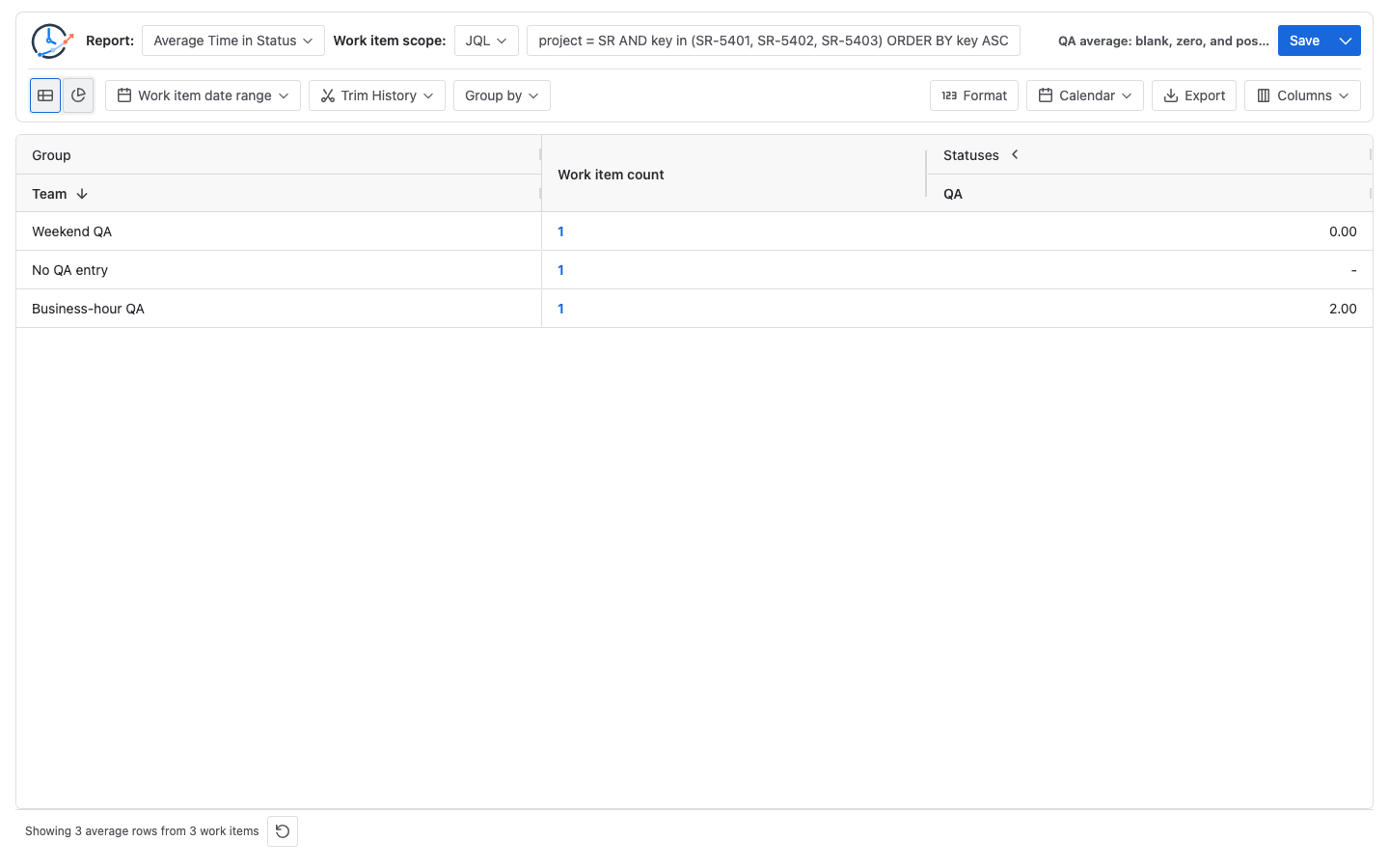
Manually check all three cells
Dash: no calculated QA contribution
SR-5401 has no QA entry in the History used by this report:
QA contributor count = 0
QA duration records  = none
Numeric QA average   = not defined
Displayed value      = -
The dash is not another way to write zero. It preserves the fact that this row has no calculated QA contribution. In another report, that absence could result from scope, permissions, Work item date range, Trim History, or changed Jira History—not only from a workflow path that skipped QA.
Displayed zero: first distinguish exact zero from rounding
SR-5402 records a real two-hour elapsed QA interval from Saturday 09:00 to 11:00 UTC. Its exit time and the report run time are after the interval, the Calendar timezone is UTC, working days are Monday-Friday, working hours are 09:00-17:00, and Trim History is off. The whole interval is therefore outside the selected Calendar:
Recorded QA interval          = Saturday 09:00 → 11:00 UTC
Overlap with selected Calendar = 0h
QA contributor count           = 1
QA average                     = 0h ÷ 1 = 0.00h
This controlled calculation proves an exact counted zero. The cell text alone would not. For example:
0.004h = 14.4 seconds
Displayed with two Decimal Hours places = 0.00h
That rounded positive value is not the same raw result as 0h, even though both display as 0.00. The numeric zero therefore preserves different evidence from the dash, but its exact magnitude still requires raw timestamps, Calendar intersection evidence, or a more precise export/format.
Positive value: one QA contribution inside the Calendar
SR-5403 records the same two-hour clock interval on Monday, fully inside 09:00–17:00 UTC:
Recorded QA interval           = Monday 09:00 → 11:00 UTC
Overlap with selected Calendar = 2h
QA contributor count           = 1
QA average                     = 2h ÷ 1 = 2.00h
This is not a cross-team performance comparison. The three rows are controls that isolate status participation and Calendar overlap.
Prove that the exact zero stays in the denominator
Run a second Average Time in Status report with only SR-5402 and SR-5403, grouped by Project. Both work items entered QA, so both are contributors:
QA total counted duration = 0h + 2h = 2h
QA contributor count      = 2
QA average                = 2h ÷ 2 = 1.00h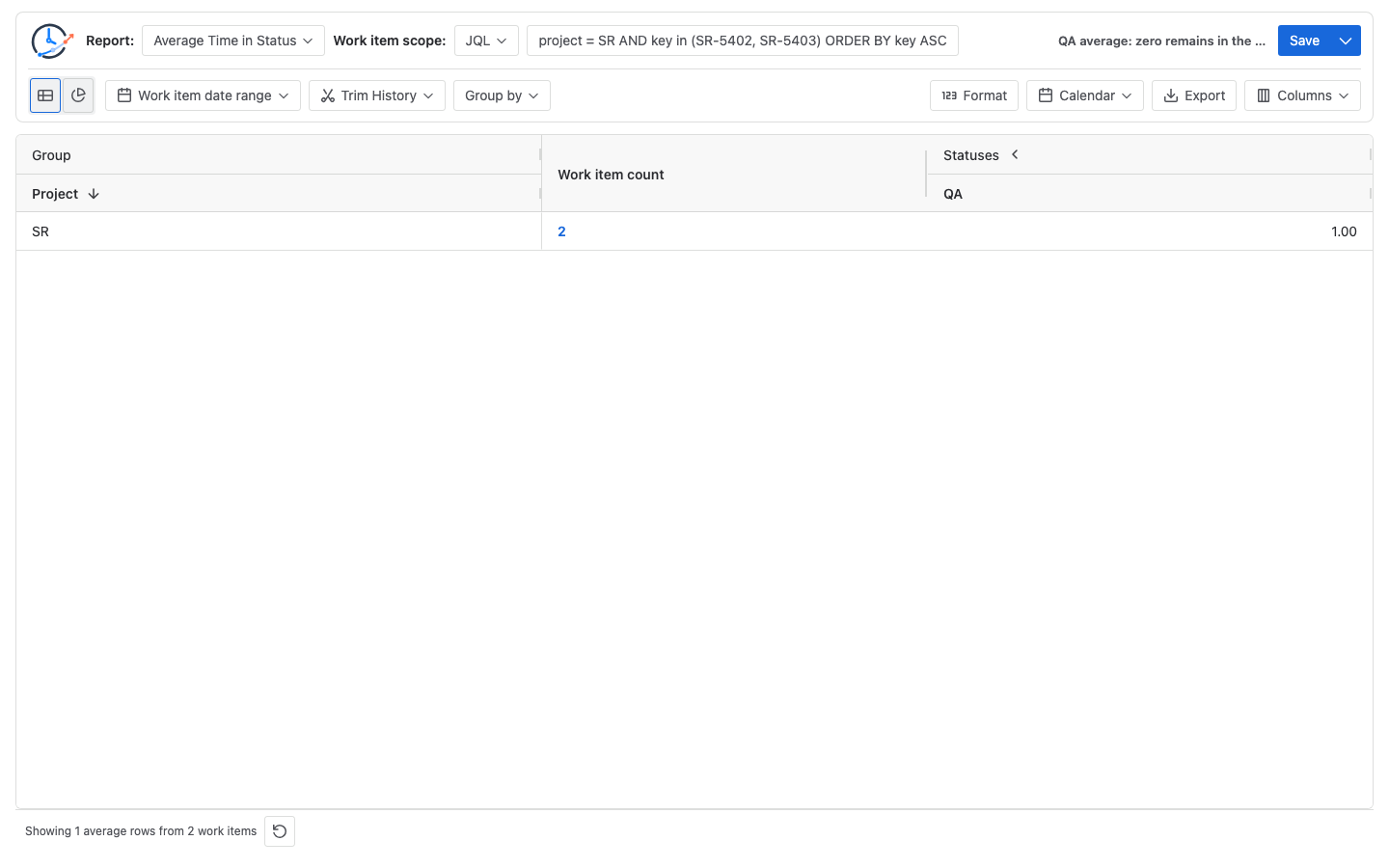
If the zero contributor were incorrectly dropped, the result would be 2h ÷ 1 = 2.00h. The captured 1.00 result is the aggregate proof that a qualifying exact-zero contribution participates in the denominator.
Reproduce the check in StatusPath Reports
- Open each work item’s Jira Activity → History and verify the QA entry and exit events. Do not infer a past QA interval from the current status.
- Run Average Time in Status with the explicit three-key scope.
- Leave Work item date range empty and Trim History off for this check.
- Select
Weekdays 09:00-17:00 UTC, choose Decimal Hours, group by Team, and keep only QA visible. - Confirm that all three group rows have a Work item count of one.
- Hover or keyboard-focus each numeric QA average cell and reconcile its total duration and participant count. Do not infer exact zero from the two-decimal text alone.
- Run the two-key aggregate and confirm
(0h + 2h) ÷ 2 = 1.00h. - For the dash, or if a numeric value remains unexplained, run Time in Status with the same scope and time controls to inspect the work-item rows and confirm whether a QA contribution exists.
See Report types for the distinction between Average Time in Status and Time in Status. Use Calendars and duration to verify working days, hours, timezone, holidays, and exceptions, and Table view for cell and column behavior.
A compact decision table
| What the QA cell shows | First evidence to check | Safe interpretation |
|---|---|---|
- | QA participant count, scope, history window, and rules | No qualifying QA contribution for this grouped row |
0.00 | Raw duration, precision, participant count, and Calendar overlap | A numeric QA value exists; the unrounded value is zero or rounds to zero |
| Positive value | History interval and Calendar overlap | Counted QA duration exists; reconcile the displayed unit |
Do not replace the evidence check with the visible group size. Work item count is the size of the Team group; a status-specific participant count can be smaller.
Common mistakes
Converting every dash to zero
This erases the difference between no calculated QA contribution and a contributed interval whose counted duration is zero.
Treating zero as proof that no time passed
Two elapsed hours pass for SR-5402. The selected working Calendar counts zero because both timestamps fall on Saturday.
Treating every displayed 0.00 as an exact zero
Decimal Hours rounds to two places. Verify raw or higher-precision evidence before distinguishing 0h from a small positive value such as 0.004h.
Checking only the current Jira status
A completed work item can have a historical QA interval even when its current status is Done. Check Activity → History.
Comparing results from different Calendars
The same Saturday interval can produce a different counted duration under a 24×7 Calendar. Record the Calendar name and definition with the value.
Assuming Work item count is the QA denominator
All three controlled Team rows contain one work item, but only two rows contain a QA contributor. Inspect the QA cell evidence.
Changing scope and history controls while diagnosing the symbol
Different JQL, permissions, date filters, or Trim History boundaries can change whether a QA contribution exists. Hold them fixed before attributing a difference to the Calendar.
Frequently asked questions
Does a dash always mean the work item never entered QA?
No. It means the current grouped result has no calculated QA value. Check Jira History, scope, permissions, Work item date range, and Trim History before deciding why.
Why does a two-hour Saturday interval display 0.00?
The work item contributes a QA interval, but Weekdays 09:00-17:00 UTC has no Saturday working window. Zero hours overlap the selected Calendar.
Can 0.00h represent a positive duration?
Yes. With two-decimal display precision, any sufficiently small positive hour value can round to 0.00h. The controlled weekend row is exact zero because its entire interval has no Calendar overlap; the display text alone would not prove that.
Would a 24×7 Calendar change the weekend row?
Yes, if the same full interval remains in scope. A 24×7 Calendar would count the two elapsed hours, so the one-contributor QA average would be 2.00 Decimal Hours.
Is Work item count enough to determine whether a dash is correct?
No. It describes the group population, not necessarily the status-specific participant count. Reconcile the QA cell and, when needed, the Time in Status detail.
Should I compare 0.00 directly with another report’s zero?
Only after aligning scope, History boundaries, Calendar, timezone, grouping, status identity, and display format. Matching text alone does not prove matching calculation rules.
Related Guides
- How Is Average Time in Status Calculated in Jira?
- Current Status Average Time in Status in Jira
- Why a Jira Status Column Is Missing from a Time in Status Report
- How to Exclude Weekends from Jira Time in Status
- How to Calculate Time in Status in Jira Cloud
Keep absence separate from a counted zero
A dash means there is no qualifying numeric QA contribution in that grouped row. 0.00 means a numeric contribution exists, but it may be exact zero or a positive value rounded to two decimals. Preserve all three states before changing workflow, scope, or Calendar policy.
Try StatusPath Reports on the Atlassian Marketplace to reproduce the three-cell check, then save the verified scope, Team grouping, QA column, and Calendar configuration.