
How an Open Current-Status Interval Changes Average Time in Status
See how one open Jira In Review interval moves a controlled grouped average from 3.00 to 3.67 hours.
Under one controlled configuration, an open current In Review interval can move grouped Average Time in Status even when no work item transitions. Two completed contributions stay at 2h and 4h while one open contribution grows from 3h to 5h. The numerator therefore moves from 9h to 11h and the average from 3.00h to 3.67h for the same three contributors. The exact increase is 2h ÷ 3 = 0.666666...h; the difference between the displayed Decimal Hours values is 0.67h.
This Guide isolates the group average
This bridge Guide answers one question: how can one open current interval change a grouped average? It does not repeat the full single-work-item interval model, general denominator rules, or the difference between averages and totals. For those foundations, use Why Current Jira Status Time Keeps Growing, How Is Average Time in Status Calculated in Jira?, and Average vs Total Time in Status in Jira.
Jira’s History records field edits and workflow movements in the work item’s Activity section. Use Atlassian’s work-item activity documentation to verify when each item entered and left In Review. Jira History supplies those events; StatusPath applies the report boundary, Calendar, grouping, and averaging rule.
Recorded Jira observations: one current In Review interval
The controlled population contains three work items. Two have completed In Review intervals; the third is still in In Review. The table records two observations of the same report at 12:00 and 14:00 UTC on July 14, 2026. These are recorded run times, not endpoints a reader can enter later.
| Work item | In Review history | At 12:00 UTC | At 14:00 UTC |
|---|---|---|---|
SR-5201 | In Review 08:00 → Done 10:00 | 2.00h | 2.00h |
SR-5202 | In Review 06:00 → Done 10:00 | 4.00h | 4.00h |
SR-5203 | Enters In Review 09:00; no later status change | 3.00h | 5.00h |
Use exactly this configuration for both observations:
| Setting | Value |
|---|---|
| Report | Average Time in Status |
| Work item scope | JQL project = SR AND key in (SR-5201, SR-5202, SR-5203) ORDER BY key ASC |
| Work item date range | Empty |
| Trim History | Off |
| Calendar | All time, counting 24×7 elapsed time; observation timestamps recorded in UTC |
| Format | Decimal Hours |
| Group by | Project |
| Status to reconcile | In Review |
Between the recorded observations, no Jira history, scope, grouping, Calendar, Format, date filter, or Trim History setting changes. Only the effective report end boundary advances by two hours.
Five conditions make the average grow without a transition
All five conditions hold in this controlled example:
SR-5203remains in In Review, so its current interval has no recorded exit.- The second report run has a later effective end boundary.
- No fixed Trim History end caps the current interval before the later boundary.
- The selected All time mode counts the full two elapsed hours between those UTC-recorded boundaries.
- The same scope, history window, grouping, status selection, permissions, and three In Review contributors remain in the Project group.
If any condition differs, do not attribute the whole change to the open interval.
Calculate the 12:00 average
At 12:00 UTC, the controlled History shows that all three work items have a calculated In Review record, so the status-specific contributor count is three:
In Review numerator = 2.00h + 4.00h + 3.00h = 9.00h
In Review contributors = 3

Average In Review time = 9.00h ÷ 3 = 3.00h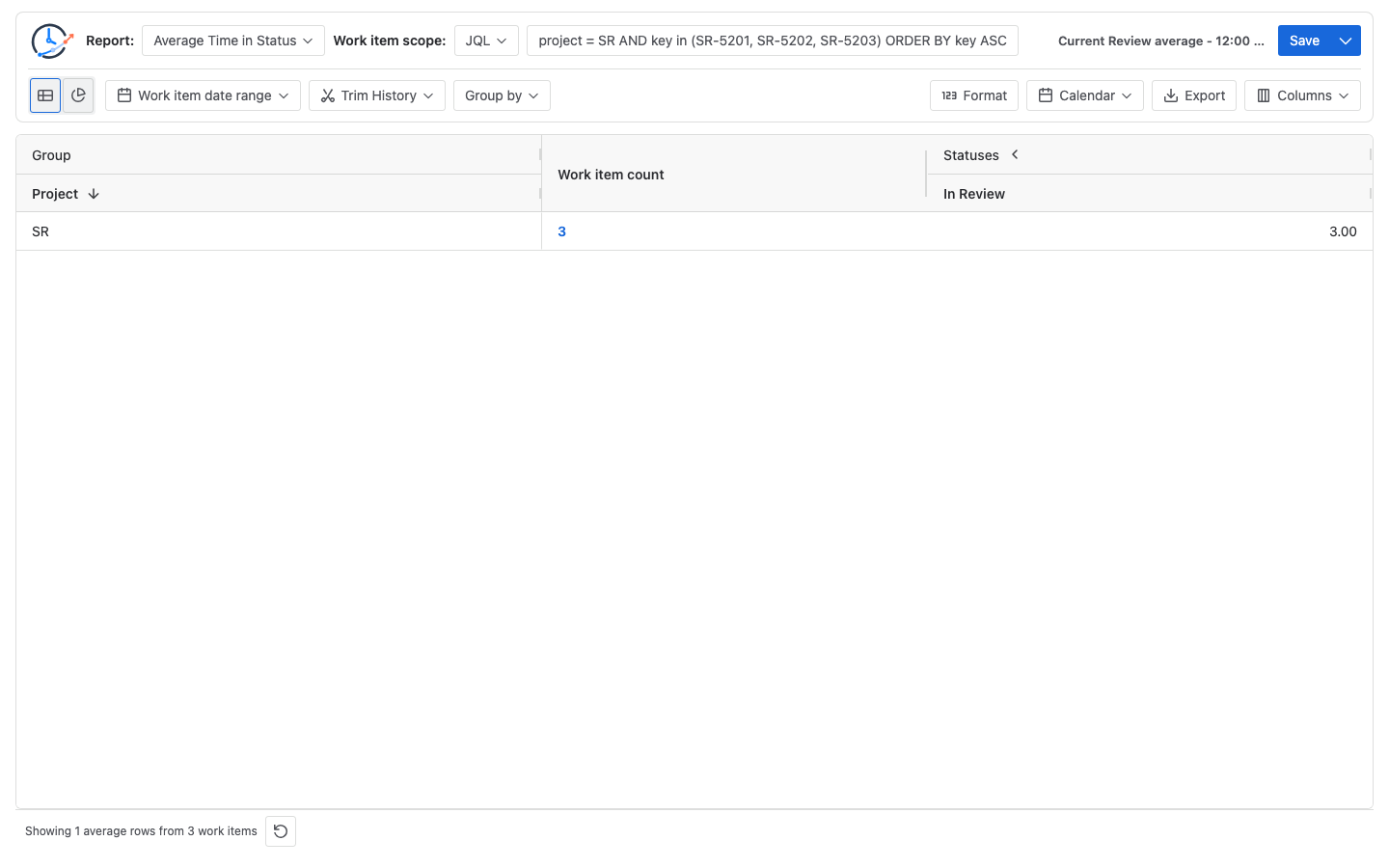
The visible Work item count is the Project-group population; it does not by itself prove a status-specific denominator. Hover or keyboard-focus the In Review average cell to read its total duration, participant count, and formula. In this controlled data, that formula confirms 9.00h across three In Review contributors. Use Time in Status detail when the formula needs row-level reconciliation.
Calculate the 14:00 average
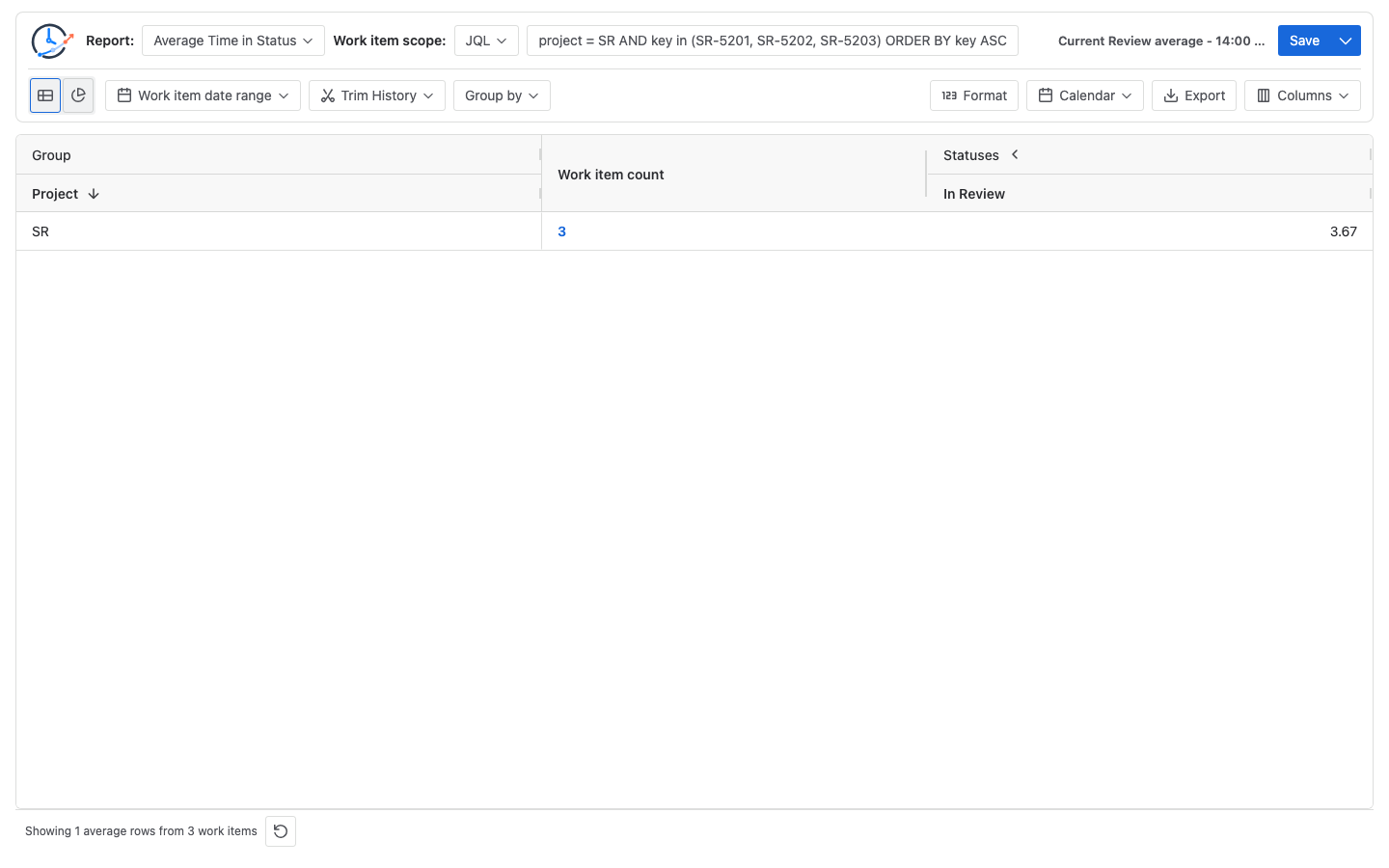
At 14:00 UTC, the two completed intervals remain fixed. SR-5203 is still in In Review, so its current contribution grows from 3.00 to 5.00 hours:
In Review numerator = 2.00h + 4.00h + 5.00h = 11.00h
In Review contributors = 3

Raw average In Review time = 11.00h ÷ 3
                           = 3.666666...h
Displayed Decimal Hours    = 3.67h
The numerator grows by exactly two hours while the denominator remains three. The exact average change is therefore 2h ÷ 3 = 0.666666...h. Decimal Hours displays the endpoints as 3.00h and 3.67h, so subtracting the displayed values gives 0.67h. Treat 0.67h as the displayed difference, not the exact unrounded change. StatusPath first sums the raw duration values and divides that raw total by the contributor count; it rounds only the final displayed value. Do not round each contribution first or reuse 3.67 as an input to another calculation.
When the denominator can change too
The In Review contributor count stays at three only in this controlled example. It can change when:
- JQL, Work item date range, permissions, or work-item visibility add or remove selected work items;
- another selected item contributes to In Review for the first time;
- Trim History removes all calculated In Review evidence for one item or includes it for another;
- Jira History is corrected, deleted, restored, or otherwise changes the calculated status evidence; or
- a grouping value or grouping configuration moves items into or out of the compared row.
If a fourth selected item first contributes to In Review, both the numerator and denominator change. Its contribution can raise or lower the average. Check the In Review formula evidence before describing a changing average as current-interval growth.
Reproduce the comparison in StatusPath Reports
- Choose your own bounded population containing completed In Review contributions and at least one item currently in In Review.
- Open Average Time in Status, select that scope, and verify each item’s Jira History.
- Leave Work item date range and Trim History unchanged between runs. A fixed Trim History end caps an open interval at that boundary, so later report runs cannot extend it beyond the cap.
- Select the same Calendar for both runs. Use All time for a 24×7 elapsed-time comparison, record run times in UTC, and select Decimal Hours.
- Group by the field you want to compare and keep In Review visible.
- At the first future run, record the run time, visible Work item count, In Review average, and the participant count and formula from the In Review cell.
- At a later run, confirm the current item still has no new status transition, rerun the unchanged report, and record the same evidence.
- Reconcile completed and current contributions in Time in Status. Your values will follow your Jira History and elapsed interval; they do not need to match the recorded 12:00 and 14:00 observations above.
See Report types for Average Time in Status behavior and Report setup and scope for JQL, date-range, and Trim History controls.
Keep native Jira metrics distinct
Atlassian’s Control Chart documentation describes cycle time or lead time across selected statuses and displays an average, rolling average, standard deviation, and outliers for company-managed spaces. That is not the same metric or formula as StatusPath’s Project-grouped In Review Average Time in Status, and matching one Calendar does not make the values equivalent. A Control Chart cannot validate the 9h ÷ 3 or 11h ÷ 3 calculation here. Before comparing, align the population, selected statuses, timeframe, treatment of current/open work, working-day definition, and aggregation method.
Common mistakes
Explaining only the single current duration
The current interval explains why SR-5203 grows. The group average also requires the other In Review contributions and the status-specific contributor count.
Assuming no transition means no report change
No new Jira transition is required only when the interval stays open, the report boundary advances, the Calendar counts that time, and the controlled population and contributor set stay unchanged.
Changing the report configuration between runs
Different JQL, permissions, date filters, Trim History, Calendar, Format, or grouping destroys the controlled comparison.
Calling 0.67h the exact increase
The exact increase is 2h ÷ 3 = 0.666666...h. The report displays 3.00h and 3.67h, whose visible difference is 0.67h.
Assuming the denominator always stays fixed
It stays at three only in this controlled example. Scope, permissions, Trim History, grouping, or a selected item contributing to In Review for the first time can change the denominator.
Comparing the result directly with a Control Chart
A Control Chart’s configured cycle- or lead-time measure does not use the same formula as this grouped In Review average.
Frequently asked questions
Why did the average change when no work item transitioned?
SR-5203 remained in In Review, the effective boundary advanced, the 24×7 UTC Calendar counted the two hours, and the controlled contributor set stayed at three.
Why does SR-5203 count as a contributor at both times?
It already entered In Review before the first recorded observation and has a calculated In Review duration in both runs.
Is 3.67 hours caused by rounding each work item first?
No. The raw durations total 11.00 hours, and 11 ÷ 3 = 3.666666.... The report displays the final value as 3.67 Decimal Hours.
Can a new In Review contributor make the average decrease?
Yes. A new item changes the denominator as well as the numerator. If its In Review contribution is below the prior average, the new average can decrease even though total In Review time increased.
Does a Saved Report freeze this average?
No. A Saved Report preserves reusable configuration, not Jira data or result rows. Open intervals and contributor membership can change on a later run.
Related Guides
- How Is Average Time in Status Calculated in Jira?
- Why Current Jira Status Time Keeps Growing
- How Jira Time in Status Date Ranges Clip History
- Average vs Total Time in Status in Jira
Reconcile the moving numerator and its denominator
A changing In Review average is explained only after the open current interval, completed contributions, effective report boundary, counted Calendar time, and status-specific contributor count reconcile under one unchanged configuration.
Try StatusPath Reports on the Atlassian Marketplace to compare grouped Jira status averages with the work-item durations behind them.