
How to Calculate Average Time in Status in Jira Cloud
Calculate Jira average time in status with a worked example. Learn denominators, blank vs zero, repeated visits, business hours, groups, and outliers.
In StatusPath Reports, Average Time in Status is the sum of the calculated duration contributed by work items to a status, divided by the number of work items that contributed to that status. The denominator is status-specific: an item that never entered In Review does not silently become a zero-hour review. Always read the average together with the population, contributor count, history window, and calendar.
Status average = sum of contributing work-item durations
                 ÷ number of contributing work items
For the underlying entry and exit intervals, start with the Jira Time in Status calculation guide.
Population, history window, and contributors
Three sets affect the result:
- Population: items selected by Project, Filter, JQL, Sprint, Epic, and work-item date filters.
- History window: the portion of each selected item’s status history included in the calculation.
- Status contributors: items with a calculated record for that status in the history window.
A group can contain three work items while only two contribute to In Review. The group population and a status denominator are therefore not always the same number.
Real Jira scenario: one story skipped review
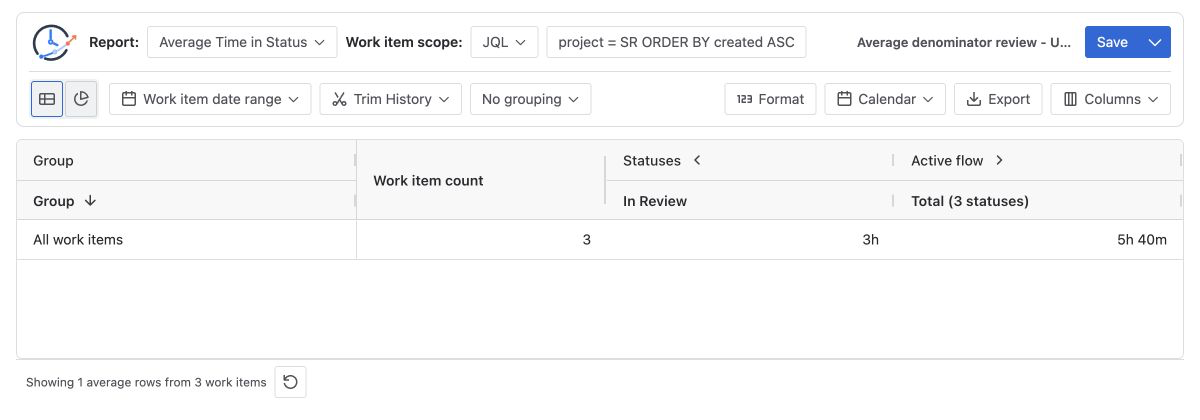
In this example, the report contains three completed work items:
| Work item | In Review duration | Contributes? |
|---|---|---|
| SR-2101 | 2h | Yes |
| SR-2102 | 4h | Yes |
| SR-2103 | Never entered | No |
The correct average for “how long did reviewed work spend in review?” is:
(2h + 4h) ÷ 2 contributors = 3hDividing by all three items would produce 2h and answer a different question. StatusPath Reports’ current calculation excludes an untouched status from that status’s denominator. A touched record whose calculated duration is zero remains a contributor; inspect Trim History and Calendar to understand the zero.
Repeated entries are summed before averaging
If one story enters In Review twice, first for 2 hours and later for 3 hours, it contributes one 5-hour work-item total to the average. It does not become two work items.
Story A: 2h + 3h = 5h
Story B:           1h
Average: (5h + 1h) ÷ 2 items = 3h
Use Status Count or Transition Count when the question is how many review loops occurred.
Group size and weighted averages
Grouping changes the comparison question. Suppose two sprints show:
| Sprint | Contributors | Total In Review | Average |
|---|---|---|---|
| Sprint 41 | 8 | 32h | 4h |
| Sprint 42 | 2 | 12h | 6h |
Sprint 42 has the higher average but only two contributors. One outlier can move it sharply. Do not take a simple mean of 4h and 6h. The combined weighted average is:
(32h + 12h) ÷ (8 + 2) = 4.4hAtlassian’s Control Chart shows average, rolling average, and standard deviation for selected cycle- or lead-time statuses, and it calls attention to variation and outliers. Its rolling average is a different calculation from a grouped per-status average. Confirm statuses, population, timeframe, and working-day settings before comparing them.
Configure an Average Time in Status report
- Select the population using Project, Filter, JQL, Sprint, or Epic.
- Use Trim History only when the metric should include status time inside a defined period.
- Select Average Time in Status and choose grouping fields that answer a specific question. Avoid fragmenting the result into groups of one.
- Select a Calendar and Format consistently. The calendar changes which time enters the numerator; format changes presentation.
- Read every status value with the group count and, when needed, inspect the same scope in Time in Status.
- Save the configuration for repeatability, remembering that a Saved Report does not freeze changing Jira data.
See Report types for grouped-average behavior and Calendars and duration for business-time configuration.
Common mistakes
Using the full group count as every status denominator
Some items may never enter a selected status. Reconcile contributors for each status rather than assuming one denominator fits every column.
Averaging already rounded values
Average raw durations first, then format the result. Rounding individual rows before averaging can introduce avoidable error.
Comparing different calendars or history windows
Weekends, timezone, holidays, Trim History, and current-status end rules can change the numerator even when the work-item scope looks identical.
Ignoring small samples and outliers
A high average based on two items is not equivalent evidence to the same average based on 200 items. Show counts and inspect individual rows.
Treating a current status as fixed
An unresolved item’s current duration can continue growing until the report end time. Fix the end boundary when reproducing a result.
Frequently asked questions
Are items that never entered a status included as zero?
Not in StatusPath Reports’ current calculation. An untouched status is excluded from that status-specific denominator.
What about a zero-duration status entry?
A touched status record with zero calculated duration remains a contributor. Calendar overlap, timestamp precision, or Trim History can produce zero.
Is the group work-item count always the denominator?
No. It describes the population. A particular status can have fewer contributors.
Can Jira native averages be compared directly with this report?
Only after confirming that both views use the same statuses, population, timeframe, working days, current-status handling, and averaging rule.
Related Guides
- How to Calculate Time in Status in Jira Cloud
- How to Exclude Weekends from Jira Time in Status
- How to Find Jira Workflow Bottlenecks
- How an Open Current-Status Interval Changes Average Time in Status
- Average vs Total Time in Status in Jira
- How to Compare Average Time in Status Across Jira Teams
- Jira Average Time in Status: Dash vs 0.00 Explained
Make the denominator visible
An average is useful only when its population, contributor rule, history window, and calendar are understood. Use Average Time in Status for comparison and Time in Status to inspect the work items behind a surprising value.
Try StatusPath Reports on the Atlassian Marketplace to build grouped Jira duration reports with reviewable detail.