
How to Measure Jira Rework with Status Count and Transition Count
Use Jira status-entry and transition counts to find review loops, reopened work, and other rework signals with an auditable worked example.
To investigate possible rework in Jira, first use Status Count to find work items that entered a workflow status more than once. Then use Transition Count to inspect the exact backward or repeated movements, such as In Review → In Progress or QA → In Progress. These are signals, not an automatic rework classification: apply a written team definition and verify representative work items in Jira History.
This two-step approach is more useful than looking only at the current status. A story in Done can still have passed through review three times. It is also more precise than using elapsed time alone: a long review may be a waiting-time problem, while repeated returns from review may indicate unclear acceptance criteria, incomplete implementation, or a workflow rule that needs investigation.
If the question is how multiple visits become one accumulated duration rather than whether the movement is rework, use the repeated-status calculation guide.
What should count as Jira rework?
There is no universal Jira field named “rework.” Teams normally define a measurable proxy based on their workflow. Common examples include:
- A work item returns from In Review to In Progress.
- A work item returns from QA or Testing to In Progress.
- A completed work item moves from Done back to an active status.
- A work item enters Blocked or Waiting for Review several times.
- The same forward transition happens repeatedly because the item first moved backward.
Write the definition before building the report. For example:
For this team, a rework event is a transition from In Review or QA back to In Progress. A work item with at least one such event is reworked; the number of those transitions is the rework-event count.
That definition is specific enough to audit. It also prevents a common mistake: treating every second entry into a status as a failure. A second In Progress entry is suspicious, but the transition that caused it tells you whether the item came from Review, QA, Done, or another valid route.
Status Count and Transition Count answer different questions
Atlassian defines a Jira workflow as statuses connected by transitions. Transitions are one-way, so a move from In Progress to In Review and a return from In Review to In Progress are separate workflow movements.
Status Count counts how many times each work item entered each status in the calculated history window. Use it to answer:
- Which stories entered In Review more than once?
- Which bugs repeatedly returned to In Progress?
- Which work items were blocked multiple times?
Transition Count counts movements from one status to another. Use it to answer:
- How often did In Review return to In Progress?
- Did QA send work back, or did the loop happen earlier?
- Which work items were reopened from Done?
Think of Status Count as a screening report and Transition Count as a diagnosis report. A high status count highlights a repeated stage; a transition count identifies the route responsible for that repetition.
Worked example: one story with two kinds of rollback
Suppose story WEB-142 has this history:
To Do → In Progress → In Review → In Progress → In Review
      → QA → In Progress → In Review → Done
The Status Count view would show these entry counts:
| Status | Entry count |
|---|---|
| To Do | 1 |
| In Progress | 3 |
| In Review | 3 |
| QA | 1 |
| Done | 1 |
This immediately shows repetition in In Progress and In Review, but it does not explain the path.
The relevant Transition Count values are:
| Transition | Count | Interpretation |
|---|---|---|
| To Do → In Progress | 1 | Initial start |
| In Progress → In Review | 3 | Three review submissions |
| In Review → In Progress | 1 | One review rollback |
| In Review → QA | 1 | One review passed to QA |
| QA → In Progress | 1 | One QA rollback |
| In Review → Done | 1 | Final completion path |
Under the sample definition above, WEB-142 has two rework events: one review rollback and one QA rollback. It entered In Progress three times, but only two of those entries were returns from later stages; the first entry was the normal start of work.
That distinction is why a useful Jira rework investigation should retain both views. Status Count is fast to scan, while Transition Count helps test the team’s written classification against the actual path.
What Jira can show natively
Jira provides several useful starting points.
On a single work item, open the Activity section and select History. Atlassian documents History as the place where field changes and workflow movements are recorded. This is suitable for validating one suspicious item, but manually reviewing histories does not scale well across a sprint or project.
JQL can also find items that experienced a particular status change. For example:
project = WEB
AND status CHANGED FROM "In Review" TO "In Progress"
AND sprint = 42
The CHANGED operator supports predicates including FROM, TO, AFTER, BEFORE, and DURING. It is useful for selecting work items that match a known rollback path. Standard JQL results, however, identify matching work items; the query itself does not produce a per-item column showing how many times that transition occurred. That limitation matters when you need to distinguish one rollback from four.
Jira Software’s Control Chart is useful for cycle time, lead time, rolling averages, variation, and outliers. Atlassian notes that reopened work can add to cycle time. That makes the chart useful for flow analysis, but it answers a different question from an exact per-work-item transition count.
How to build a rework report in StatusPath Reports
1. Choose a focused work item scope
Open StatusPath Reports and select a Project, saved Filter, JQL, Sprint, or Epic. For a retrospective, Sprint is often the clearest scope. For a cross-team process review, use a saved filter or JQL that applies the same inclusion rule to every team. See Report setup and scope for the current scope behavior.
2. Separate selection time from history time
StatusPath Reports has two different time controls:
- Work item date range decides which work items enter the report based on Created, Updated, or Resolved date.
- Trim History limits which part of each selected work item’s history is calculated.
Do not assume these are interchangeable. A story resolved this sprint may have begun last sprint. Filtering by Resolved date can include it, while trimming history to the current sprint can exclude earlier transitions. Decide whether your metric is “rework on work completed this sprint” or “rework events that occurred during this sprint.”
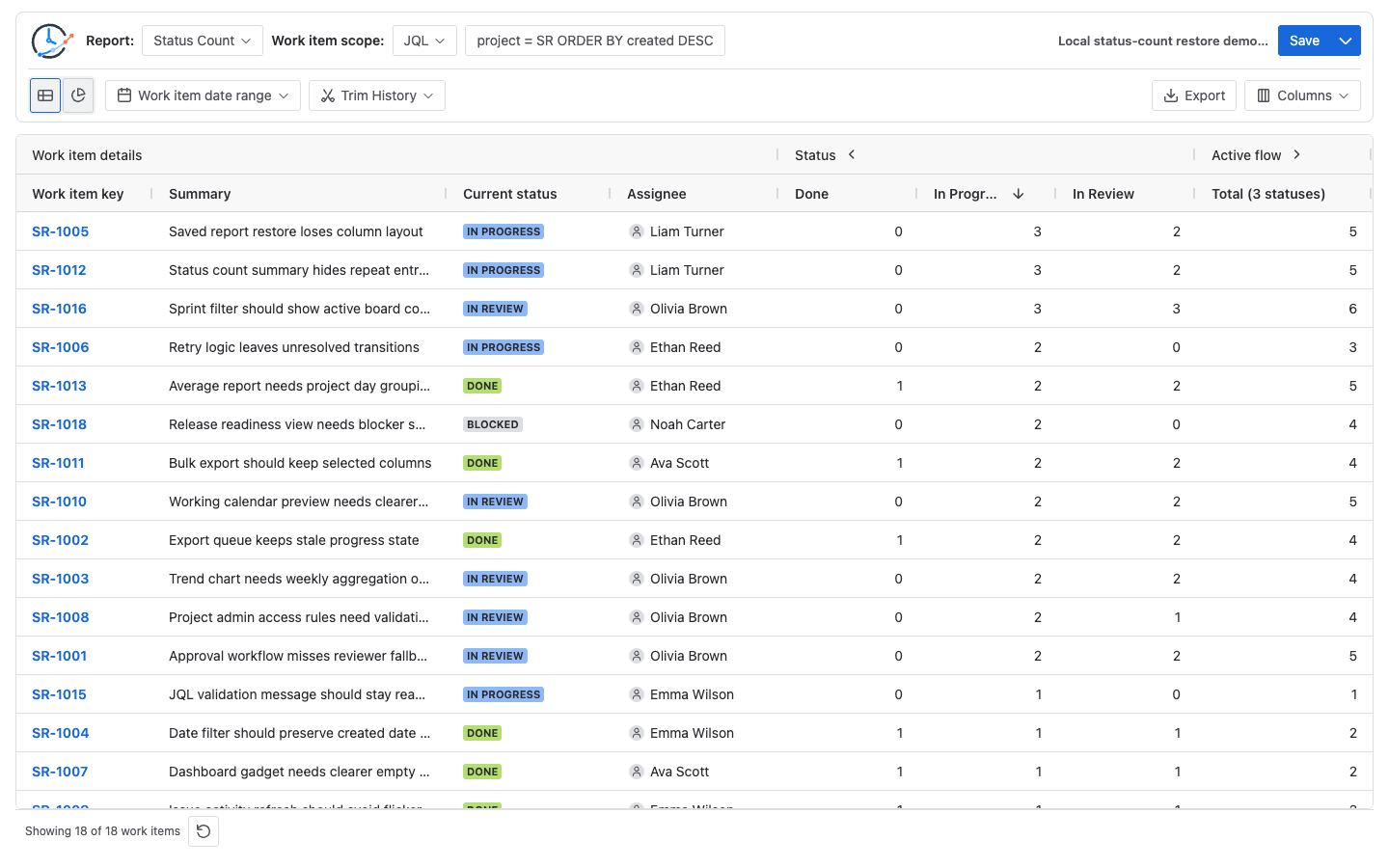
3. Run Status Count first
Select Status Count and add the statuses that can reveal repetition, such as In Progress, In Review, QA, Testing, Blocked, or Done.
Sort the most relevant status column from highest to lowest, or use a numeric column filter. Investigate entries greater than one, but remember that the threshold depends on the workflow. If the normal path enters a status twice, use a higher threshold or go directly to the relevant transition.
Status Count is a count report. Duration Format and Calendar do not determine these values. Trim History can still change them because it changes the history window being counted.
4. Switch to Transition Count
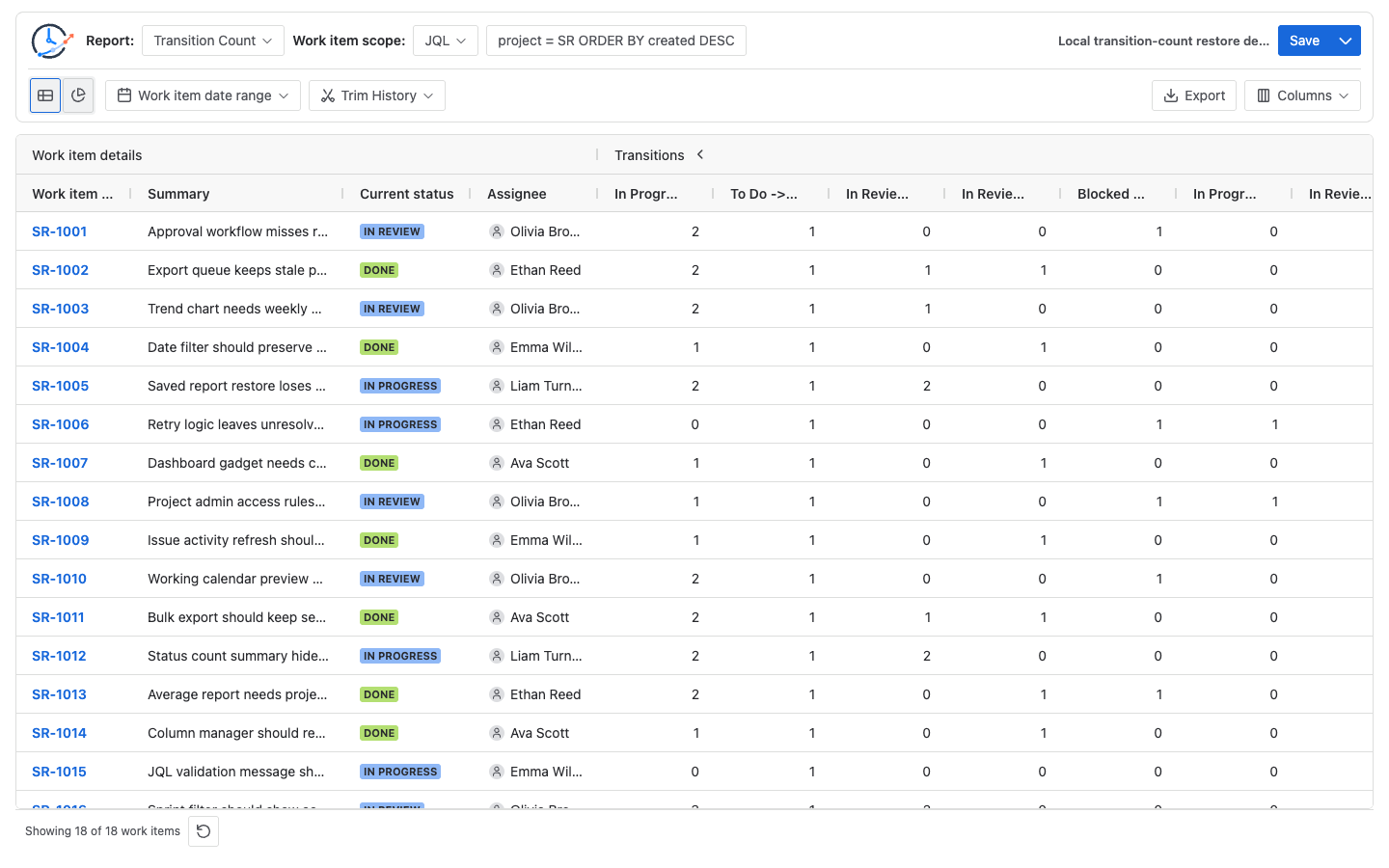
Select Transition Count for the same scope and history window. Look for the backward movements in your written rework definition, for example:
- In Review → In Progress
- QA → In Progress
- Testing → In Progress
- Done → In Progress
Sort or filter those columns to isolate affected work items. Transition columns depend on movements present in the selected data, so a transition that never occurred may not appear.
5. Validate representative items
Open several work items with high counts and compare the report with Jira History. You can also use StatusPath Reports Issue Activity on the current work item to inspect Status Count and Transition Count without rebuilding a multi-item report.
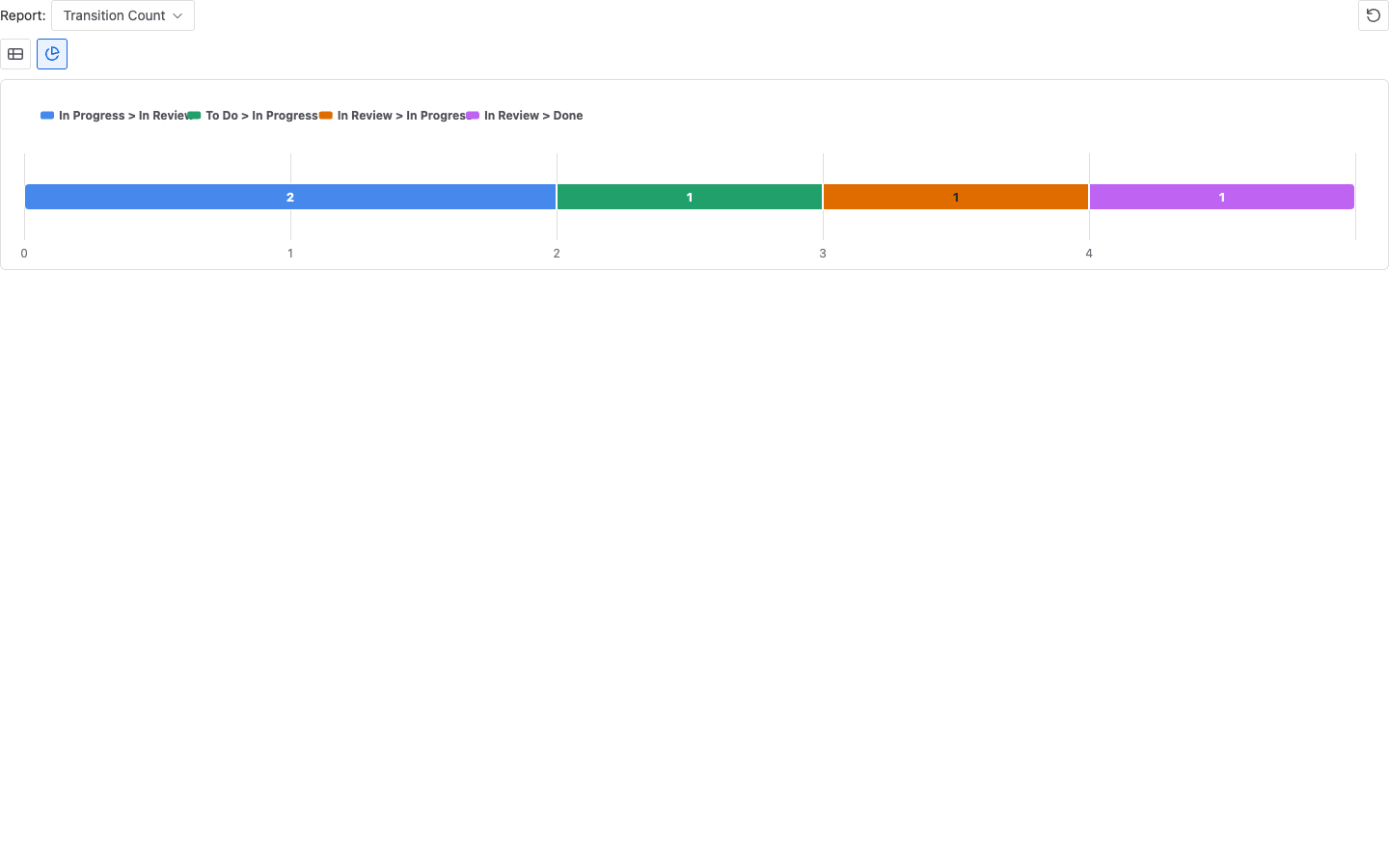
Validation catches workflow-specific exceptions such as migration history, renamed statuses, automation, deliberate reopenings, or looped actions.
Test the same evidence path on your Jira data. StatusPath Reports is built by BlueGrove Labs. Open StatusPath Reports on Atlassian Marketplace to run Status Count and then Transition Count on one known workflow loop, and verify representative rows in Jira History. It counts recorded entries and directions; it does not automatically classify rework or explain its cause. No meeting or screen share is required.
6. Save or export the review set
Save the setup when the team wants to repeat the review. Saved Reports preserve configuration, not a frozen snapshot of Jira data. Export to CSV or XLSX when you need an auditable list.
Common configuration and interpretation mistakes
Counting repeated entries without checking direction
In Progress = 3 does not by itself mean three rework events. One entry may be the normal start. Use the transitions into In Progress to separate initial flow from returns.
Comparing reports with different history windows
Status Count and Transition Count can disagree with a manual review if Trim History removes the beginning or end of a transition sequence. Keep the scope and history window visible in any shared report.
Treating all reopenings as defects
Done → In Progress can represent escaped defects, changed requirements, an incorrect resolution, or a valid operational process. Add Resolution, work type, priority, component, or labels as context before drawing conclusions.
Confusing count with duration
A work item can have one review entry lasting ten days, while another has three short review loops in one day. Count reports measure repetition; Time in Status measures elapsed or business time. Use both if you need to distinguish waiting from churn.
A practical review framework
For each retrospective or monthly process review:
- Define the backward transitions that represent possible rework.
- Select a stable population, such as completed work items in one sprint.
- Use Status Count to screen for repeated stages.
- Use Transition Count to count the defined rollback paths.
- Check high-count items in Jira History.
- Group findings by cause only after reviewing the actual work items.
- Track the same definition over time; do not compare periods built with different scopes or history windows.
Follow up by checking unclear acceptance criteria, premature review, repeated defect types, and unexpected automation transitions.
For a sprint retrospective, keep the same rollback definition while following the Jira sprint workflow analysis sequence for board scope, completion, waiting time, and trends.
Frequently asked questions
Can JQL count how many times a Jira status changed?
JQL’s CHANGED operator can find work items that experienced a specified change and can restrict it by source, destination, date, or user. Standard JQL results do not provide a per-work-item repetition count for that transition. Use the query for scope selection, then calculate counts from history with a reporting tool or API-based process.
Is a high Status Count always rework?
No. It means the work item entered a status repeatedly within the calculated history window. The workflow route and business context determine whether those entries represent rework.
Which is better: Status Count or Transition Count?
Use both. Status Count is better for quickly finding repeated stages. Transition Count is better for identifying and counting the exact workflow paths that created the repetition.
Do business hours affect Status Count or Transition Count?
No. They are count reports, not duration reports. Work calendars matter for duration reports such as Time in Status, Average Time in Status, and Time in Assignee. Trim History can still affect count reports.
How should a team measure a rework rate?
A practical definition is:
Rework rate = work items with at least one defined rollback transition
              ÷ work items in the reviewed population
Treat this as a team-defined process metric, not a built-in universal Jira formula. Document the scope, history window, and included rollback transitions whenever you report it.
Related Guides
- How to Reconcile One Jira Work Item Across Four Issue Activity Reports
- How Repeated Jira Status Entries Affect Time in Status
- How to Find Jira Workflow Bottlenecks
- How to Calculate Time in Status in Jira Cloud
- How to Find a Code Review Bottleneck in Jira
- How to Analyze a QA or Testing Bottleneck in Jira
- Jira Transition Direction Report Template
- Jira Workflow Review Checklist
Turn repeated workflow movement into a reviewable list
Status Count and Transition Count turn Jira history into two complementary views: repeated stages and exact movements. StatusPath Reports can run both reports across a Project, saved Filter, JQL, Sprint, or Epic, then sort, filter, save, or export the results. Start with one workflow and a written rework definition so the numbers remain understandable and verifiable.