
Jira Sprint Workflow Analysis: Time in Status, Rework, and Trends
Analyze Jira sprint completion, status time, review loops, carryover, and trends with a consistent board, scope, and history window.
A Jira sprint workflow analysis should combine scope and completion with history-derived evidence. Use the Jira Sprint Report to confirm the board-specific sprint population and scope changes, then inspect Time in Status, Status Count, Transition Count, and trends to locate waiting and repeated movement. Keep the board, sprint, history window, calendar, and rework definition consistent.
Sprint scope and workflow history are different layers
Atlassian’s Sprint Report documentation applies to company-managed Scrum spaces. In that context, the report is board-specific, includes only work items matching the board’s saved filter, and identifies items added after the sprint started. Team-managed spaces have a different report entry and report set, so verify the reports available in the actual space before using this sequence. This distinction scopes Jira’s native Sprint Report; it does not limit the history-based workflow analysis below to one Jira space type.
Workflow history answers different retrospective questions:
| Retrospective question | Evidence |
|---|---|
| What was completed or added after start? | Jira Sprint Report |
| Where did individual items wait? | Time in Status |
| Which stage has the longest average? | Average Time in Status with contributor count |
| Which items revisited Review or QA? | Status Count |
| Which direction did the loop take? | Transition Count |
| Did a delay repeat across sprints or periods? | Status Trend or cross-report trend |
Use the workflow reporting guide when you need to choose among all sources and output formats. This page owns the sprint retrospective sequence.
Real Jira scenario: 22 items, review loops, and carryover
Suppose StatusPath Sprint 8 contains 22 work items in the review population:
- 18 are completed at the reporting endpoint.
- 4 remain unfinished.
- After the sprint closes, 1 unfinished item is moved to the next sprint and counted as carryover for this retrospective.
- 5 items moved from In Review back to In Progress at least once.
- All 22 entered In Review, accumulating 140 hours there.
The first calculations are:
Completion share   = 18 / 22 × 100 = 81.8%
Review-loop share  =  5 / 22 × 100 = 22.7%
Average Review time = 140h / 22 = 6.36h per contributing item
These figures answer separate questions. The completion share describes the population outcome. The review-loop share is a team-defined rework signal. Average Review time describes duration, not the number or cause of returns.
A repeatable sprint analysis sequence
1. Confirm the board and sprint population
Record the board, selected sprint, start and end dates, board filter, items added or removed after start, and the rule for subtasks. Atlassian notes that the Sprint Report does not include subtask estimates and does not show sprint-specific completion details for subtasks.
2. Write the retrospective questions
Separate outcome questions from process questions:
- Outcome: What completed, carried over, or changed scope?
- Waiting: Which statuses held work the longest?
- Rework: Which defined backward transitions occurred?
- Ownership: Were handoffs or unassigned intervals involved?
- Trend: Is the signal repeated or isolated?
3. Keep selection time and history time explicit
A Sprint source selects the sprint population. Trim History controls which portion of each selected item’s status and assignee history is calculated. If an item began before the sprint, full-history Time in Status and sprint-window Time in Status answer different questions. Follow the Sprint-source setup and acceptance guide to configure and compare those boundaries without changing the population.
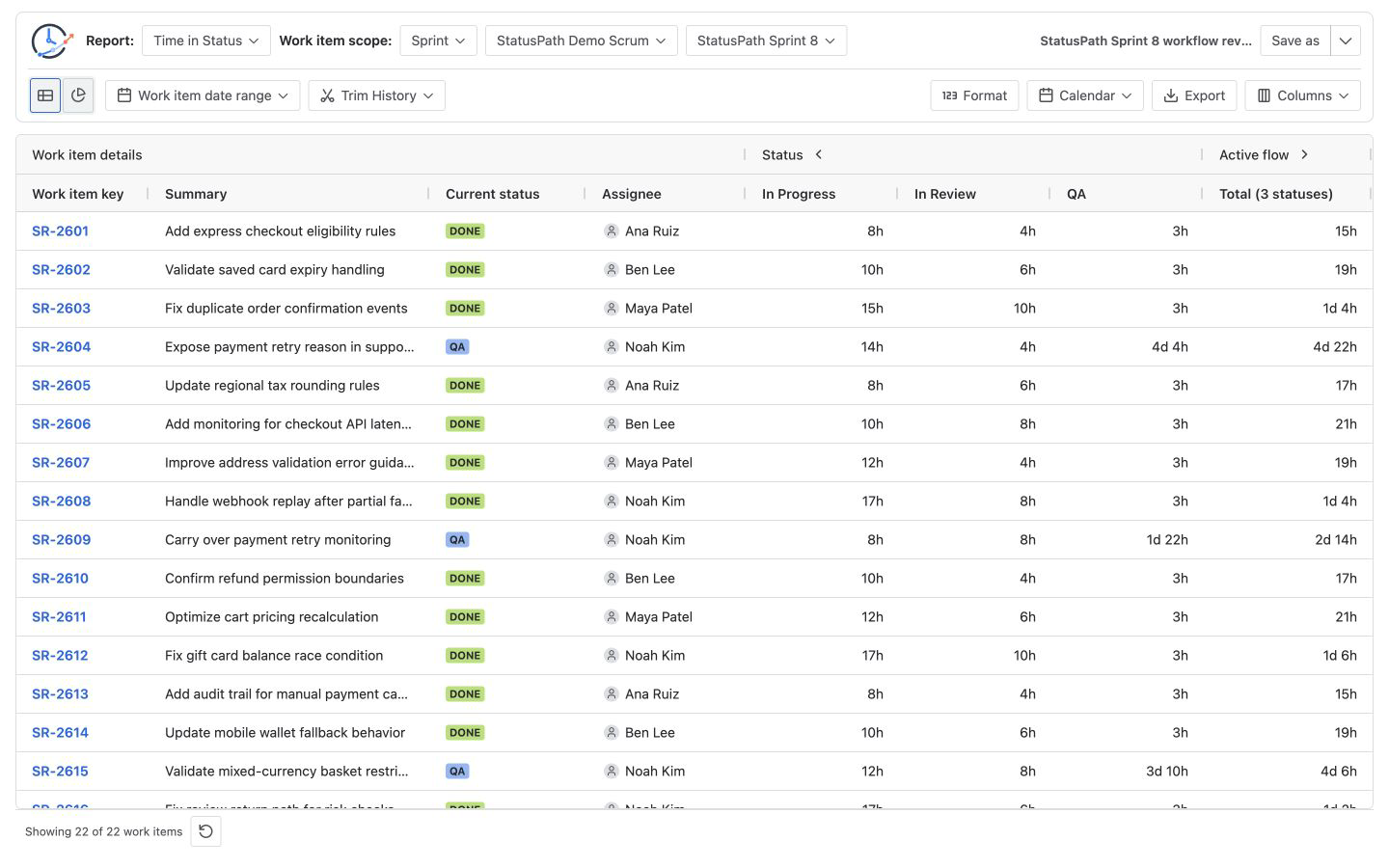
4. Start with the detail table
Run Time in Status for the Sprint source and keep Review, QA, Blocked, and relevant work item fields visible. Sort a target status from longest to shortest and inspect both common delays and outliers. If participating workflows use different detailed names, use the Status Group design and reconciliation Guide before comparing a shared Review or Validation stage.
5. Add counts for rework
Use Status Count to screen for repeated stages, then Transition Count to test the written definition. For this scenario, the defined signal is In Review → In Progress. Follow the exact validation method in the Jira rework guide.
6. Compare the trend without losing the definition
Use the same statuses, calendar, timezone, and history rule when comparing periods. A falling average built from a different workflow mapping is not a like-for-like improvement. The chart below is not cumulative: each point is the aggregate duration contributed to that day bucket, and the labels use decimal days.
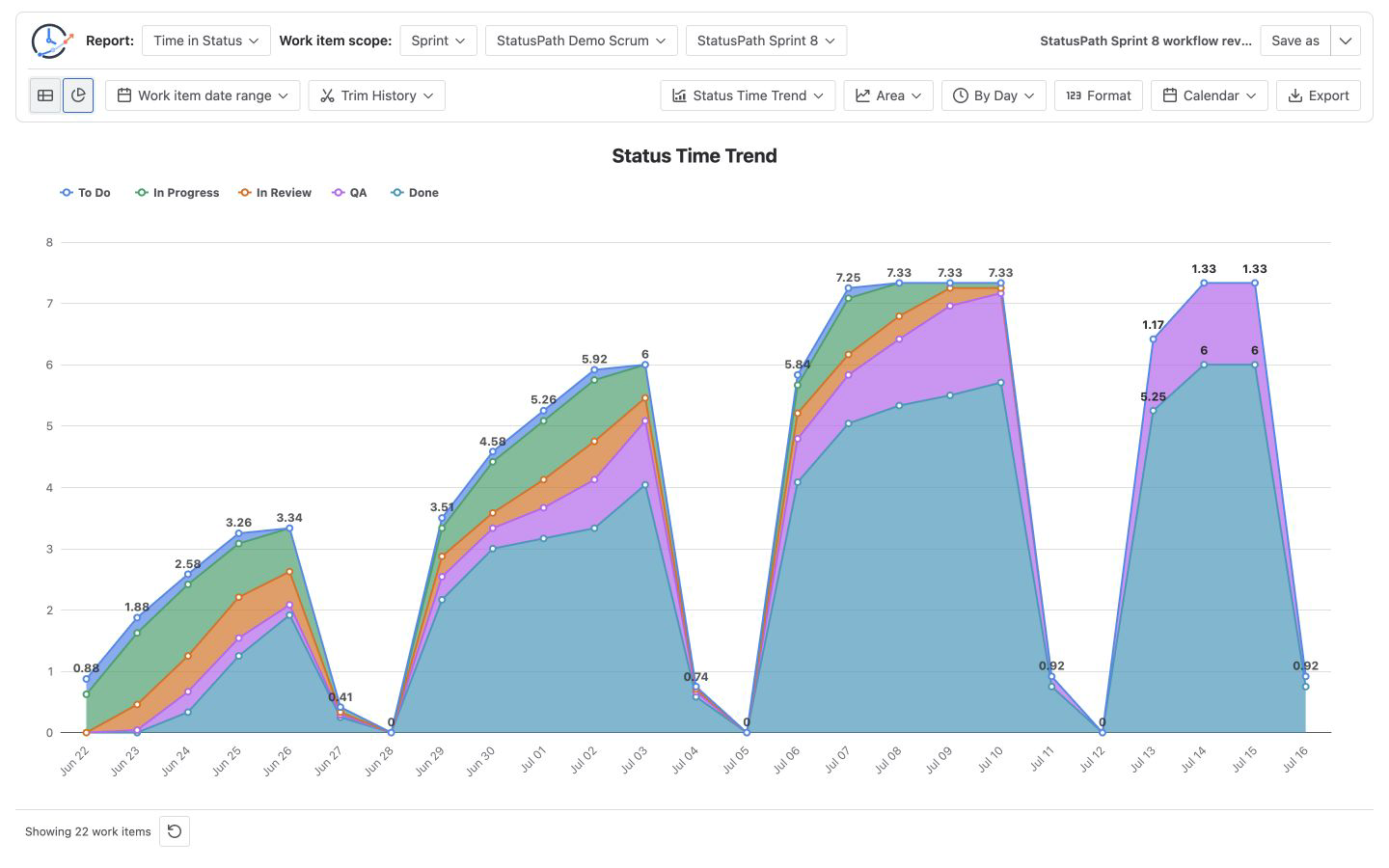
Read Chart view documentation for current trend controls and Report setup and scope for Sprint selection and Trim History.
7. Validate representative items
Check the highest-duration item, a repeated-transition item, the carryover item, and at least one normal completed item against Jira History. Do not classify cause from a table value alone.
How Jira’s Control Chart fits the analysis
Atlassian’s Control Chart documentation explains that cycle time is based on selected workflow columns and that reopened work adds time. The chart is useful for cycle-time variation, rolling averages, and outliers.
Time in Status and transition reports answer narrower questions: exactly which status accumulated time and which directional movements repeated for each work item. Use the two layers together; do not claim that a status table is the same metric as a configured Control Chart.
Common mistakes
Treating the Sprint field as the full scope definition
Sprint reports are tied to boards and board filters. Record the board and verify the actual population.
Mixing full lifecycle and sprint-window history
Full history answers “how did these sprint items behave overall?” Trimmed history answers “what happened during this window?” Label the choice.
Calling every repeated Review entry a defect
Review returns can reflect incomplete work, changed requirements, automation, or a valid workflow route. Check the transition direction and item history.
Comparing averages without contributor counts
An average from two items is not equivalent to an average from twenty. Keep sample size visible.
Ranking individuals from waiting time
Status and assignee duration include queues, dependencies, leave, and non-working time. They are process signals, not standalone productivity measures.
Frequently asked questions
Is the Jira Sprint Report enough for a retrospective?
It is the primary native source for board-specific sprint scope and completion context. Add history-derived reports when the retrospective also needs status waiting, handoffs, or exact workflow loops.
How should carryover be handled?
Define carryover as a team rule, keep it visible as a scope outcome, and decide whether the workflow calculation uses full history or only the sprint window. Moving this scenario’s unfinished item to the next sprint is the recorded scope event; carryover is not inferred from status duration. Do not silently mix the two history windows.
What is a practical sprint rework metric?
Define one or more backward transitions, then divide items with at least one defined transition by the reviewed sprint population. Document the transition list and history window.
Do business calendars affect rework counts?
No. They affect duration reports. Status Count and Transition Count are event-count reports, though Trim History can still change which events are included.
Can two sprint workflow reports both be correct but disagree?
Yes. They may use different board filters, sprint membership snapshots, history windows, calendars, statuses, or contributor rules.
Related Guides
- How to Create a Jira Time in Status Report by Sprint
- How to Find Jira Workflow Bottlenecks
- How to Measure Jira Rework with Status Count and Transition Count
- How to Calculate Time in Status in Jira Cloud
- Jira Workflow Review Checklist
Turn a sprint review into testable process questions
A useful sprint analysis records scope first, then checks completion, status waiting, repeated movement, ownership, and trends with consistent rules. StatusPath Reports can use a Sprint source for six history-derived report types and preserve the setup as a Saved Report for the next retrospective.
Try StatusPath Reports on the Atlassian Marketplace to reproduce the workflow review with your own Scrum board and Jira permissions.