
How to Reconcile One Jira Work Item Across Four Issue Activity Reports
Reconcile Time in Status, Time in Assignee, Status Count, and Transition Count against one complete 12-hour Jira history.
To reconcile one surprising Jira result, record the source report’s history boundary, calculation time, Calendar, timezone, and Format, then compare Time in Status, Time in Assignee, Status Count, and Transition Count for the same work item. This is calculation reconciliation—not a Jira Audit Log or compliance audit. Issue Activity provides calculated summaries; Jira History remains the source for original event order and timestamps.
This Guide has one job: four-view reconciliation
The Issue Activity documentation owns controls, Chart/Table behavior, Refresh, and the difference from the main report. The rework Guide owns the team-defined rework investigation method, and the QA bottleneck Guide owns population-level QA diagnosis. This Guide only checks whether four calculated summaries for one work item reconcile to the same source history.
| View | Reconciliation question | Expected evidence |
|---|---|---|
| Time in Status | Where did included time accumulate? | All included status intervals sum to the Calendar-counted window |
| Time in Assignee | Under which recorded owners did that time accumulate? | Assignee and Unassigned intervals sum to the same window when history is complete |
| Status Count | How many included status intervals began? | Entry evidence only—not duration, rework, or root cause |
| Transition Count | Which directed status changes were included? | Every relevant edge reconciles to adjacent Jira History events |
Atlassian explains that a Jira workflow is composed of statuses and transitions. It also documents that the work item’s History records field edits and workflow movements, while Work log records explicitly logged time. Use History as the event source; do not treat logged time as a substitute for status or Assignee history.
Worked reconciliation: one complete 12-hour event sequence
Bug SR-5001 uses a controlled history snapshot from 09:00 to 21:00 UTC on July 6, 2026. The snapshot uses All time (UTC) and Decimal Hours, so all 12 elapsed hours are included. A live work item with an open status or Assignee interval can continue growing after Refresh; 21:00 is the reproducible snapshot boundary, not an Issue Activity endpoint control.
| Time | Status event | Assignee event | Interval that follows |
|---|---|---|---|
| 09:00 | Created in To Do | Created under Ana Ruiz | 1h |
| 10:00 | To Do → In Progress | No change | 4h |
| 14:00 | In Progress → QA | Ana Ruiz → Priya Shah | 2h |
| 16:00 | QA → In Progress | Priya Shah → Ben Lee | 3h |
| 19:00 | In Progress → QA | Ben Lee → Priya Shah | 2h |
| 21:00 | QA → Done | No change | Snapshot boundary |
This event table comes from the Jira History timestamps used by the calculation. The app views below aggregate those events; they do not expose this raw sequence as a timeline.
Check 1: Time in Status totals 12 hours
To Do       = 1h
In Progress = 4h + 3h = 7h
QA          = 2h + 2h = 4h
Done        = 0h at the snapshot boundary
Total       = 1h + 7h + 4h = 12h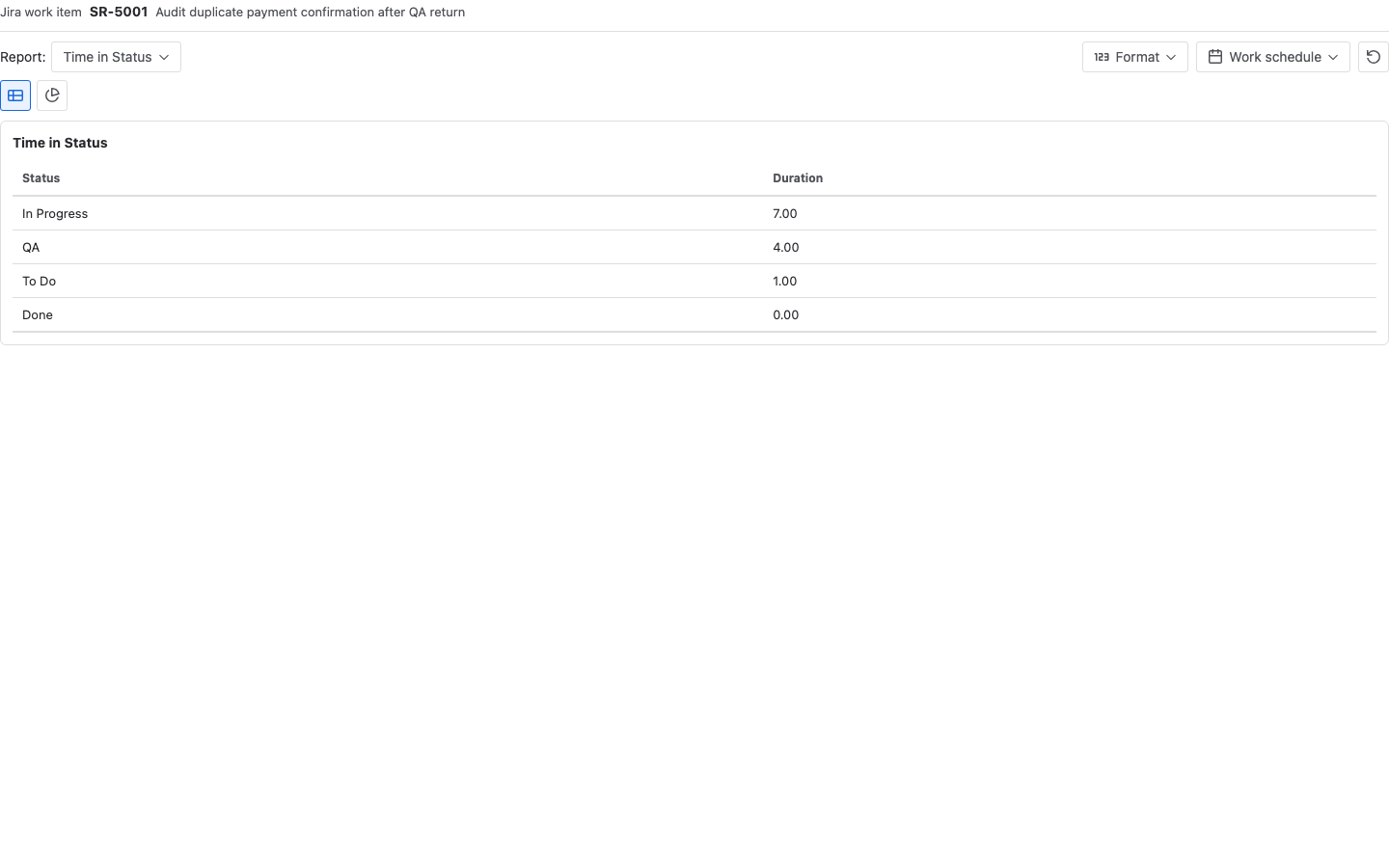
The zero-hour Done entry is still part of the event history: the item reaches Done at the snapshot boundary, so no later duration has accumulated. Because this example uses All time, its Calendar-counted window equals 12 elapsed hours. Under a working schedule, the included total can be smaller than the elapsed timestamp span.
Check 2: Time in Assignee also totals 12 hours
Ana Ruiz   = 1h To Do + 4h In Progress = 5h
Priya Shah = 2h QA + 2h QA             = 4h
Ben Lee    = 3h returned In Progress   = 3h
Total      = 5h + 4h + 3h              = 12h
The two duration reports partition the same Calendar-counted window in different ways. A general reconciliation must include every Assignee plus Unassigned, use complete Assignee history, and keep the same history boundary, calculation time, Calendar, and timezone. Do not add 12h + 12h and describe the result as 24 hours of work. Time in Assignee records ownership, not active effort; the Time in Assignee Guide explains that boundary in detail.
Check 3: Status Count preserves repeated entries
To Do entries       = 1
In Progress entries = 2
QA entries          = 2
Done entries        = 1
Total status entries = 6
The repeated entries are count evidence only. Whether they represent rework belongs to the team’s workflow definition and the rework Guide; Status Count alone does not identify cause or avoidability.
Check 4: Transition Count preserves direction
To Do > In Progress = 1
In Progress > QA    = 2
QA > In Progress    = 1
QA > Done           = 1
Total transitions   = 5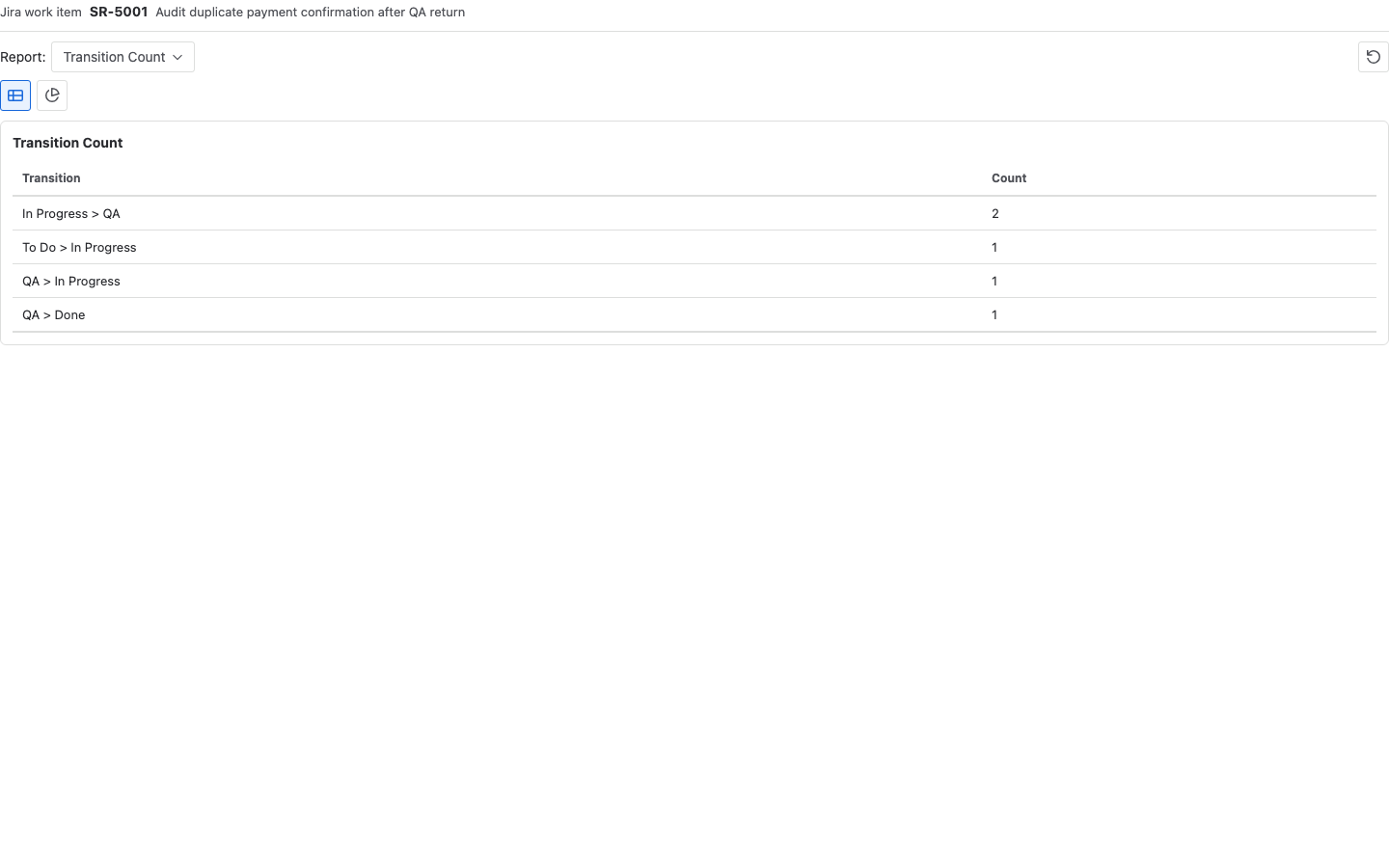
In this complete, untrimmed sequence, with no same-status actions and every directed edge included, six status entries equal one initial status plus five between-status transitions. This is not a universal formula. Trimmed or missing history, boundary reconstruction, omitted transition columns, and same-status actions can break the relationship. Atlassian documents that Jira transitions are one-way and can also loop without changing status.
Reconcile the abnormal result in six checks
- Record the source result. Preserve the work item key, source-report history boundary, calculation time, Calendar, timezone, Format, and the abnormal value. If the source report used Trim History, note that Issue Activity does not expose an equivalent Trim History control.
- Sum Time in Status. In one Issue Activity run, add every displayed status duration and compare the result with the time the selected Calendar includes. Record whether a current interval is still open.
- Sum Time in Assignee. Add every owner and Unassigned duration. A missing Assignee interval or incomplete history prevents a valid comparison.
- Sum Status Count. Record each included status entry, including the initial and final statuses, without interpreting the count as duration or rework.
- Sum Transition Count. Include every relevant directed edge and compare the total with adjacent status events.
- Return to Jira History. Explain discrepancies with exact timestamps, field edits, same-time changes, renamed statuses, permissions, missing history, or a source boundary that Issue Activity cannot reproduce.
Common mistakes
Treating Issue Activity as raw Jira History
Issue Activity provides calculated single-work-item summaries; it is not Jira’s raw field-edit log and does not establish ownership or cause. Use the Jira work item’s History area when the audit needs every source field edit and Jira’s authoritative event record. The Report Center Average drill-down is documented separately in Issue drill-down and Status Journey.
Comparing different history boundaries or calculation times
The views cannot reconcile when the source report and current Issue Activity run use different included history, Calendar, timezone, Format, or calculation time. A live open interval may have grown since the source report was generated.
Ignoring Trim History on the source report
The main report can use a trimmed history window, while Issue Activity does not expose the same Trim History control. Record that boundary difference instead of claiming the two surfaces share a configurable endpoint.
Adding parallel duration totals
Both 12-hour totals classify the same observation window. They are not additive labor measures.
Comparing a status entry with one transition column
QA has two entries here because In Progress > QA occurs twice. In another workflow, QA might have several inbound paths; one directional column would not equal the full QA entry count.
Treating arithmetic traceability as a process diagnosis
A successful reconciliation proves that the calculated summaries trace back to the included history. It does not prove rework, root cause, individual performance, or a QA bottleneck.
Ignoring a zero-duration final status
Done has one entry but zero duration because the calculation ends at the same timestamp. Count and duration answer different questions.
Frequently asked questions
Is this a Jira Audit Log or compliance audit?
No. This is a calculation-reconciliation method for one work item. It does not review administrative audit events, access changes, or compliance controls.
Why do Time in Status and Time in Assignee both equal 12 hours?
Each view partitions the same Calendar-counted time: one by status and one by recorded owner. Equal totals are expected here because the snapshot has complete Status and Assignee history, no Unassigned gap, one All time Calendar, and one calculation boundary. Those conditions must be checked in another case.
Why does Done have a count but no duration?
The item enters Done exactly at the snapshot boundary. The entry exists, but no time after that event is inside the calculation window.
Is Status Count always one more than Transition Count?
Not as a general report rule. It happens in this simple sequence when every event moves between different statuses and all directed edges are included. Same-status looped transitions, selected columns, and scope boundaries can break the relationship.
Does Time in Assignee measure work performed by each person?
No. It measures how long the Assignee field recorded each owner. Work logs, comments, dependencies, and operational context are separate evidence.
What should I do when the four views do not reconcile?
Check the source history boundary, Calendar and timezone, calculation time and any open interval, Unassigned coverage, history completeness and permissions, and whether every relevant directed transition is included. Then use Jira History to explain the first remaining difference.
Related Guides
- How to Trace a Jira Work Item That Moves Back and Forth Between Statuses
- How to Measure Jira Rework with Status Count and Transition Count
- How to Measure Time by Assignee in Jira
- Jira Transition Direction Report Template
- How to Calculate Time in Status in Jira Cloud
- Jira Workflow Review Checklist
Close the check with one reconciled event history
A single-item reconciliation is complete when both duration views return to the same included Calendar time, status entries and directed transitions trace back to Jira History, and every remaining discrepancy has a named boundary, setting, or source event to investigate.
Try StatusPath Reports on the Atlassian Marketplace to reconcile a surprising result across four Issue Activity reports and trace any remaining difference to Jira History.