
How to Trace a Jira Work Item That Moves Back and Forth Between Statuses
Trace one Jira work item in chronological order, reconcile a 41-hour report contribution with 56 hours of full history, and verify the decisive status changes.
To trace one Jira work item that moved back and forth, first fix the report population, Calendar, history window, and generation time. Run Time in Status, find the target key, and use View status journey. Compare Selected report status contribution with the Full history accessible status timeline and path. Then check decisive changes in Jira Activity → History before classifying a return as rework or assigning responsibility.
This method answers a narrow operational question: was the delay dominated by one long wait, repeated returns, or a handoff pattern worth investigating? It is not a feature tour and does not replace the surrounding Jira context.
Reproduce one back-and-forth work item with fixed boundaries
The evidence below uses StatusPath Reports 2.5.0 with a synthetic work item, NOVA-420, in a deterministic article Mock running the current local code. The names and timestamps are controlled test data. The screenshots show this local Report Center flow and its displayed outputs; the manual calculations below check those outputs. They are not recreated Jira chrome or proof of a particular Marketplace tenant.
Use one small, fixed population:
project = NOVA
AND key in (NOVA-420, NOVA-421, NOVA-422)
ORDER BY key ASC
Keep these settings with the evidence:
| Setting | Controlled value |
|---|---|
| Report | Time in Status |
| Target work item | NOVA-420 |
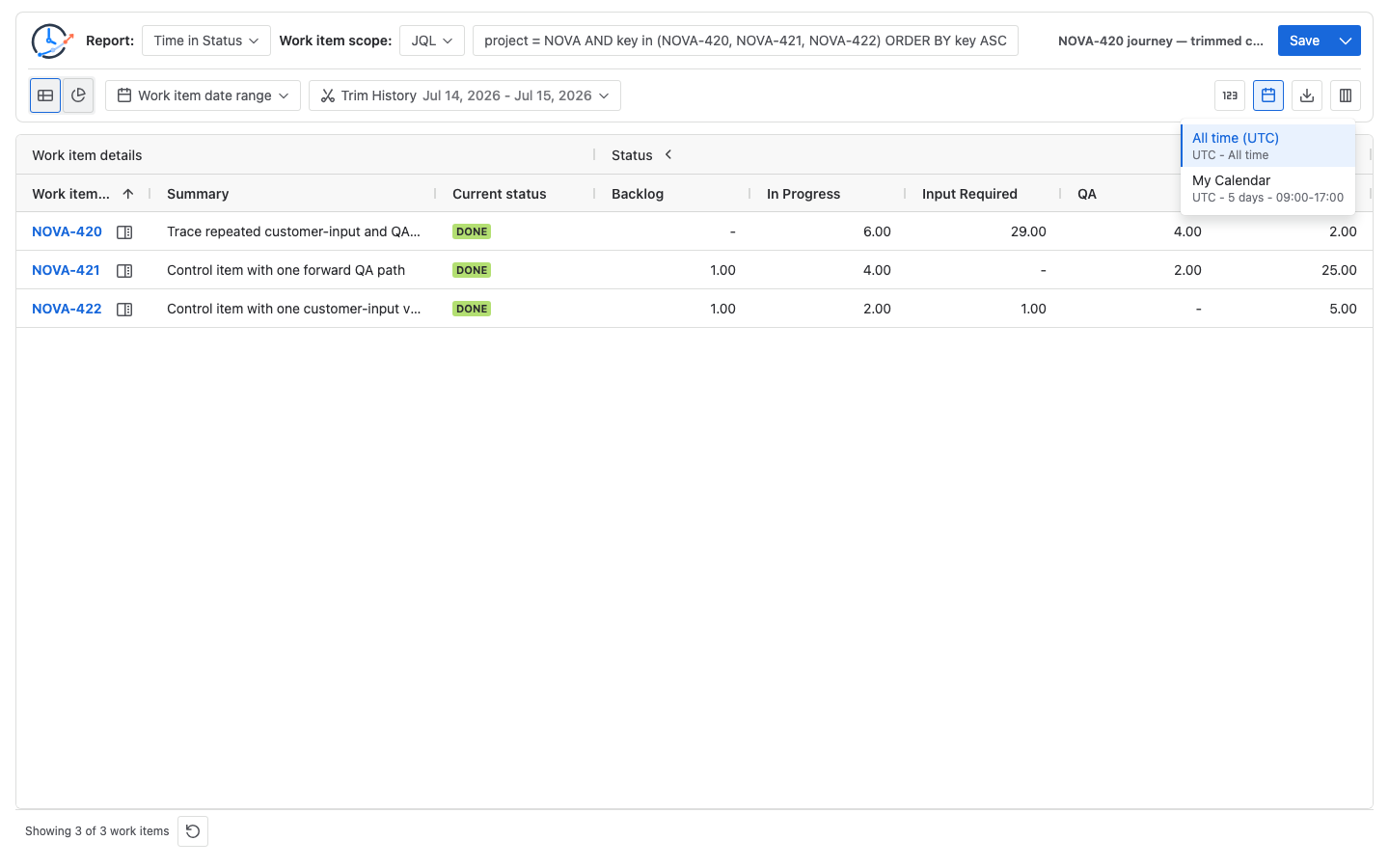
| Calendar | 24×7 |
| Timezone | UTC |
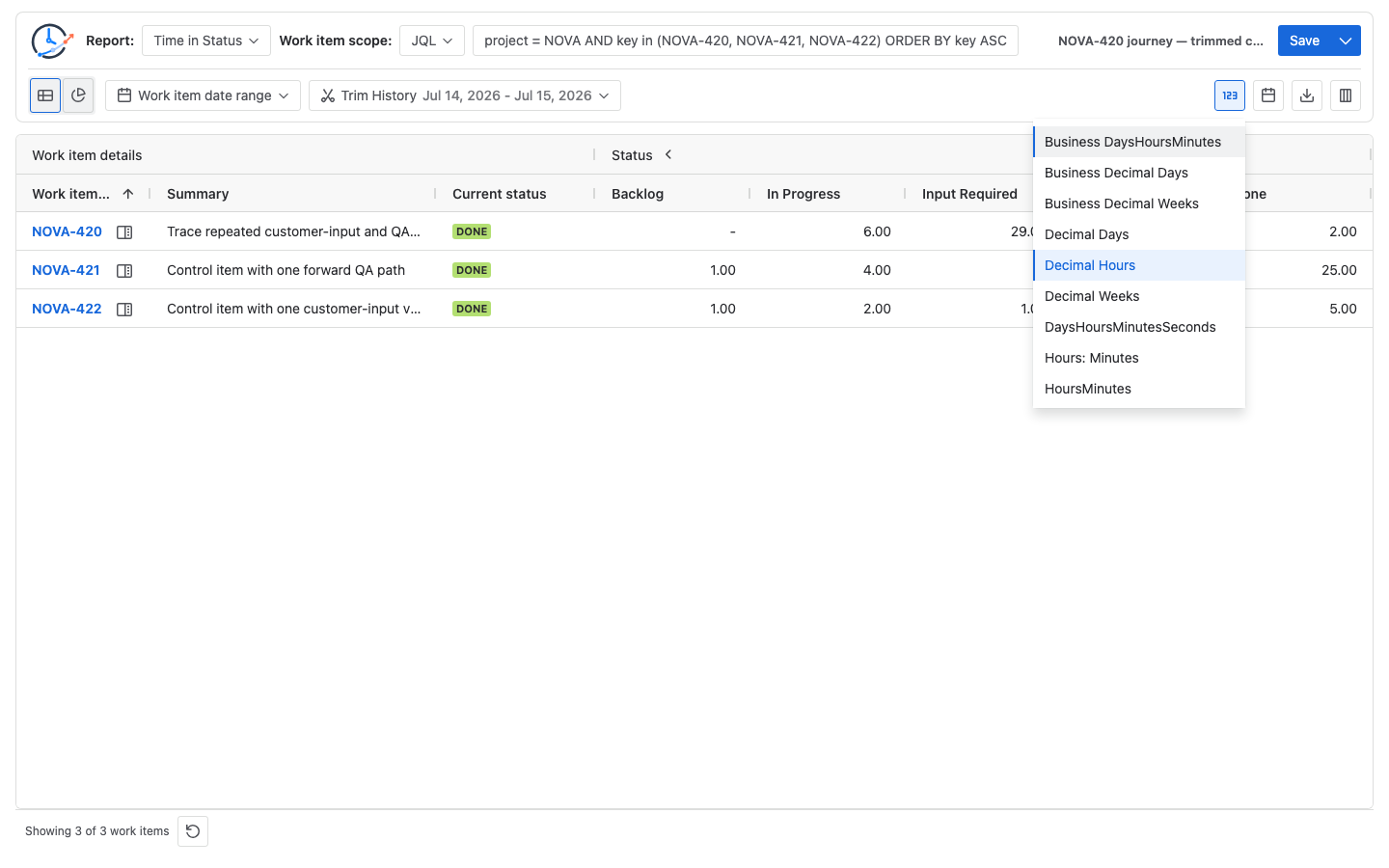
| Format | Decimal Hours |
| Report history window | July 14, 2026 at 00:00 through July 15, 2026 at 17:00 UTC |
| Trim History | On |
| Report generated at | July 15, 2026 at 17:00 UTC |
The two configuration frames make the calculation context visible before the result is interpreted:
The report row shows this selected contribution:
| Work item | Backlog | In Progress | Input Required | QA | Done | Included total |
|---|---|---|---|---|---|---|
NOVA-420 | — | 6.00 | 29.00 | 4.00 | 2.00 | 41.00h |
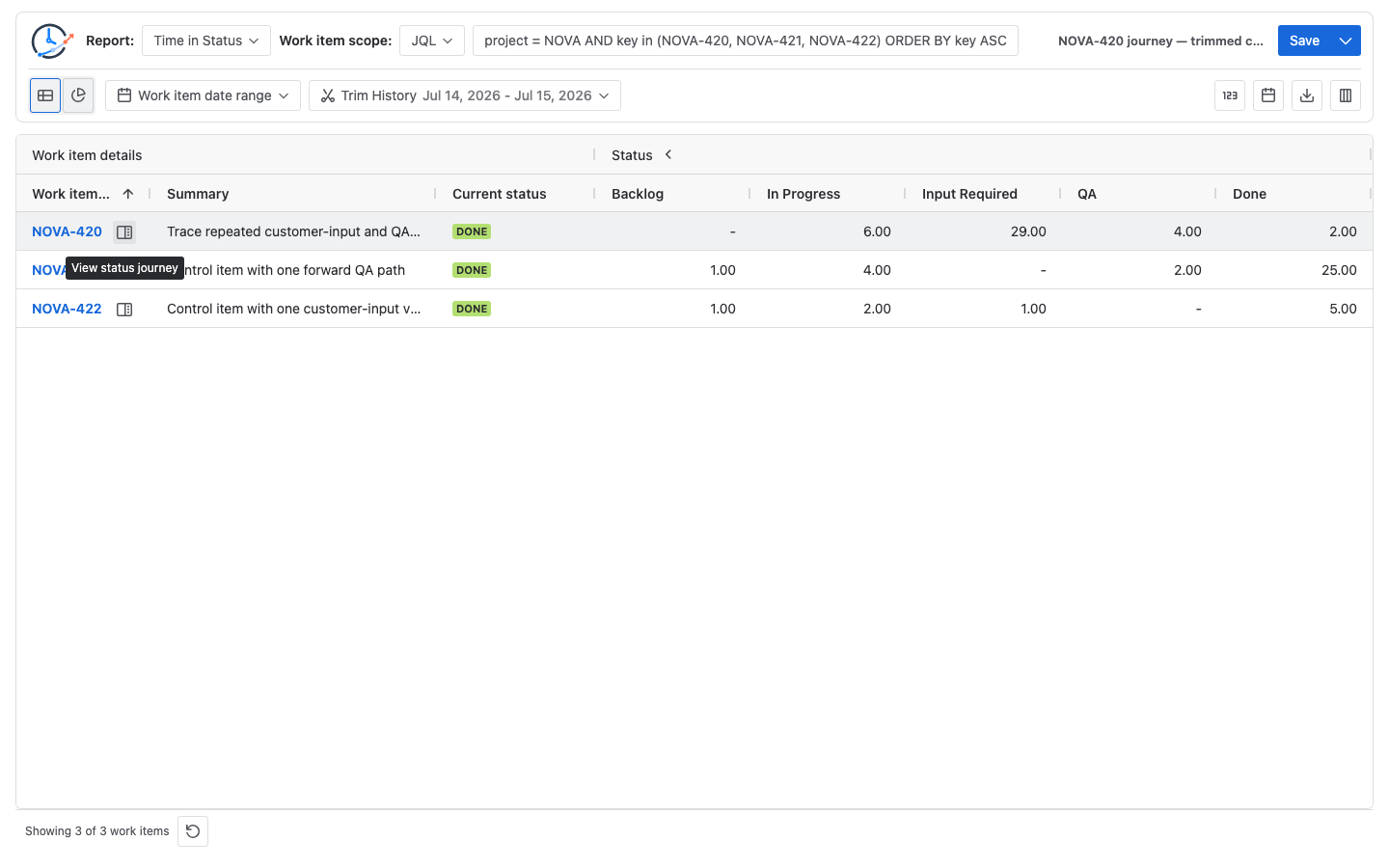
The dash under Backlog does not mean that the work item never entered Backlog. It means Backlog contributed no duration inside this report’s trimmed history window. That distinction is why the report row and the full journey must remain separate.
Why the report shows 41 hours while Full history shows 56
The two totals answer different questions:
| Evidence | Boundary | Question |
|---|---|---|
| Selected report status contribution | The report’s population, selected columns, Calendar, generation time, and Trim History window | What did this work item contribute to the report row? |
| Full history Status timeline and History path | The accessible status sequence from the initial status through the report generation time, without the report’s Trim History clipping | What complete path led to this result? |
For NOVA-420, the full timeline contains nine status intervals:
| Order | Status interval | Duration | Status-change author shown for entry |
|---|---|---|---|
| 1 | Backlog | 1h | — |
| 2 | In Progress | 4h | Ana Ruiz |
| 3 | Input Required | 20h | Ben Lee |
| 4 | In Progress | 3h | Maya Patel |
| 5 | QA | 2h | Ben Lee |
| 6 | Input Required | 19h | Priya Shah |
| 7 | In Progress | 3h | Sofia Chen |
| 8 | QA | 2h | Ben Lee |
| 9 | Done | 2h | Priya Shah |
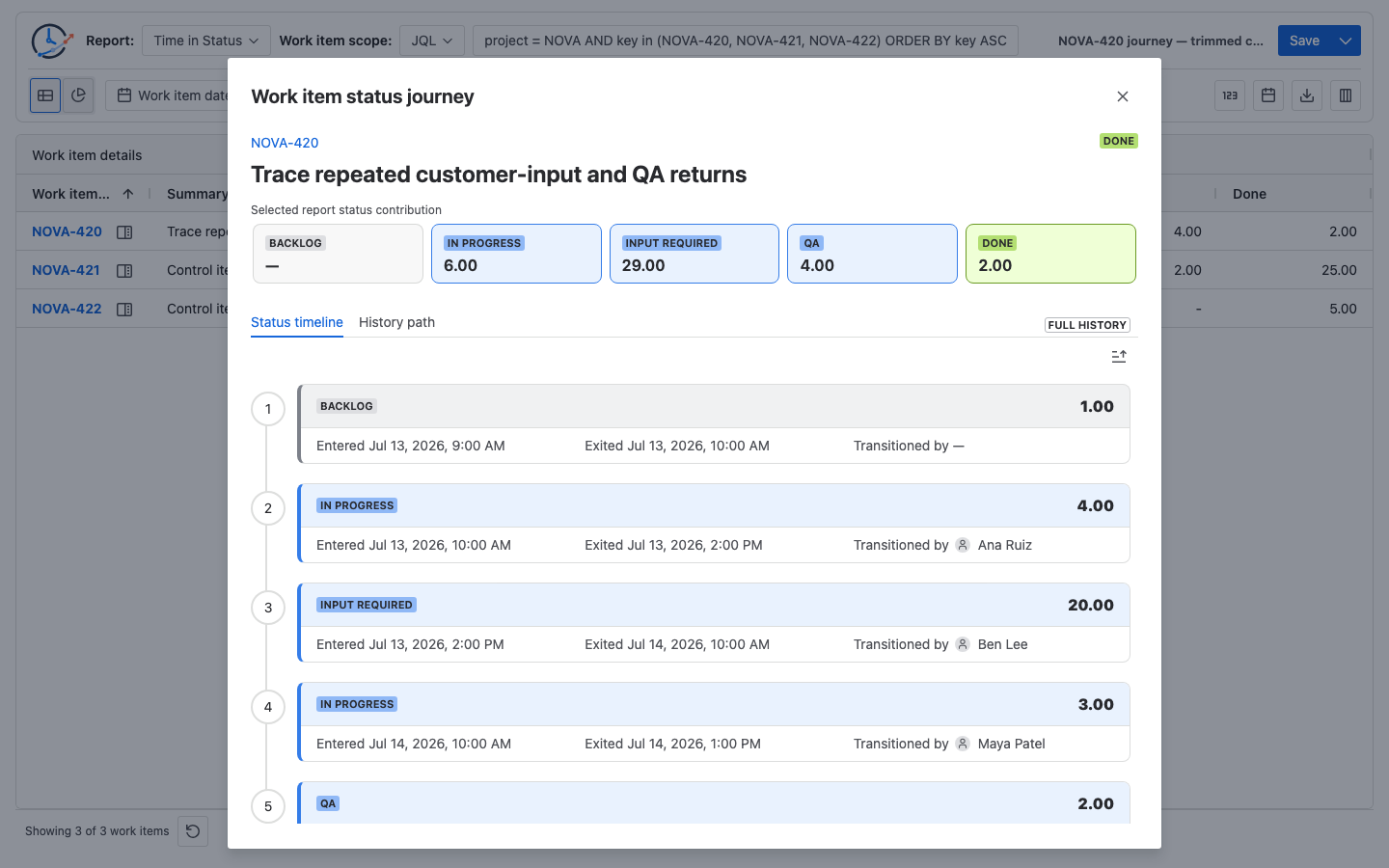
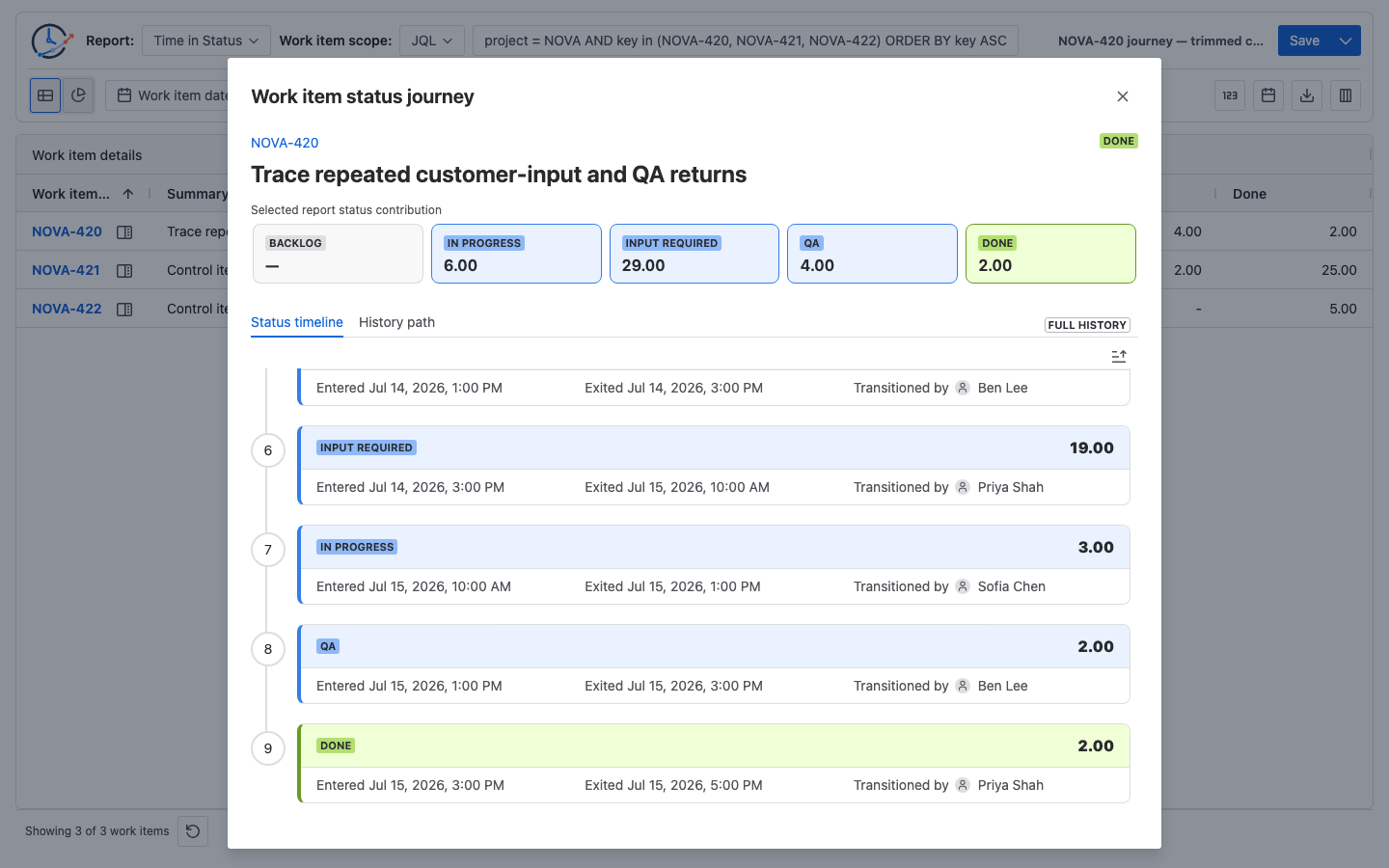
Manually total the complete lifecycle first:
Backlog        = 1h
In Progress    = 4h + 3h + 3h = 10h
Input Required = 20h + 19h     = 39h
QA             = 2h + 2h       = 4h
Done           = 2h

Full history total = 1 + 10 + 39 + 4 + 2 = 56h
Then apply the trimmed report start at July 14, 00:00 UTC. The first 1h Backlog interval, the first 4h In Progress interval, and the first 10h of the 20h Input Required interval are before the selected window:
In Progress    = 3h + 3h   = 6h
Input Required = 10h + 19h = 29h
QA             = 2h + 2h   = 4h
Done           = 2h

Selected report contribution = 6 + 29 + 4 + 2 = 41h
The 15-hour difference is expected boundary evidence, not a mismatch: 56h - 15h = 41h. For the general rule that combines repeated visits into one Time in Status cell, use How Repeated Jira Status Entries Affect Time in Status instead of turning this investigation into another calculation tutorial.
Follow the path before naming the cause
The timeline answers when each interval occurred. History path collapses the same ordered history into status nodes and directed connections so repeated movement is easier to see.
Atlassian’s workflow transition guidance treats transitions as one-way paths. A move into a status and a return from it are therefore separate directions to inspect, even when they involve the same two status names.
In the controlled result, the path contains 5 statuses and 8 transitions. Its node totals reconcile with the 56-hour timeline:
Backlog 1h · In Progress 10h · Input Required 39h · QA 4h · Done 2hTwo directed connections repeat:
Input Required → In Progress = 2
In Progress → QA              = 2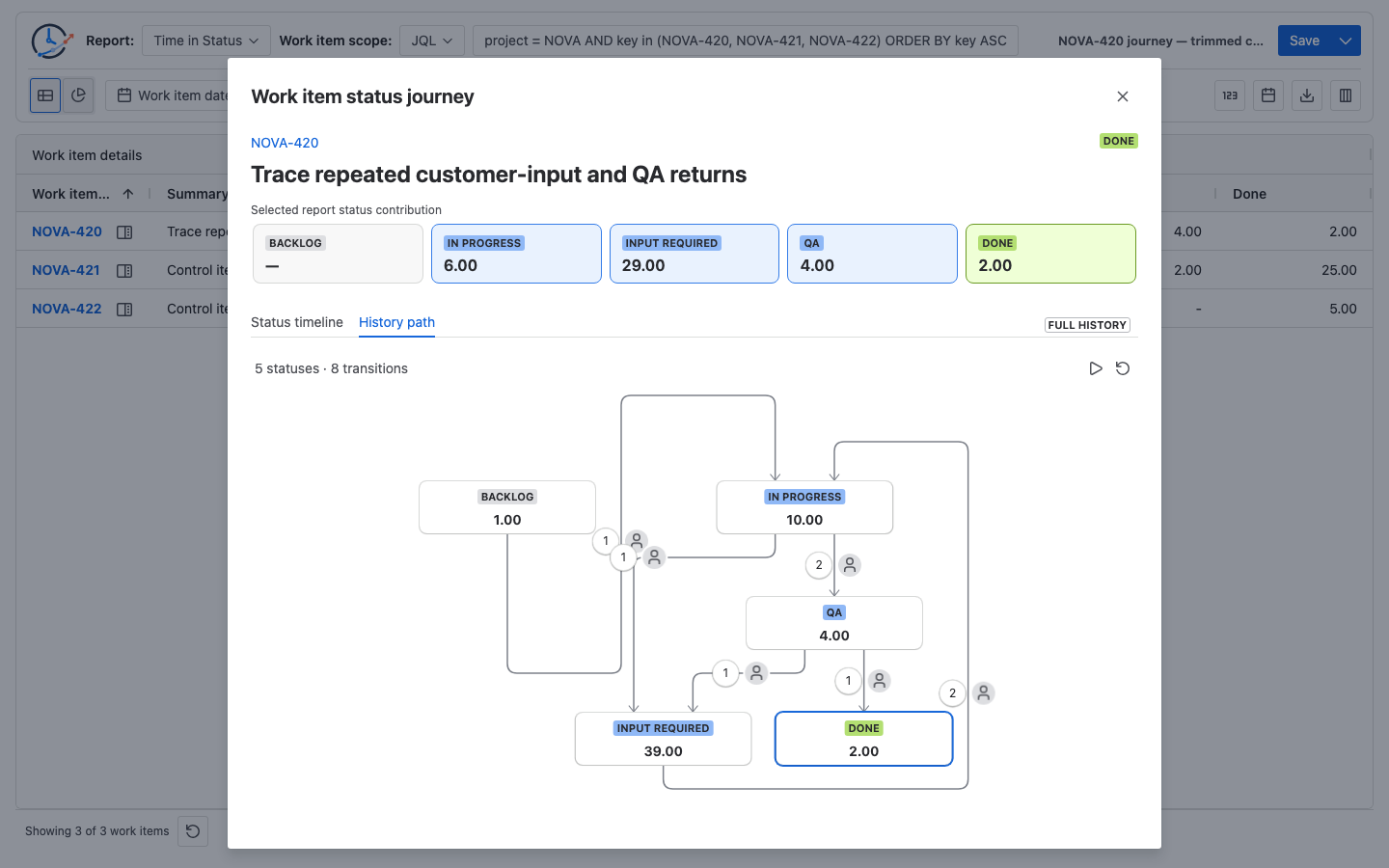
This evidence supports three separate observations:
- Waiting: Input Required accumulated 39 hours across two visits, substantially more than any other status.
- Repeated movement: both
Input Required → In ProgressandIn Progress → QAoccurred twice. - Change-event records to inspect: the displayed changelog authors help locate the relevant Jira history entries; they do not prove who owned the work, caused the delay, or should be contacted.
Pause or replay the path to follow the edges in event order. Do not turn the animation into a causal explanation. A backward-looking edge can represent correction, an approved loop, an information request, automation, or another valid workflow route.
Check only the decisive Jira History changes
For a real investigation, open the actual target work item in Jira and use Activity → History to check the events that support the conclusion. Atlassian’s work item activity documentation describes History as including field changes and workflow movements. This run did not load the synthetic NOVA-420 fixture into a Jira tenant and did not capture Jira-native History.
If the fixture were loaded into a test Jira for an equivalent check, the decisive expectations would be:
| Fixture status change | Expected UTC timestamp | Expected changelog author |
|---|---|---|
| Input Required → In Progress | July 14, 10:00 | Maya Patel |
| In Progress → QA | July 14, 13:00 | Ben Lee |
| Input Required → In Progress | July 15, 10:00 | Sofia Chen |
| In Progress → QA | July 15, 13:00 | Ben Lee |
For a real work item, also compare repeated status spans before describing their accumulated time as waiting on the same cause. Jira History provides surrounding recorded changes to examine; comments, approvals, automation rules, Assignee changes, and team knowledge may still be needed to explain why the item moved.
If the question is whether four different calculated reports reconcile to the same event history, use How to Reconcile One Jira Work Item Across Four Issue Activity Reports. This Guide stops after tracing the Journey and checking the key changes.
Keep seven interpretation boundaries visible
- Report contribution is not Full history. The 41-hour cards follow the selected report calculation. The 56-hour timeline and path do not apply its Trim History boundary.
- Full history still has an end time. Here it ends at the report generation time. It is not future history, and its latest interval should not be presented as a guaranteed live current-visit age.
- Actor means changelog author. It is the account Jira returned for the status change and may represent a person, automation, or an app. It is not necessarily the Assignee, work owner, reporter, approver, or party responsible for the delay.
- The initial actor can be blank. Backlog has no preceding transition in the reconstructed sequence, so
—is expected rather than a missing owner. - The path is not a workflow-definition archive. It combines loaded status history with current workflow status metadata when that metadata is available; it does not reconstruct every historical workflow configuration change.
- Repeated direction is not an automatic rework label. The team must define which paths represent correction or rejection. Use the Jira Transition Direction Report Template when that definition needs to become a population-level metric.
- A status total is not the latest-visit age. Input Required
39.00combines two visits (20h + 19h); it does not mean the latest visit lasted 39 hours.
This reproduction confirms the direct row action in Report Center → Time in Status. It does not imply that Status Count or Transition Count tables have the same direct action, or that Issue Activity and Dashboard Gadget present the same set of Journey panels. See Issue drill-down and Status Journey for the surface-specific controls and data boundaries.
Related Guides
- How to Reconcile One Jira Work Item Across Four Issue Activity Reports
- How Repeated Jira Status Entries Affect Time in Status
- Jira Transition Direction Report Template
Finish with an issue-level investigation record
Before changing the workflow or escalating a process problem, retain:
- the work item key, exact population, Calendar, timezone, Trim History range, and report generation time;
- the selected report contribution and the independently checked Full history total;
- the repeated directed edges and the timestamps where they occurred;
- the Jira History changes checked and any surrounding evidence still needed;
- a separate statement of observation and interpretation—for example, “two Input Required visits totaling 39 hours” is evidence, while “avoidable rework” is a team judgment.
That record lets another reviewer reproduce the path without copying every timestamp into a new spreadsheet, while keeping the report calculation, full lifecycle, and business conclusion separate.
Try StatusPath Reports on the Atlassian Marketplace to run Time in Status for your real Jira population, open one high-risk work item’s Journey, and compare its selected contribution with Full history before drawing a process conclusion.