
How Repeated Jira Status Entries Affect Time in Status
See how repeated Jira status visits are summed into Time in Status while Status Count preserves the number of entries, with a verified six-story example.
When a Jira work item enters the same status more than once, StatusPath Reports treats each visit as a separate timestamp interval, applies the same history window and Calendar to each interval, then adds the included durations into one Time in Status cell. Status Count remains separate: it shows how many times the item entered that status. A four-hour total can therefore mean one four-hour visit or two two-hour visits.
Start with the broader Jira Time in Status calculation guide for the interval model. The current controls and output shapes are documented in Report types and Issue Activity.
Separate Jira history from the calculated reports
Atlassian describes a Jira workflow as statuses and transitions that a work item moves through during its lifecycle. Atlassian also documents that workflow transitions are one-way: moving from In Progress to In Review and returning from In Review to In Progress requires two directions in the workflow.
Jira provides the evidence for those movements. The work item’s Activity → History records field edits and workflow movement. For app access, Jira Cloud’s changelog REST resources return timestamped changelog records subject to Jira permissions and app-access rules.
StatusPath turns that ordered history into two different outputs:
| Report | Calculation | Question answered |
|---|---|---|
| Time in Status | Sum the included duration of every visit to a status | How much calculated time did this work item spend in In Progress? |
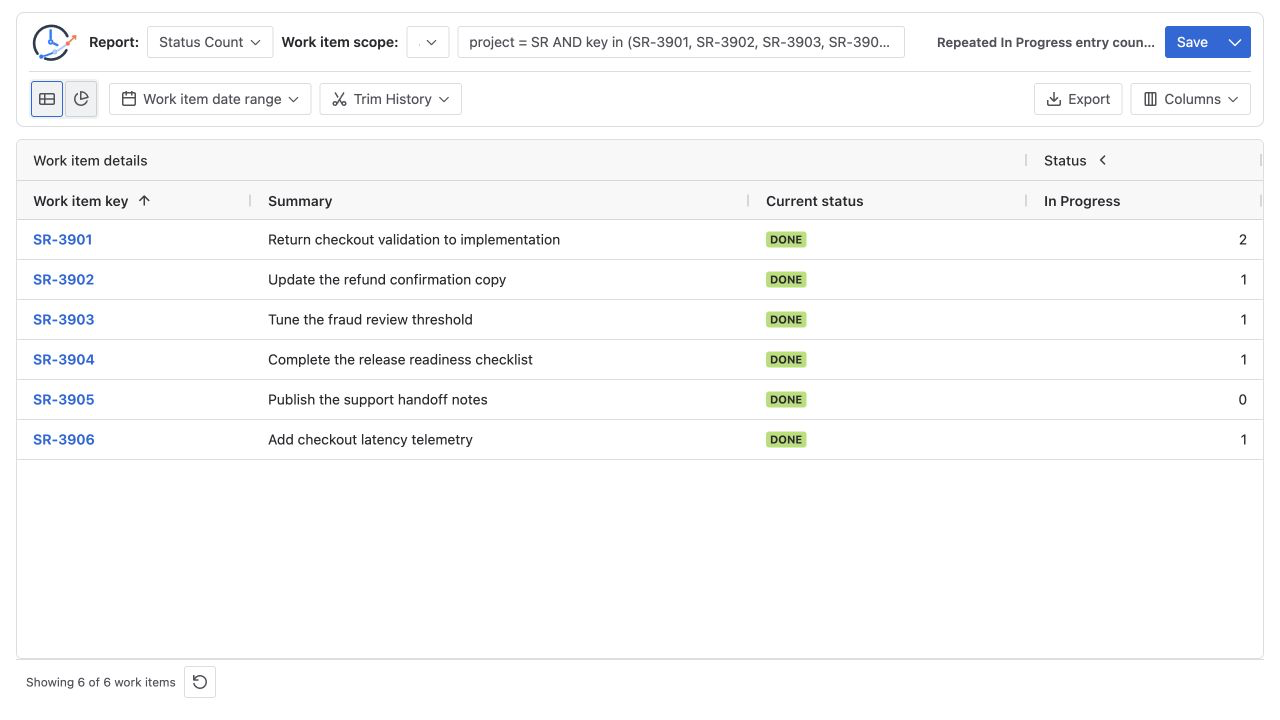
| Status Count | Count entries into the status inside the calculated history window | How many times did this work item enter In Progress? |
| Transition Count | Count a selected directional movement | Which workflow route created the return? |
This distinction is StatusPath behavior, not a claim that Jira natively exposes the same calculated columns. Jira supplies current field values and history; StatusPath calculates the duration and count reports from that evidence.
Reproducible Jira scenario: two visits, one duration cell
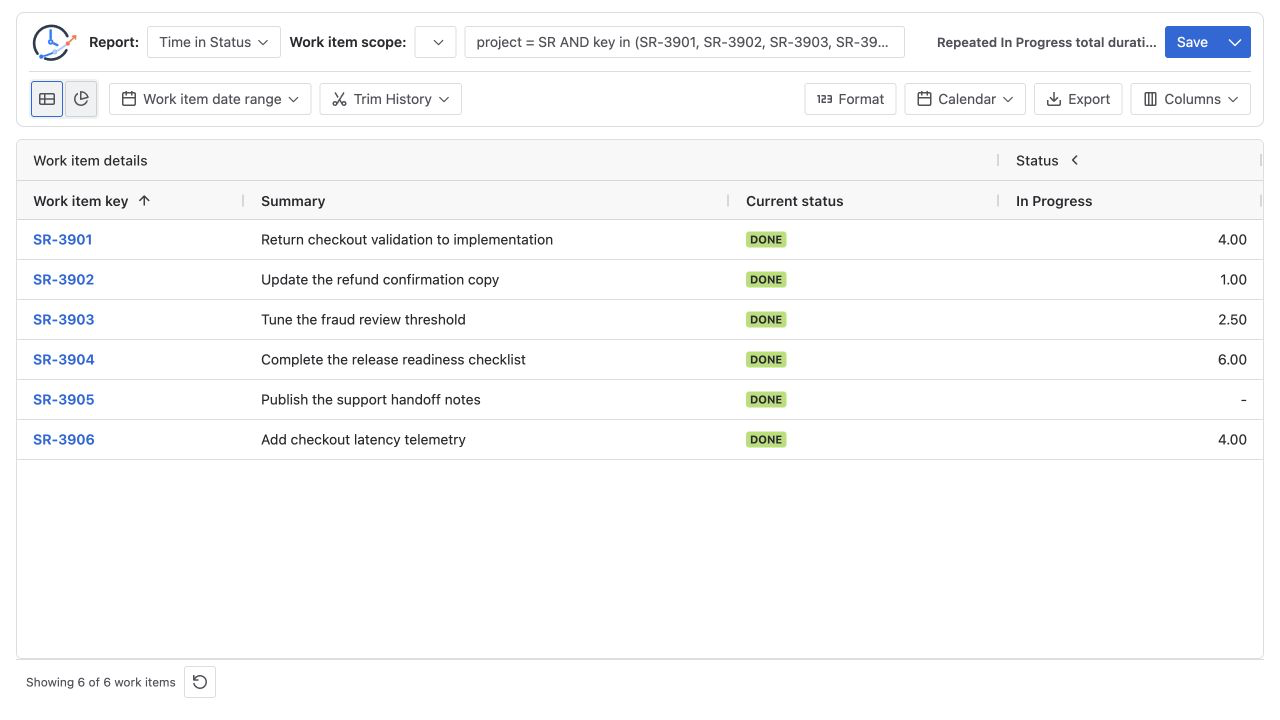
This reproducible demonstration uses synthetic data in a Jira test project: six Stories, a configured 24×7 UTC Calendar, Decimal Hours, and no Trim History. SR-3901 enters In Progress twice; the other five rows provide one-visit, skipped-status, and equal-total controls.
Use this report definition:
| Setting | Value |
|---|---|
| Work item scope | JQL project = SR AND key in (SR-3901, SR-3902, SR-3903, SR-3904, SR-3905, SR-3906) ORDER BY key ASC |
| Work item date range | Empty |
| Trim History | Off |
| Time in Status Calendar | Configured 24×7 Calendar in UTC |
| Time in Status Format | Decimal Hours |
| Validation reports | Time in Status, then Status Count with the same scope and history window |
| Visible columns | Work item key, Summary, and In Progress |
The 24×7 Calendar makes the example equal to elapsed timestamp subtraction. A business Calendar would apply its working hours to each duration interval, while Status Count would remain an event count.
Calculate SR-3901 timestamp by timestamp
The relevant workflow history is:
| Timestamp (UTC) | New status | Effect on In Progress |
|---|---|---|
| 2026-07-06 09:00 | To Do | No In Progress interval yet |
| 2026-07-06 10:00 | In Progress | First visit starts |
| 2026-07-06 12:00 | In Review | First visit ends after 2 hours |
| 2026-07-06 13:00 | In Progress | Second visit starts |
| 2026-07-06 15:00 | Done | Second visit ends after 2 hours |
Calculate each visit before adding them:
first In Progress visit  = 12:00 - 10:00 = 2.00h
second In Progress visit = 15:00 - 13:00 = 2.00h

Time in Status: 2.00h + 2.00h = 4.00h
Status Count:   2 entries
The one-hour In Review interval is not part of the In Progress total. It separates the two visits and provides the return transition In Review → In Progress. Transition Count can verify that direction, but the question of whether the return is rework belongs in the Jira rework measurement guide.
Reconcile all six control rows
Use the same Calendar, history window, and display format for every row:
| Work item | Included In Progress intervals (UTC) | Manual duration | Expected Time in Status | Expected Status Count |
|---|---|---|---|---|
SR-3901 | 10:00–12:00 and 13:00–15:00 | 2.00h + 2.00h | 4.00h | 2 |
SR-3902 | 10:00–11:00 | 1.00h | 1.00h | 1 |
SR-3903 | 10:00–12:30 | 2.50h | 2.50h | 1 |
SR-3904 | 10:00–16:00 | 6.00h | 6.00h | 1 |
SR-3905 | Never entered In Progress | 0.00h | — | 0 |
SR-3906 | 10:00–14:00 | 4.00h | 4.00h | 1 |
The manual checks are:
total In Progress duration = 4.00 + 1.00 + 2.50 + 6.00 + 0.00 + 4.00
                           = 17.50h

total In Progress entries  = 2 + 1 + 1 + 1 + 0 + 1
                           = 6
SR-3901 and SR-3906 prove why duration alone cannot reveal repeated visits: both total 4.00 hours, but their entry counts are 2 and 1. The dash for SR-3905 is the empty duration display for a status it never entered; the visible Status Count column uses numeric 0 for that row.
Configure and verify the two reports
1. Fix one population
Run the bounded JQL and confirm that it returns exactly SR-3901 through SR-3906. Do not change the source, date filter, or Jira permissions between the duration and count checks.
2. Reconcile Time in Status first
Choose Time in Status, the configured 24×7 UTC Calendar, and Decimal Hours. Keep In Progress visible. Confirm the six expected cells and the 17.50-hour manual total before interpreting repetition.
3. Switch to Status Count without changing history scope
Choose Status Count with the same work item scope and Trim History setting. Calendar and duration Format do not calculate this count report. Confirm that the In Progress values are 2, 1, 1, 1, 0, 1.
4. Inspect Jira History for the exceptional row
Open SR-3901, select Activity → History, and verify the two entries into In Progress and both exit timestamps. Atlassian’s JQL fields reference documents that Status supports historical operators such as WAS and CHANGED; use those predicates to select matching work items, not as a substitute for the per-work-item count.
5. Use Transition Count only for the route
If the business question depends on direction, check In Review → In Progress separately. A status entry count says the item returned; the directional transition says where it returned from. Investigate the Jira context before labeling the movement.
Common mistakes
Keeping only the latest visit
Calculating 13:00–15:00 for SR-3901 and ignoring 10:00–12:00 produces 2.00 hours instead of 4.00. Reconstruct every included interval before summing.
Reading four hours as four entries
Time in Status is a duration. Status Count is a count. Their numbers can look similar by coincidence, but they use different units and answer different questions.
Treating JQL as a per-row count
status WAS "In Progress" or status CHANGED TO "In Progress" can help select work items with matching history. The query result does not replace the Status Count value calculated for each work item.
Comparing different history windows
Trim History can remove an earlier visit from both duration and entry-count calculations. Keep the same population and history window when reconciling the two reports.
Counting a loop that did not change status
Atlassian permits looped workflow transitions whose destination is the same status. Do not assume every workflow action created a new status visit; confirm an actual Status changelog entry.
Calling every second entry rework
A return can reflect rework, an approved process loop, automation, or another workflow rule. Use the directional history and team definition before assigning a cause.
Frequently asked questions
Does Time in Status create a separate column for every visit?
No. For one work item and one status, StatusPath adds the included visit durations into one Time in Status value. Use Status Count to keep the entry frequency visible.
Do business calendars affect Status Count?
No. A Calendar changes duration calculations such as Time in Status. Status Count counts entry events, although Trim History can still change which events fall inside the calculated history window.
Can standard JQL tell me how many times each work item entered a status?
JQL can select work items whose Status was or changed to a value. Use Status Count or a changelog-based audit when the result needs a numeric entry count for each work item.
Is a second status entry automatically a rework event?
No. It proves a repeated visit inside the chosen history window, not its cause. Inspect the directional transition and Jira History, then apply a written team definition of rework.
Related Guides
- How to Calculate Time in Status in Jira Cloud
- How to Measure Jira Rework with Status Count and Transition Count
- How Is Average Time in Status Calculated in Jira?
- How Jira Time in Status Date Ranges Clip History
Make repeated visits auditable
Time in Status shows the accumulated duration; Status Count preserves how many visits produced it; Transition Count identifies the route. Keep their population and history window aligned, then verify one exceptional row against Jira History before drawing a process conclusion.
Try StatusPath Reports on the Atlassian Marketplace to reproduce the duration-and-count check with your own Jira workflow and permissions.