
Jira Transition Direction Report Template
Define auditable Jira transition metrics with an editable from-to matrix, a 12-Bug worked example, Transition Count setup, and validation steps.
A Jira transition-direction report should begin with an editable matrix, not a generic label such as “rework.” Name every From → To pair, decide whether it belongs in the metric, assign an owner, and retain a Jira History sample. Then run Transition Count for the same population and history window so each matrix row can be reconciled with a directional report column.
Editable transition-direction matrix
Copy this table into the team’s review document and replace every bracketed field before running the report:
| From → To path | Business meaning | Include in metric? | Count rule | Owner | Validation sample | Follow-up action |
|---|---|---|---|---|---|---|
[From status] → [To status] | [Why this movement matters] | [Yes / No / Control] | [Every event / first event / affected work item] | [Role or team] | [Jira key] | [Review, fix, or monitor] |
[From status] → [To status] | [Why this movement matters] | [Yes / No / Control] | [Every event / first event / affected work item] | [Role or team] | [Jira key] | [Review, fix, or monitor] |
[From status] → [To status] | [Why this movement matters] | [Yes / No / Control] | [Every event / first event / affected work item] | [Role or team] | [Jira key] | [Review, fix, or monitor] |
Keep the status names editable and workflow-specific. Atlassian describes a Jira workflow as statuses connected by transitions, and its workflow-administration guidance explains that transitions are the one-way paths between statuses. Therefore In Progress → In Review and In Review → In Progress are two different movements, even though they involve the same statuses.
For a broader explanation of using repeated stage entries as a screen before identifying the exact return path, use How to Measure Jira Rework with Status Count and Transition Count.
Worked Jira scenario: 12 Bugs and six named paths
The controlled SR project contains Bugs SR-4601 through SR-4612. This example uses complete history with Trim History off. Eight Bugs follow the standard path, two return from In Review once, one returns from QA twice, and one is reopened after Done.
The team’s matrix is:
| From → To path | Business meaning | Include? | Count rule | Owner | Validation sample | Follow-up |
|---|---|---|---|---|---|---|
In Review → In Progress | The Bug was returned from In Review to In Progress for more implementation | Yes | Count every matching event | Engineering lead | SR-4609 | Review return reason |
QA → In Progress | QA returned the Bug to implementation | Yes | Count every matching event | QA lead | SR-4611 | Review both QA returns |
Done → Reopened | Completed work was reopened | Yes | Count every matching event | Delivery lead | SR-4612 | Confirm reopen classification |
In Progress → In Review | Forward control path into In Review | Control | Do not add to rework total | Engineering lead | SR-4601 | Compare with return volume |
In Review → QA | Forward control path into QA | Control | Do not add to rework total | Review owner | SR-4601 | Check expected onward flow |
QA → Done | Forward control path into Done | Control | Do not add to rework total | QA lead | SR-4601 | Check completion flow |
The 12 histories are deliberately small enough to audit:
| Bugs | Workflow path | Number of Bugs |
|---|---|---|
SR-4601–SR-4608 | In Progress → In Review → QA → Done | 8 |
SR-4609, SR-4610 | In Progress → In Review → In Progress → In Review → QA → Done | 2 |
SR-4611 | In Progress → In Review → QA → In Progress → In Review → QA → In Progress → In Review → QA → Done | 1 |
SR-4612 | In Progress → In Review → QA → Done → Reopened → In Progress → In Review → QA → Done | 1 |
Reconcile the per-Bug rows
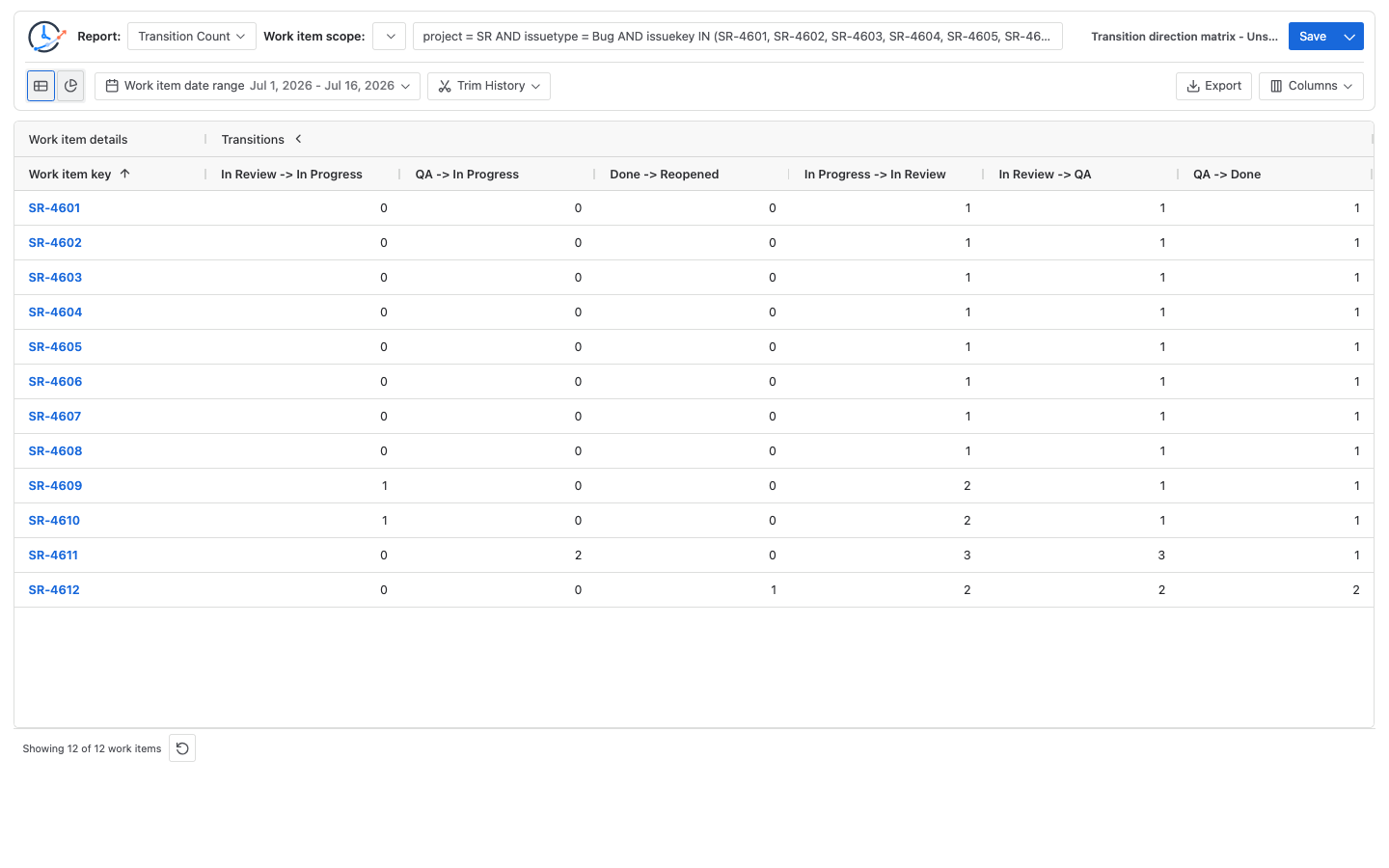
The Transition Count table should produce these six columns for the controlled population:
| Bug | In Review → In Progress | QA → In Progress | Done → Reopened | In Progress → In Review | In Review → QA | QA → Done |
|---|---|---|---|---|---|---|
SR-4601 | 0 | 0 | 0 | 1 | 1 | 1 |
SR-4602 | 0 | 0 | 0 | 1 | 1 | 1 |
SR-4603 | 0 | 0 | 0 | 1 | 1 | 1 |
SR-4604 | 0 | 0 | 0 | 1 | 1 | 1 |
SR-4605 | 0 | 0 | 0 | 1 | 1 | 1 |
SR-4606 | 0 | 0 | 0 | 1 | 1 | 1 |
SR-4607 | 0 | 0 | 0 | 1 | 1 | 1 |
SR-4608 | 0 | 0 | 0 | 1 | 1 | 1 |
SR-4609 | 1 | 0 | 0 | 2 | 1 | 1 |
SR-4610 | 1 | 0 | 0 | 2 | 1 | 1 |
SR-4611 | 0 | 2 | 0 | 3 | 3 | 1 |
SR-4612 | 0 | 0 | 1 | 2 | 2 | 2 |
| Column total | 2 | 2 | 1 | 17 | 15 | 13 |
The arithmetic is:
Defined rework/reopen events = 2 + 2 + 1 = 5 events
Affected Bugs                 = SR-4609, SR-4610, SR-4611, SR-4612 = 4 Bugs

In Progress → In Review       = 8 + 2 + 2 + 3 + 2 = 17
In Review → QA                = 8 + 1 + 1 + 3 + 2 = 15
QA → Done                     = 8 + 1 + 1 + 1 + 2 = 13
Five events do not mean five affected Bugs: SR-4611 contributes two QA → In Progress events. Keep both the event total and the distinct affected-work-item count when the decision needs both frequency and reach.
Configure the report in StatusPath Reports
1. Freeze the question and matrix
Decide whether the metric counts events, affected work items, or both. Mark forward paths as controls rather than silently adding them to a “rework” total. Record the exact Jira status labels; do not assume Review, In Review, Code Review, and Waiting for Review are interchangeable.
2. Select the 12-Bug population
Use a Project, saved Filter, or JQL source. For this worked example:
project = SR
AND issuetype = Bug
AND issuekey IN (
  SR-4601, SR-4602, SR-4603, SR-4604, SR-4605, SR-4606,
  SR-4607, SR-4608, SR-4609, SR-4610, SR-4611, SR-4612
)
ORDER BY issuekey ASC
Atlassian’s JQL operator reference documents history predicates such as CHANGED, FROM, TO, BEFORE, AFTER, and DURING. Atlassian documents JQL as selecting matching work items; it does not document a per-row occurrence-count output. Use Transition Count when the review needs those per-work-item counts.
3. Keep the history window explicit
Leave Trim History off for this full-history example. If the review is period-specific, record the exact start and end boundaries before running it. Changing the selected population and changing the calculated history window answer different questions; Report setup and scope documents that distinction.
4. Run Transition Count and choose explicit columns
Select Transition Count, switch to the Table view, and retain the six named directional columns. Transition columns are based on movements in the calculated history for the selected population, so a path with no matching event may not be available as a dynamic column.
Do not use a Status Group for this task. Current Transition Count reports use explicit From status → To status columns; Status Groups are not available for Transition Count. See the exact current behavior in Columns and grouping.
5. Reconcile columns and affected Bugs
Sum each directional column and compare it with the matrix. Then filter each of the three included columns above zero separately, collect the matching Bug keys, and de-duplicate their union. Column filters combine with AND, so applying all three at once would incorrectly return no rows here. The controlled result is five included events across four affected Bugs, plus forward controls of 17, 15, and 13.
6. Validate representative Jira histories
Check at least one normal path (SR-4601), one Review return (SR-4609), the double QA return (SR-4611), and the reopened path (SR-4612). Atlassian explains that a work item’s Activity → History records field changes and workflow movements. StatusPath Issue Activity can provide a focused Transition Count view for the current work item, while Jira History remains the source record to inspect.
7. Save the definition and export the evidence
Keep the matrix beside the named report configuration. Export CSV or XLSX when reviewers need the counted rows; Export documentation describes the current table-export behavior. A saved configuration can be rerun against changing Jira data, so date the exported evidence separately.
Common mistakes
Calling every non-forward movement rework
Direction alone does not establish cause. Use the matrix to distinguish valid exceptions, automation, cancellation, approved reopening, and locally defined rework.
Reporting five events as five Bugs
SR-4611 has two QA returns. Event count is five, but only four distinct Bugs have an included movement.
Using Status Count to infer direction
A repeated In Progress entry does not identify the prior status. Use Transition Count for direction.
Expecting documented JQL output to include occurrence-count columns
JQL narrows the population; it does not provide the per-row occurrence counts needed here. Use Transition Count for the counted output.
Combining transitions with a Status Group
Status Groups are not available in current Transition Count. Keep each from-to pair explicit and combine columns only in the written calculation.
Changing scope or Trim History between checks
Use the same population and history boundary for the matrix, aggregate table, and Jira History samples.
Frequently asked questions
Is every backward Jira transition a rework event?
No. A team must define which paths belong in its metric and validate representative work items. A path that appears to run backward can be a valid workflow route rather than a defect or failure.
Why are there five events but only four affected Bugs?
Because SR-4611 moved from QA to In Progress twice. Event totals count occurrences; affected-Bug totals count distinct work items with at least one included occurrence.
Can JQL calculate each Bug’s transition count?
Atlassian documents JQL as selecting Bugs whose history matches conditions such as CHANGED FROM and TO; it does not document a reusable per-row occurrence-count output. Run Transition Count for this review and validate the result in History.
Why is a transition column missing?
The selected population or calculated history window may contain no matching movement. Confirm the exact status labels, population, and Trim History boundaries before changing the metric definition.
Can Transition Count use a Status Group?
No, not in the current report. Transition Count exposes explicit directional columns. Keep the matrix workflow-neutral by editing its status names, not by claiming that grouped transition columns exist.
Related Guides
- How to Measure Jira Rework with Status Count and Transition Count
- Jira Workflow Reporting Guide: From Scope to Export
- Jira Sprint Workflow Analysis: Time in Status, Rework, and Trends
- How to Analyze a QA or Testing Bottleneck in Jira
Turn a transition label into an auditable metric
Try StatusPath Reports on the Atlassian Marketplace to run Transition Count for a controlled Jira population, reconcile explicit from-to paths, and retain the evidence behind the team’s editable matrix.