
Why Current Jira Status Time Keeps Growing
Learn why an open Jira status interval grows between report runs and reproduce the result with fixed scope, calendar, and Trim History boundaries.
A current Jira status duration keeps growing because the work item entered that status but has no later status change to close the interval. StatusPath Reports therefore ends the open segment at the report’s effective end boundary; when that boundary advances on a later run, the duration increases. Keep the Time in Status calculation model and report scope and Trim History configuration fixed to reproduce it.
An open status has no recorded exit yet
Atlassian defines a Jira workflow as the statuses and transitions a work item moves through during its lifecycle. A completed status segment starts with a recorded status change into that status and ends with a later change to a different status. A current segment has an entry but no later status change in the available history, so a duration report needs an effective end boundary for that still-open interval.
Jira records work-item actions in the Activity section, and its History view includes movement through the workflow. Use Jira work-item activity and History to verify the last status move. For a programmatic check, Jira Cloud also exposes a paginated issue changelog endpoint that returns changelogs in date order, subject to Jira permissions.
Those Jira sources establish the recorded workflow events. They do not calculate a StatusPath duration. StatusPath applies its report boundary, Trim History, Calendar, and Format to those events.
Reproducible Jira scenario: open interval and completed control
This reproducible example uses demonstration work items, a team-configured 24×7 Calendar in UTC, and Decimal Hours so the boundary arithmetic stays visible. Record that Calendar’s schedule and timezone with any production result.
| Work item | Status history | What should change between runs |
|---|---|---|
SR-3701 | Enters Waiting for Review at 2026-07-13 00:00 UTC and has no later status change | The open Waiting for Review segment grows when the report end boundary advances |
SR-3702 | Enters Waiting for Review at 2026-07-13 00:00 UTC and transitions to Done at 04:00 UTC | The completed Waiting for Review segment stays at four hours |
Keep the report type, work-item scope, status columns, Calendar, Format, Work item date range, and Trim History unchanged between the two observations. Atlassian’s workflow overview supplies the status-and-transition model. The observation times below are recorded run times, not a user-settable report endpoint.
Two runs explain the increase
The reproducible snapshot records the same report at these two run times:
| Run | Recorded run time | SR-3701 current segment | SR-3702 completed control |
|---|---|---|---|
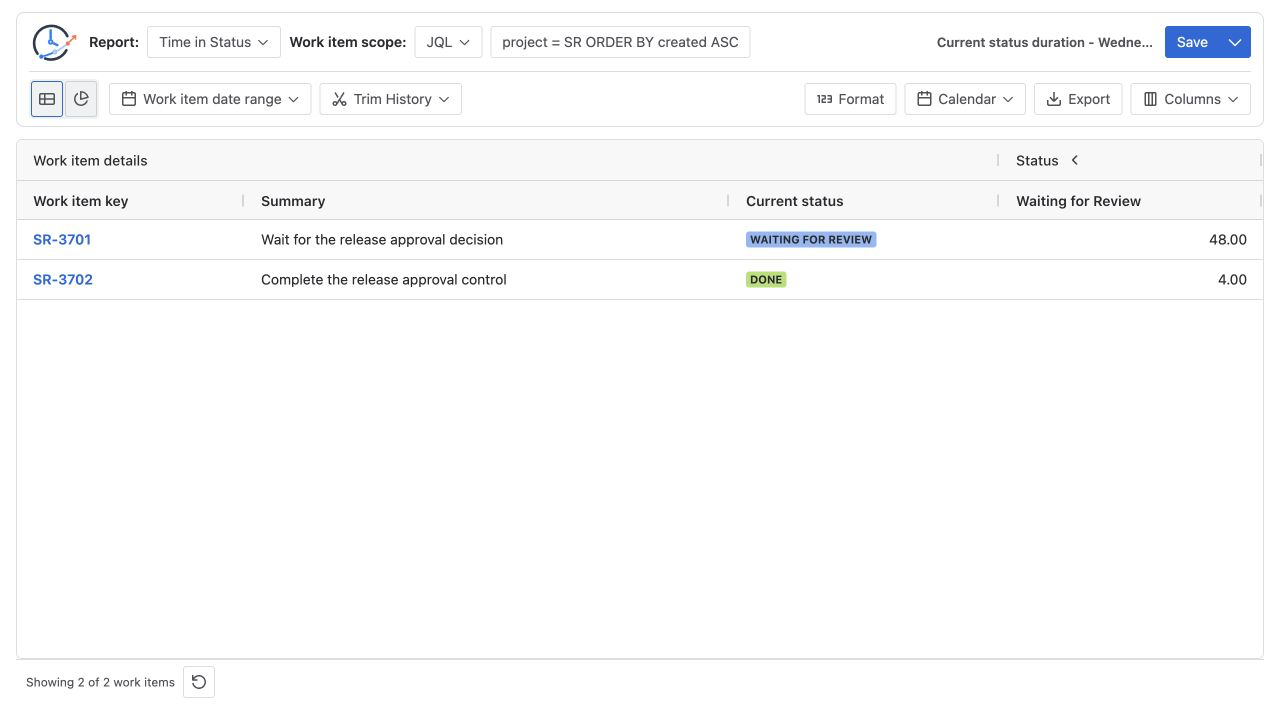
| A | 2026-07-14 00:00 UTC | 24.00 hours | 4.00 hours |
| B | 2026-07-15 00:00 UTC | 48.00 hours | 4.00 hours |
The open-item arithmetic is:
Run A: 2026-07-14 00:00 - 2026-07-13 00:00 = 24 hours
Run B: 2026-07-15 00:00 - 2026-07-13 00:00 = 48 hours
Growth: 48 - 24 = 24 hours
The completed control has a recorded transition to Done:
2026-07-13 04:00 - 2026-07-13 00:00 = 4 hoursIts value does not depend on either later run boundary. If both rows grow, the comparison is no longer isolating the open current segment; recheck the recorded status changes and configuration.
Fix the history boundaries for a repeatable result
To rerun the example later without letting the open segment advance:
- Keep the same Time in Status report and work-item scope.
- Keep the same configured 24×7 UTC Calendar and Decimal Hours selected.
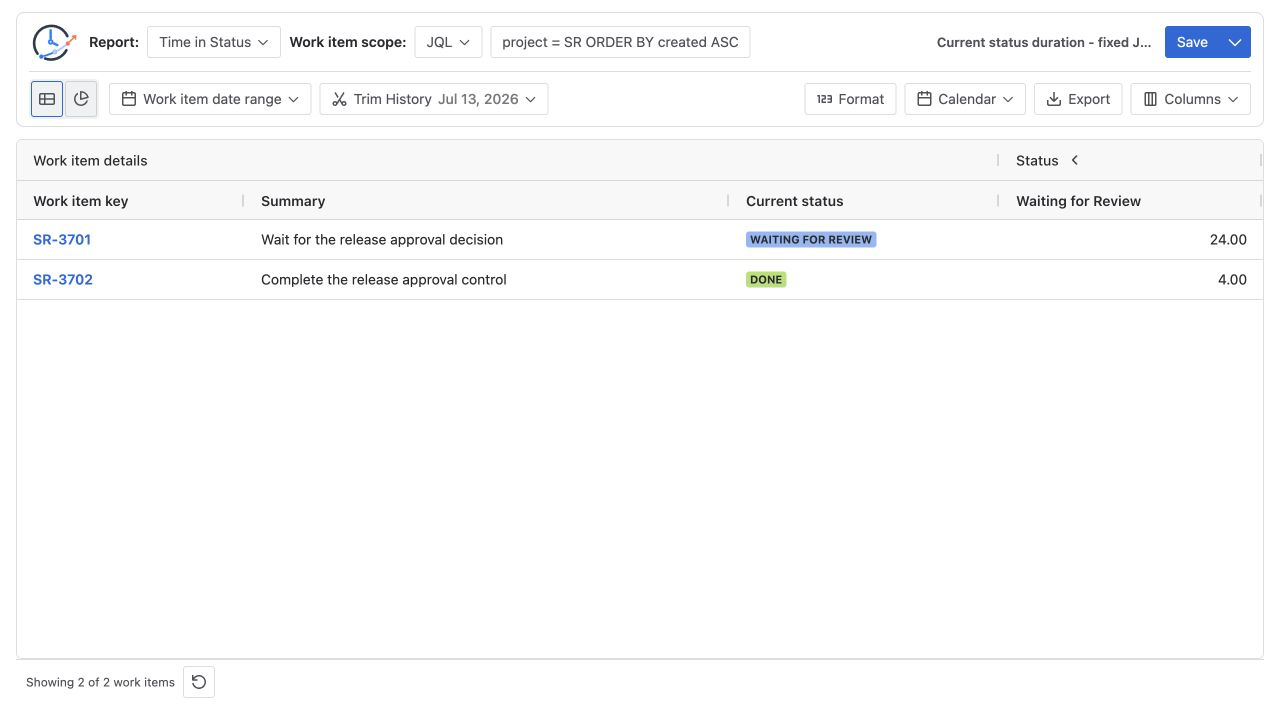
- Open Trim History and set both From and To to 2026-07-13.
- Save the range and wait for the report to refresh.
- Confirm
SR-3701displays 24.00 hours andSR-3702displays 4.00 hours.
Trim History uses calendar-date boundaries in the selected Calendar timezone. With the one-day UTC range above, the inclusive end is 2026-07-13 23:59:59.999 UTC. The raw open interval is therefore 24 hours minus one millisecond, which displays as 24.00 Decimal Hours. Record the timezone and the date boundaries with the result; a date without its Calendar timezone is not a complete reproduction instruction.
Do not use Work item date range as a substitute. That control decides which selected work items enter the report. Trim History decides which part of each included work item’s history participates in the calculation.
Common mistakes
Treating every increase as a defect
First check whether the work item still has no later status change. Growth is expected when the current segment is open and the report end boundary advances.
Comparing runs with different calendars
A business-hours Calendar can count only scheduled periods, while an all-time calendar counts every elapsed hour. Keep the Calendar and timezone fixed before attributing a difference to the open segment.
Trying to freeze the value with Work item date range
Work item date range filters the population. It does not set the end of the status-history calculation. Use a complete Trim History range for the fixed comparison.
Ignoring the inclusive end-of-day boundary
Trim History accepts dates, not an arbitrary timestamp in this workflow. Convert the selected To date into the selected Calendar timezone’s inclusive day end when checking raw milliseconds.
Frequently asked questions
What closes a current status segment?
A later transition to a different status closes the segment in Jira history. Until Jira records that status change, StatusPath uses the effective report end boundary for the open interval.
Does a Saved Report freeze the current duration?
No. A Saved Report stores reusable configuration, not a snapshot of Jira history or result rows. A later run can therefore show a larger open segment unless the calculation boundaries are fixed.
Can Work item date range stop the current segment from growing?
No. It can include or exclude the work item based on the selected Jira date field. Use Trim History to clip the history used for duration calculation.
Why might the increase be less than 24 hours after one day?
The selected Calendar may exclude nights, weekends, holidays, or other non-working periods. Confirm the Calendar, timezone, Trim History, and Decimal Hours output before reconciling the interval.
Related Guides
- How to Calculate Time in Status in Jira Cloud
- How Jira Time in Status Date Ranges Clip History
- How Time Zones Affect Jira Status Duration and Trend Reports
Make the open boundary explicit
An increasing current-status value is reproducible when the entry status change, effective end boundary, Trim History range, Calendar, timezone, and Format are recorded together. Use Report setup and scope to set the history boundary and Calendars and duration to document counted time. Try StatusPath Reports on the Atlassian Marketplace to compare an open Jira status with a completed control.