
Jira Renamed and Localized Statuses in Workflow Reports
Keep Jira workflow metrics tied to status IDs when renames or localized labels make report columns look identical.
When a Jira status is renamed or translated, treat its ID—not the visible label—as the identity you reconcile. A rename changes the status object’s current name; a translation changes the label returned or rendered for a user’s language; deleting and recreating or replacing a status creates a different identity. StatusPath can calculate separate columns for distinct same-label statuses, but the current table and export headers repeat the visible label rather than exposing the Jira status ID. Do not use the header text alone as audit evidence.
Separate status identity from its display label
A status label answers “what text is shown now?” A status ID answers “which Jira status object produced this metric?” Those questions diverge after a rename, when Jira renders a translation, or when two status objects share the same current name.
Atlassian documents that renaming a status updates every workflow and space that uses that shared status. Jira also supports workflow status translations, with the default value used when a translation is unavailable. Atlassian’s localized status REST example shows that the same stable id can have a language-dependent name and an untranslatedName. A visible label is therefore not a durable cross-project join key.
| Change | Status ID | What can change | Reporting consequence |
|---|---|---|---|
| Rename | Same | Current default name | Keep the metric identity; refresh the documented label |
| Translation | Same | User-language name | Keep the metric identity; record review locale |
| Delete/recreate or replacement | Different | Identity and history mapping | Treat it as a new status and reconcile both IDs |
Use this decision table before changing a report:
| Evidence | Interpretation | Reporting action |
|---|---|---|
| Same status ID, current label changed | One Jira status object has a new display name | Keep one metric identity and update the documented label |
| Same status ID, label differs by viewer language | One status is rendered with localized text | Keep one metric identity and record the locale used for review |
| Different status IDs, same current label | Two distinct Jira status objects look alike | Preserve two metrics and retain an ID-to-workflow map |
| Expected status ID has no calculated values | Scope, history, or column discovery may be the issue | Use the missing status-column diagnostic |
Atlassian’s workflow status REST documentation represents a status with both id and name. Its lookup guidance specifically warns that a name may be used by more than one status and recommends an ID when an exact result matters.
Real Jira scenario: two distinct statuses now named Review
Consider a cross-project Time in Status report for two work items. The Platform workflow has status ID 10012, which was labeled Peer Review in the recorded transition segment and is now named Review in the current status catalog. The Storefront workflow uses a separate status, ID 10013, also currently named Review.
The fixed report uses:
| Setting | Value |
|---|---|
| Source | key in (PLAT-1, SHOP-1) ORDER BY key ASC |
| Report | Time in Status |
| Calendar | All time (UTC) |
| Format | Decimal Hours |
| History | Complete history |
| Status selection | IDs 10012 and 10013 |
The relevant Jira evidence is:
| Work item | Project | Status ID in the interval | Label recorded for the interval | Current catalog label | UTC interval |
|---|---|---|---|---|---|
PLAT-1 | Platform | 10012 | Peer Review | Review | July 22, 09:00–11:00 |
SHOP-1 | Storefront | 10013 | Review | Review | July 22, 10:00–14:00 |
Jira’s work-item Activity → History records field edits and movements through the workflow. Inspect the actual changelog record and status ID available to your integration; do not assume that every Jira history surface will always retain an earlier label in the same form.
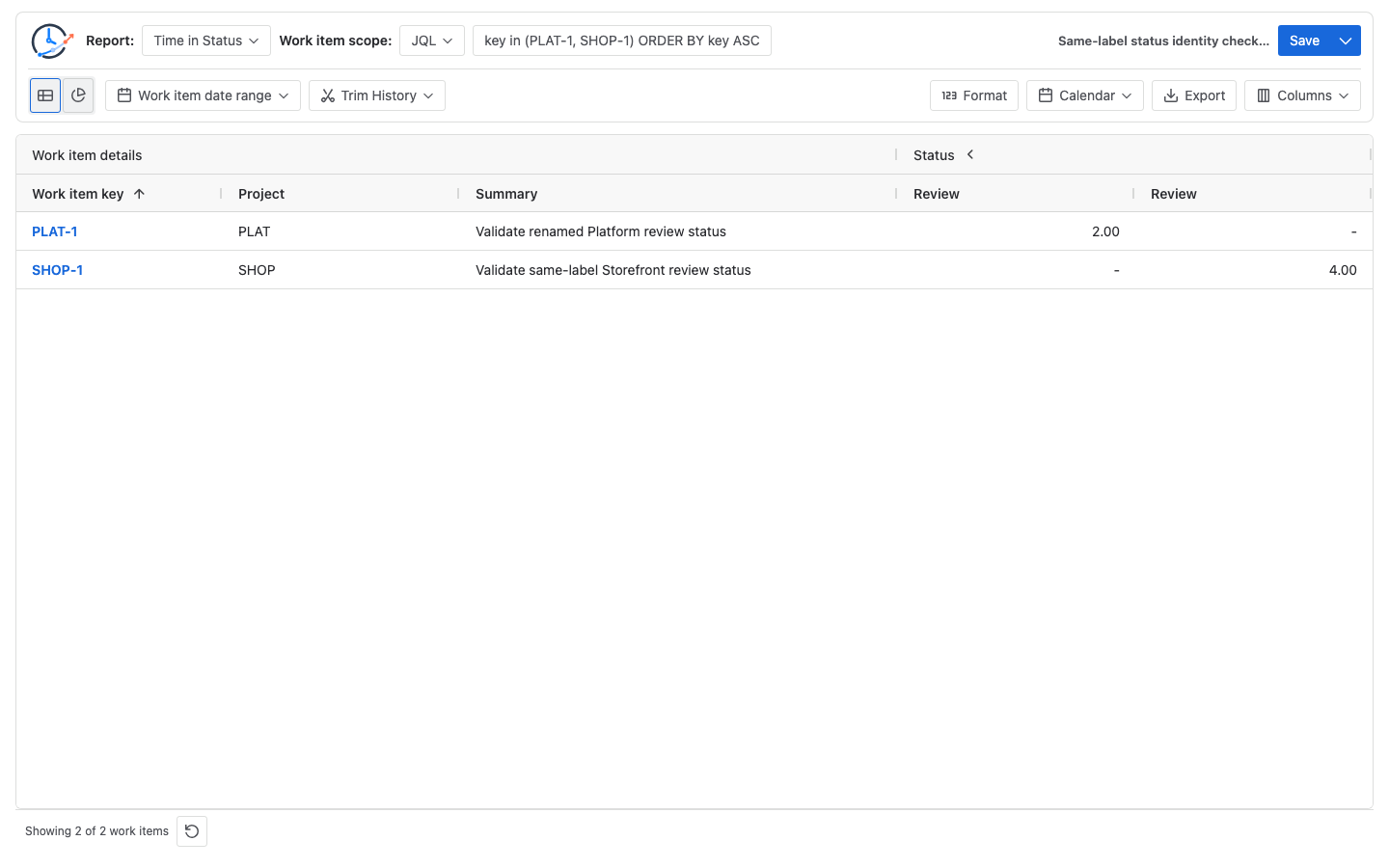
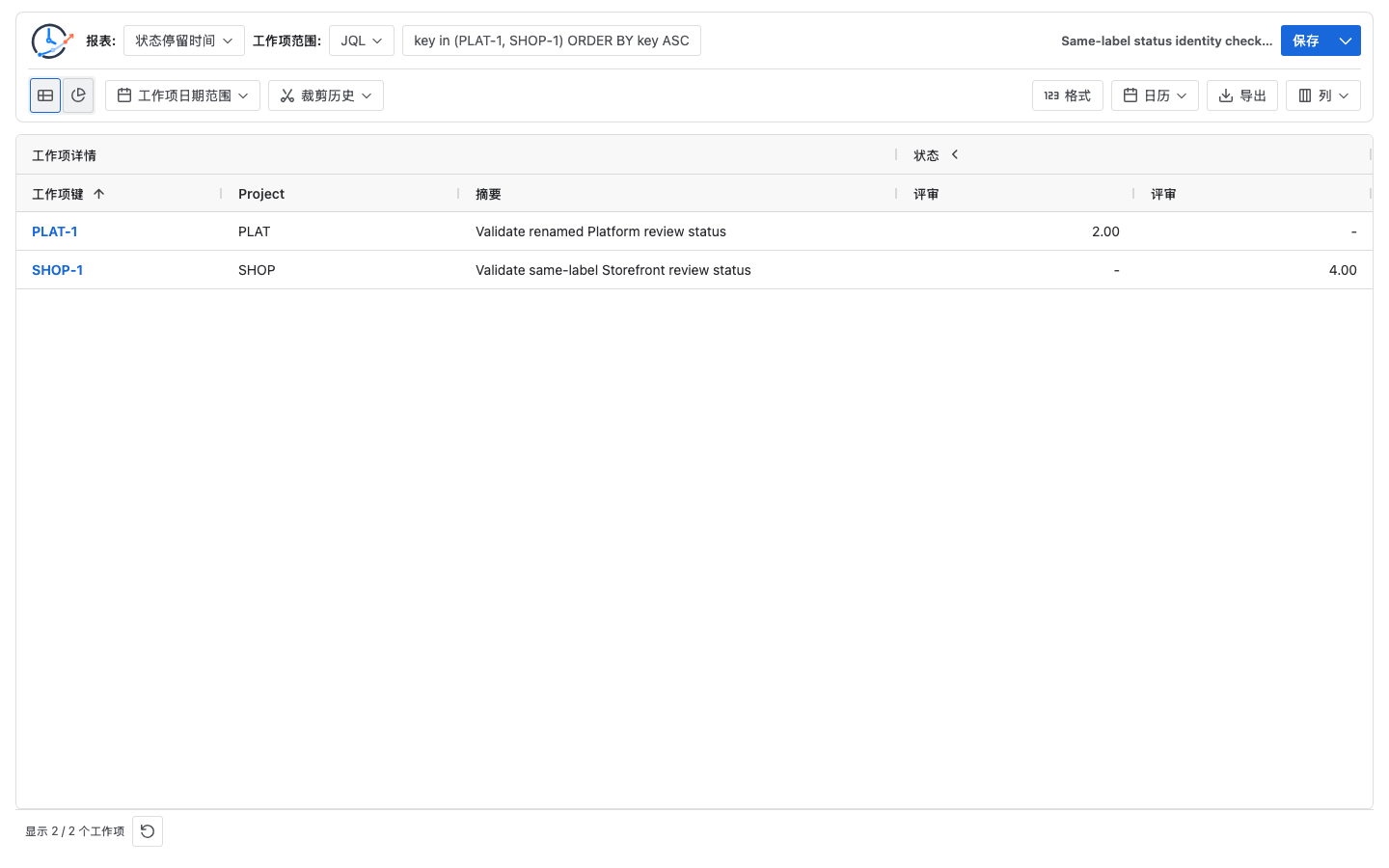
The visible label changes by language, while each calculated duration stays fixed. The screenshots do not prove that StatusPath exposes either underlying ID: it currently does not append IDs to colliding table headers, and CSV/XLSX exports can contain repeated status labels. If the result must stand alone as audit evidence, use distinct Jira status names or keep an externally reviewed ID-to-column mapping with the export.
Manually verify the two-column result
Under All time (UTC), each duration is a direct subtraction:
PLAT-1, status 10012 = 2026-07-22 11:00Z - 2026-07-22 09:00Z
                       = 2 hours

SHOP-1, status 10013 = 2026-07-22 14:00Z - 2026-07-22 10:00Z
                       = 4 hours
The expected metric matrix is:
| Work item | Status 10012 (visible label: Review) | Status 10013 (visible label: Review) | Row total |
|---|---|---|---|
PLAT-1 | 2.00 | - | 2.00 |
SHOP-1 | - | 4.00 | 4.00 |
| Column total | 2.00 | 4.00 | 6.00 |
The dashes mean that a work item has no calculated interval for that distinct status ID. They are not zero-duration visits. The 6.00h manual subtotal is only a cross-check (2.00h + 4.00h); the report does not automatically merge the two ID columns by name. Combine them only through an explicitly reviewed reporting group. See how Time in Status intervals are calculated for the entry, exit, Calendar, and history-window rules.
Reconcile a renamed or localized status step by step
1. Capture the current status catalog by ID
For the controlled example, an English account and a Chinese account can receive different name values for the same IDs:
English /rest/api/3/status → {"id":"10012","name":"Review","untranslatedName":"Review"}
Chinese /rest/api/3/status → {"id":"10012","name":"评审","untranslatedName":"Review"}
Use authenticated responses from your Jira site and keep the workflow or project context beside them. Atlassian notes that REST results reflect the requesting account’s language. Status lookup also depends on Jira permissions and workflow usage; the workflow-status API documents Browse projects requirements and active-workflow restrictions for relevant operations. Do not use a name-only lookup when duplicate names are the problem: Atlassian warns it can resolve the first match, while an ID is exact.
2. Prove the transition evidence
Open Activity → History for each representative work item and record the transition timestamp, status ID where available, displayed label, and viewer locale. First use a JQL scope that does not depend on either status name:
key in (PLAT-1, SHOP-1)
ORDER BY key ASC
Atlassian’s JQL field reference and JQL operator reference currently differ on historical status-ID matching. This check therefore uses key-only JQL for population and REST/changelog IDs for identity. JQL does not calculate the duration.
3. Hold the calculation inputs fixed
Keep the JQL population, Calendar, Format, Work item date range, Trim History boundary, and report time unchanged. Select both status identities. A name-only comparison cannot distinguish a label change from a population or calculation change.
4. Reconcile IDs first, then labels
Match each metric column to its Jira status ID, then render or document the current label. For localized reviews, record the Jira language used for each screenshot or approval. Do not translate an ID-to-status mapping by manually replacing one metric column with another.
5. Preserve a reviewable mapping
Beside the saved report, retain a short register:
| Status ID | English label | Chinese label | Relevant project or workflow |
|---|---|---|---|
10012 | Review | 评审 | Platform |
10013 | Review | 评审 | Storefront |
The StatusPath Table view documentation explains dynamic metric columns, visibility, filters, and the difference between a missing value and a displayed zero. Keep this mapping with the reviewed configuration whenever same-label headers would otherwise be ambiguous. Because the current table and export do not show the IDs, do not treat column order or repeated header text as durable standalone evidence.
Common mistakes
Merging columns by visible header text
Two columns named Review can belong to different status IDs. Combine them only when the reporting question explicitly defines a cross-workflow status group and reviewers approve that mapping.
Assuming the current header or export identifies the status ID
It does not. Same-label statuses can produce repeated headers in the current table and export. Use the Jira status catalog and a reviewed mapping, or make the Jira status names distinct before relying on the exported file independently.
Treating a translation as a new workflow step
A localized label can render the same status identity differently. Check the ID before adding another metric or concluding that Jira recorded another transition.
Using a name-only REST lookup
When names are duplicated, an ID is the exact key. Atlassian warns that a name lookup can return only the first matching status.
Assuming the old label will always be visible
The controlled PLAT-1 changelog segment contains Peer Review, but that does not establish a universal Jira storage or rendering rule. Inspect your site’s actual History or changelog response and preserve the evidence you observed.
Expecting JQL to calculate duration
JQL can fix the candidate population, but it is not the identity proof in this check. Time in Status still requires the verified status ID, entry and exit instants, a history boundary, and a Calendar.
Diagnosing same-name columns as a missing-column problem
If both underlying IDs and values exist, the issue is label ambiguity, not column discovery. If one expected ID has no column at all, follow the separate missing-column checks.
Frequently asked questions
Does renaming a Jira status create a new status ID?
Do not infer identity from the new label. Capture the ID before and after the change: the same ID means the existing status object has a new name, while a different ID means you are comparing distinct statuses.
Are two Review columns necessarily duplicates?
No. In this example, IDs 10012 and 10013 are distinct. Verify IDs, workflows, and representative histories before deciding whether the metrics answer the same business question.
Does StatusPath show the Jira status ID in a same-label column header?
Not in the current version. The calculations can remain separate, but repeated visible labels are ambiguous. Preserve an external mapping or use distinct Jira status names when the output must be self-identifying.
Can localization change the calculated duration?
A translated label alone does not change transition instants. Duration changes should be traced to the population, entry or exit timestamps, Calendar, history boundary, or report time—not attributed to translated text without evidence.
Can JQL distinguish same-name statuses?
Do not rely on JQL alone for this same-name check. Atlassian’s current field and operator references differ on historical ID matching, so use JQL to fix the work-item population and use REST or changelog IDs plus workflow context to reconcile identity. Calculate the duration separately.
What if Jira History does not show the earlier name?
Do not reconstruct it from memory. Record the current ID and label, inspect the available changelog evidence, and use an approved workflow-change record if the historical label is required for audit.
Related Guides
- Why a Jira Status Column Is Missing from a Time in Status Report
- How to Calculate Time in Status in Jira Cloud
- How to Create a Jira Time in Status Report with JQL
- How to Audit Jira Work Item Activity Reports
Keep identity evidence beside the visible label
Use StatusPath Reports to reproduce the two-ID check with your Jira permissions, then retain the status mapping with the reviewed report. Follow the Table view documentation for the visible column setup, and try StatusPath Reports on the Atlassian Marketplace when you are ready to validate renamed or localized statuses against your own Jira History.