
How to Create a Jira Time in Status Report with JQL
Use JQL to select the right Jira work items, then calculate and verify their historical status durations without confusing scope with history boundaries.
To create a Jira Time in Status report with JQL, first use JQL to select the work-item population, validate that query in Jira, and use it as the report source. Then set the history window, calendar, duration format, and status columns separately. JQL finds matching work items; it does not calculate the time each one spent in a status.
JQL selects rows; changelog history supplies durations
Atlassian describes advanced search as a way to use JQL fields, operators, and values to find work items. A query can select a project, work type, resolution state, date range, assignee, label, or status-history condition. The matching rows still need changelog timestamps before a Time in Status duration can be calculated.
Keep these two definitions separate:
| Definition | What it controls |
|---|---|
| JQL source | Which work items are included |
| Work item date range | An additional Created, Updated, or Resolved population filter |
| Trim History | Which part of each selected work item’s history is calculated |
| Calendar and timezone | Which portions of qualifying intervals count, without changing the work-item population |
| Status columns | Which calculated durations are displayed |
Real Jira scenario: resolved release stories
A release manager needs all resolved Stories in project SR between July 1 and July 8, 2026. The bounded query is:
project = SR
AND issuetype = Story
AND resolution IS NOT EMPTY
AND resolved >= "2026-07-01"
AND resolved < "2026-07-09"
ORDER BY created ASC
The exclusive upper boundary makes the period explicit: results on July 8 in Jira’s configured timezone are included, while July 9 in that timezone is not. Atlassian’s JQL fields reference explains how date values are interpreted.
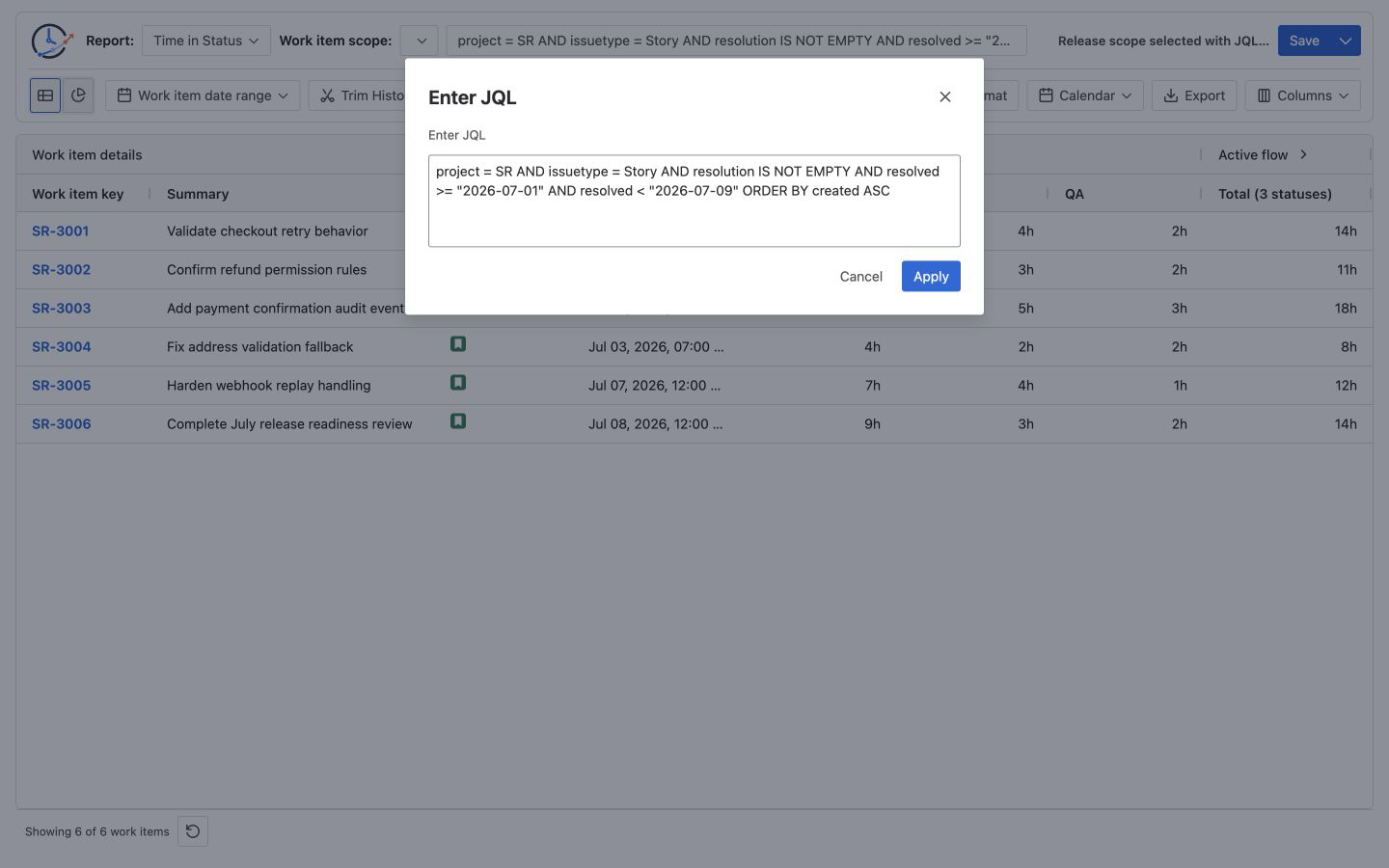
The query returns six resolved Stories. StatusPath then calculates In Progress, In Review, and QA from their histories under the report’s separate settings.
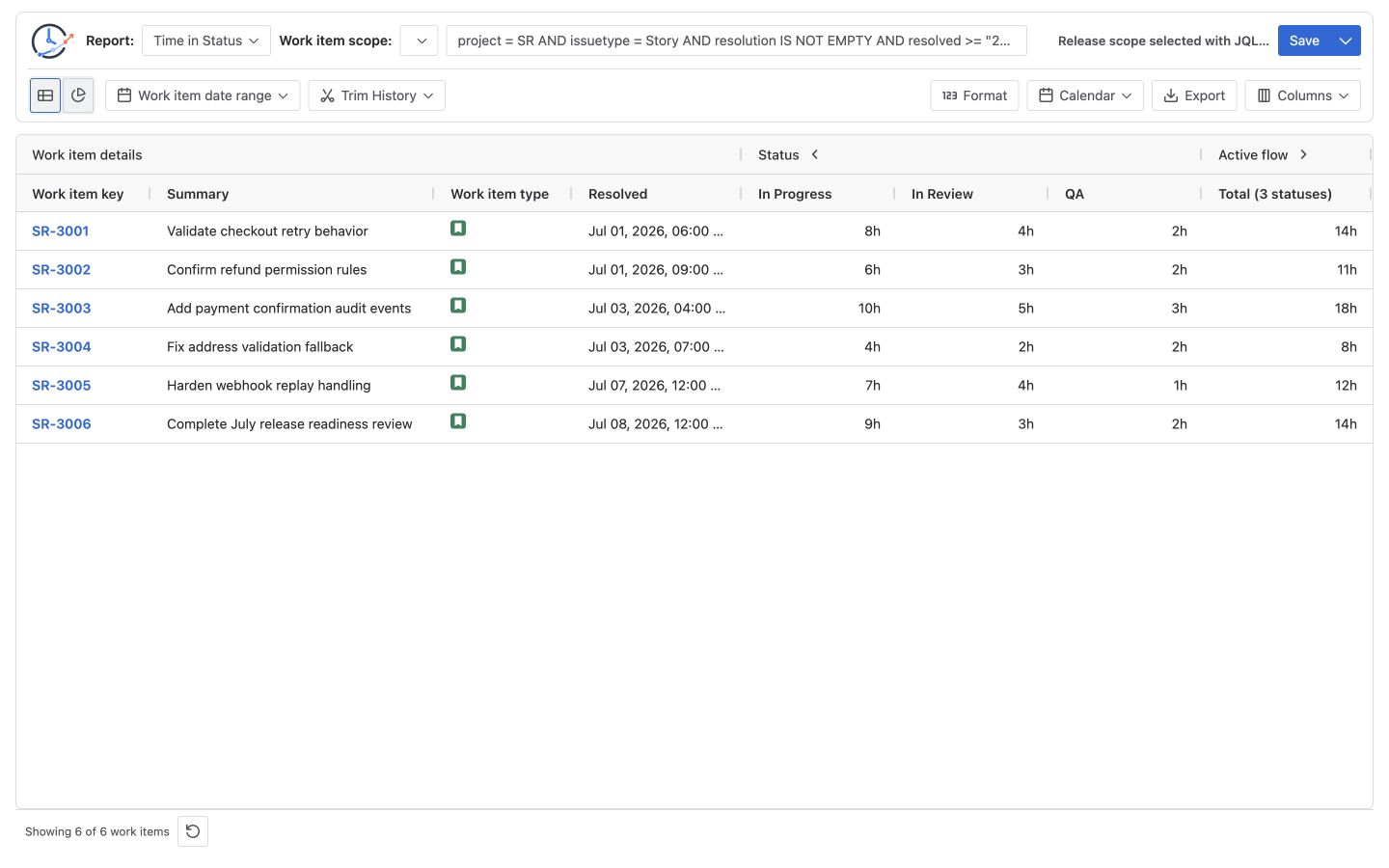
Calculation and boundary example
For SR-3001, the selected status intervals are:
| Status | Duration |
|---|---|
| In Progress | 8h |
| In Review | 4h |
| QA | 2h |
| Selected total | 14h |
8h + 4h + 2h = 14hSR-3001 was created on June 30 and resolved on July 1, so it matches the JQL resolved-date condition. Its earlier June 30 history is still part of the full-history calculation. Adding a resolved clause selects the work item; it does not silently trim the work item’s history to July 1. Use Trim History only when the business question requires clipped intervals. JQL and Work item date range control the population; Trim History controls the calculation window; Calendar and timezone control which time inside that window is counted. None of those roles is interchangeable.
Build the report step by step
1. Write one population sentence
Before writing JQL, state the cohort in plain language: “Resolved Stories in project SR from July 1 through July 8.” This makes the query testable.
2. Validate the JQL in Jira
Run the query in Jira advanced search. Confirm the result count, then spot-check at least one expected and one excluded work item. Atlassian’s JQL optimization recommendations call for bounded queries with at least one search restriction; avoid using ORDER BY as the only clause.
3. Select JQL as the StatusPath source
Open StatusPath Reports, choose JQL, paste the validated query, and apply it. The source button should preserve the exact query rather than only its description. See Report setup and scope for the current source and history controls.
4. Avoid duplicate population filters
If the JQL already selects a resolved period, leave the separate Work item date range empty unless you intentionally want both filters. Two overlapping definitions make omissions harder to diagnose.
5. Decide whether history should be trimmed
Keep full history when the question asks for each selected work item’s total lifetime duration. Set Trim History when the question asks only for time that overlaps a reporting window. Record that choice with the report.
6. Choose calendar, format, and statuses
Select elapsed or working time, timezone, duration format, and the required status columns. These settings affect values, not JQL membership. See How to Calculate Time in Status for the interval model and Table view for calculated columns, filters, and sorting.
7. Verify and save
Reconstruct one row from Jira History, confirm the report count, and save the configuration. Export only after the population and calculation settings have been reviewed.
Copyable JQL patterns
Replace the example values with names and dates that exist in your Jira site. Atlassian is introducing work-item and space terminology, but its JQL migration guidance says existing project and issuetype queries continue to work while newer terms may not yet be available on every site.
One project and work type
project = PAY AND issuetype = Bug ORDER BY created ASCCompleted release population
project = PAY
AND issuetype IN (Story, Bug)
AND resolution IS NOT EMPTY
AND resolved >= "2026-07-01"
AND resolved < "2026-08-01"
ORDER BY created ASC
Atlassian’s JQL fields reference notes that the Resolution field is not available in service team-managed spaces. When it is unavailable, use a status or status-category rule that matches that space’s workflow and validate the returned population.
Work items currently in review
project = PAY AND status = "In Review" ORDER BY updated DESCThis selects the current state. It does not include every work item that previously visited In Review.
Work items that entered review during a period
project = PAY
AND status CHANGED TO "In Review"
  DURING ("2026/07/01", "2026/08/01")
ORDER BY key ASC
The CHANGED operator can select work items by status history and date predicates. The result identifies matching work items; the report still calculates duration from their changelogs.
Common mistakes
Expecting JQL to calculate duration
JQL can find work items with a current or historical status condition. Standard JQL does not turn the interval between status changes into a Time in Status column.
Treating a resolved window as a history window
resolved >= ... filters work items by their resolved timestamp. It does not discard earlier status history.
Filtering the same population twice
A resolved window in both JQL and Work item date range can be redundant or accidentally inconsistent. Keep one authoritative definition when possible.
Using relative dates for review evidence
Queries such as resolved >= -30d change every day. Use fixed dates when another reviewer must reproduce a historical report.
Omitting parentheses around mixed AND and OR rules
Atlassian’s JQL operators reference documents that parentheses control precedence in complex queries. Add them whenever the intended grouping is not obvious.
Assuming a saved report is a frozen snapshot
A Saved Report reruns its JQL against currently accessible Jira data. Export a reviewed file when a point-in-time artifact is required.
Frequently asked questions
Can JQL calculate Time in Status in Jira?
Not by itself. JQL selects matching work items; Time in Status requires the timestamps in their status-change histories.
Should I put the date range in JQL or in the report?
Use JQL when the date is part of population membership, such as work items resolved in July. Use Trim History when only the overlapping July portion of each selected history should count.
Can I use status CHANGED as the source?
Yes. It can select work items that experienced a specific status change. It does not calculate how long they stayed there or how many times the change occurred.
Why does the same JQL return a different count later?
Jira data, permissions, and relative dates can change. If the JQL references a saved filter, changes to that filter can also change the population. Record the exact query and generation time, and use fixed dates for reproducible reviews.
Is JQL better than a saved filter?
Use JQL for a self-contained population definition. Use a saved filter when the team already maintains and governs that population. Both require ownership and change control.
Related Guides
- How to List Jira Work Items That Left To Do Last Month
- How to Calculate Time in Status in Jira Cloud
- Jira Workflow Reporting Guide
- How Jira Report Date Ranges Clip Status History
- How to Find the Date a Jira Work Item Entered a Status
Keep population logic and duration logic visible
A reproducible report preserves both the exact JQL population and the independent history, calendar, and status settings used for calculation. Try StatusPath Reports on the Atlassian Marketplace to run Time in Status from a validated JQL source, check representative histories, and save or export the reviewed result.