
How to List Jira Work Items That Left “To Do” Last Month with JQL
Use four JQL queries to find Jira work items updated beyond To Do or changed status last month, then analyze durations, calculated entry boundaries, counts, and transitions in StatusPath.
Need a monthly Kanban list rather than another cumulative chart? Start with Jira’s own JQL. If the list and current Status column answer the question, no reporting app is required. Use StatusPath only when the next question concerns status duration, an earliest calculated status-entry boundary, repeated status segments, directional transition counts, or a reviewed CSV/XLSX export.
Disclosure: StatusPath Reports is developed by BlueGrove Labs, the publisher of this guide.
This guide starts from a real Jira Cloud task. In an Atlassian Community question about monthly Kanban reporting, an administrator asked for work items currently beyond To Do that were updated during a monthly period, with their statuses. The accepted discussion also introduced WAS ... DURING and CHANGED ... DURING; the requester confirmed that the answers helped. The first query below matches that current-category-and-update-date population. The other three answer the narrower history question of which work items actually changed status during the month. Atlassian’s JQL operator reference documents DURING, FROM, and TO as predicates for CHANGED; its JQL function reference documents relative startOfMonth and endOfMonth functions.
Four JQL queries you can copy
Replace the status names with the exact names used by your Jira workflow. Optionally prepend project = YOURKEY AND to keep the result inside one project.
Work items currently past To Do that were updated last month
statusCategory != "To Do"
AND updated >= startOfMonth("-1")
AND updated <= endOfMonth("-1")
ORDER BY updated DESC
This mirrors the original Community request. statusCategory is evaluated now, while updated selects the previous calendar month. It is not a month-end status snapshot, and an item currently back in To Do will not match.
Any status change last month
status CHANGED DURING (startOfMonth("-1"), endOfMonth("-1"))
ORDER BY updated DESC
Use this when any workflow movement during the previous calendar month makes a work item relevant.
Work items that left To Do last month
status CHANGED FROM "To Do"
DURING (startOfMonth("-1"), endOfMonth("-1"))
ORDER BY key ASC
This includes every work item with a recorded transition out of To Do during the month, even when it later returned to To Do.
Work items that moved from To Do to In Progress last month
status CHANGED FROM "To Do" TO "In Progress"
DURING (startOfMonth("-1"), endOfMonth("-1"))
ORDER BY key ASC
Use an exact FROM → TO pair when that transition, rather than any movement out of To Do, defines the review.
When native Jira is enough
Run the query in Jira advanced work-item search. Add Key, Summary, Status, Assignee, and the business fields needed for the monthly review. Confirm the count, spot-check an expected work item, and save a Jira filter if the team will reuse the same population rule.
The Status column shows the work item’s current status now. It does not reconstruct the status at the end of last month. If membership and current status are all the review needs, stop here.
This fictional five-item check shows why the event and the current value must remain separate:
| Work item | Recorded event last month | Current Status now | What the row proves |
|---|---|---|---|
KAN-101 | To Do → In Progress | Done | The item left To Do last month. |
KAN-102 | To Do → In Progress | In Review | The current status can be later than the matching event. |
KAN-103 | To Do → Blocked | To Do | Returning to To Do does not erase the earlier exit event. |
KAN-104 | To Do → In Progress | In Progress | Current status happens to match the event destination. |
KAN-105 | To Do → Cancelled | Cancelled | “Left To Do” is broader than “started delivery.” |
These are synthetic keys, not a customer case or a claim about a real Jira site.
What StatusPath adds after the list
Use the validated query as a JQL data source in StatusPath Reports. JQL still controls which work items enter the report; it does not calculate workflow time. Keep the returned population reviewable and add Jira’s current Status field when the current value matters.
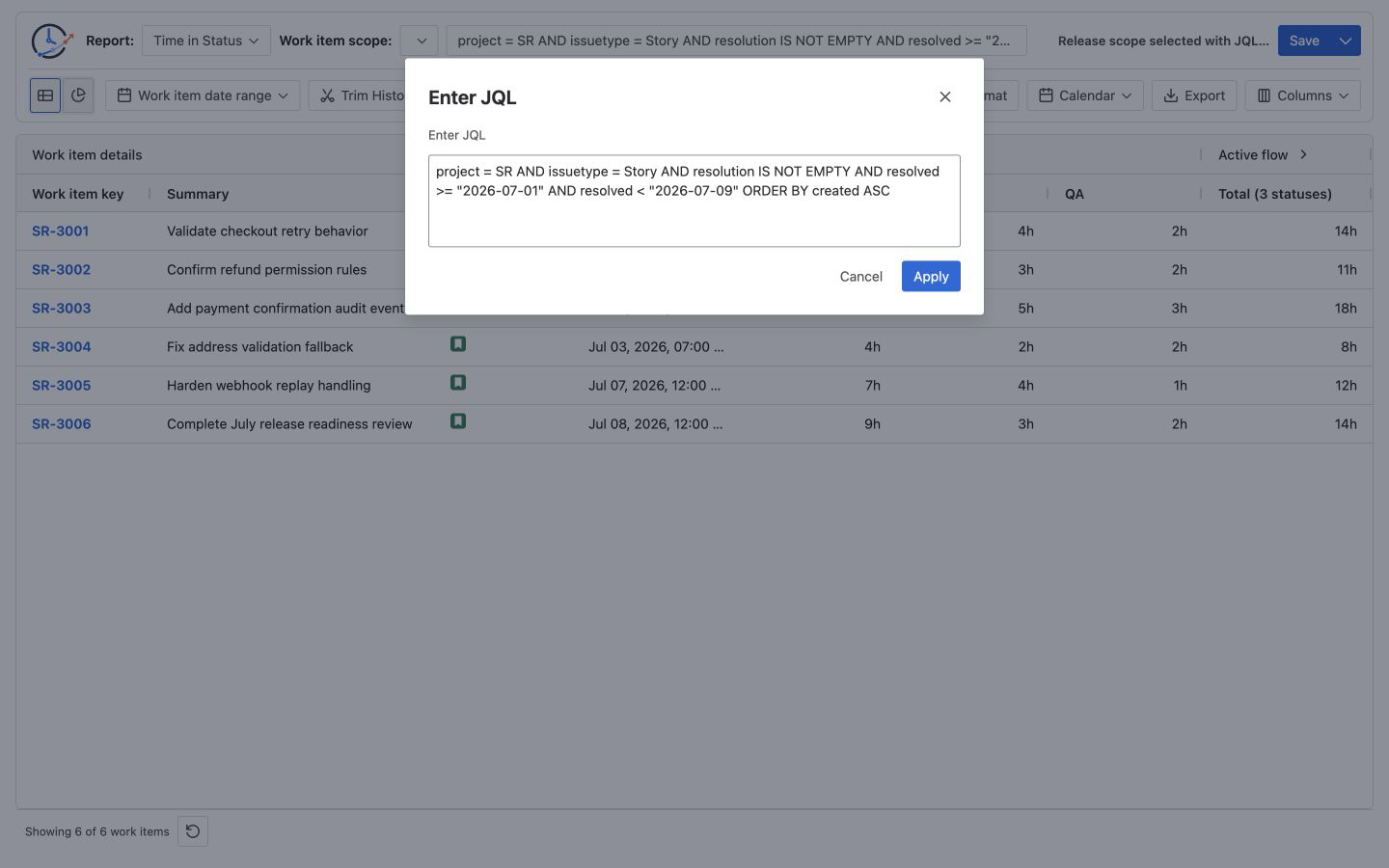
Choose the report that matches the next question:
- Time in Status — the total calculated time in each status across matching segments for the selected work items.
- Status Entry Date — the earliest calculated segment start for each status in the current history window. With full history this is the earliest calculated entry; with Trim History, a segment already open at the window start can display the Trim From boundary. It is not a latest-entry or every-entry report.
- Status Count — the calculated count of status segments or entries. A segment carried into the Trim History window can count once at the boundary, so a trimmed Status Count is not automatically the number of transition events that occurred during the month.
- Transition Count — the count of matching directional from-status → to-status changes recorded inside the calculation window.
See Report types for the current metric definitions and How to Find the Date a Jira Work Item Entered a Status for the Status Entry Date boundary.
Align the population and history window
If a metric should cover only the previous month, set Trim History to that month’s fixed first and last dates. Date To includes the complete selected date in the retained Work Calendar timezone and remains capped by report generation time. Record the Jira searching user’s timezone separately from the retained StatusPath Work Calendar timezone; the StatusPath Calendar does not change Jira JQL evaluation.
The Calendar control is hidden for count and entry-date reports because they are not duration reports, but the retained selected Work Calendar timezone still defines Trim History dates. Confirm and record that Calendar while using a duration report before relying on the same monthly trim dates in the count or date view. How Jira Report Date Ranges Clip Status History explains the population/window distinction and inclusive Date To behavior.
After checking representative rows, save the reusable configuration and export the reviewed table if a point-in-time artifact is required. Saved Reports store configuration and rerun current Jira data; they do not freeze last month’s rows. Exporting Jira Time in Status to Excel produces a single reviewed CSV or XLSX file, not an automatically updating snapshot.
Important boundaries before you report
- JQL selects the work-item population; it does not calculate time between status changes.
status CHANGED TO "In Review" DURING (...)misses an item that entered In Review before the month and remained there during the month. For overlap-duration questions, use a broader population and Trim History.- Relative month functions move when the query is rerun. Record the generation time and use fixed dates when another reviewer must reproduce a past result.
- Current Status is not a month-end snapshot.
- StatusPath Saved Reports are not immutable snapshots or scheduled monthly delivery.
- StatusPath is not a complete all-field audit log and does not promise a per-event actor report.
Need more than the list?
If Jira’s native query already answers the question, keep using it. If you need to measure the selected work items’ status time, calculated entry boundary, repeated status segments, or matching directional transition counts—and export the reviewed result—view BlueGrove Labs’ StatusPath Reports on Atlassian Marketplace to evaluate whether it fits this review.