
Report Scope
Report scope defines the Jira work items included before StatusPath Reports calculates duration, count, date, or transition metrics. StatusPath Reports builds or accepts a JQL source, applies the selected Work item range, and then requests matching work items from Jira.
Scope is the first place to check when a report has too many issues, too few issues, or unexpected results.
When to use this
Use this page when you need to choose the right data source for a report or explain why a specific Jira issue is included or excluded.
Before you begin
- Decide whether the report should follow a project, saved filter, sprint, epic, or custom JQL query.
- Confirm that the selected issues are visible to the current Jira user.
- Keep the first report scope narrow enough to validate.
Steps
- Open StatusPath Reports.
- Select the report type.
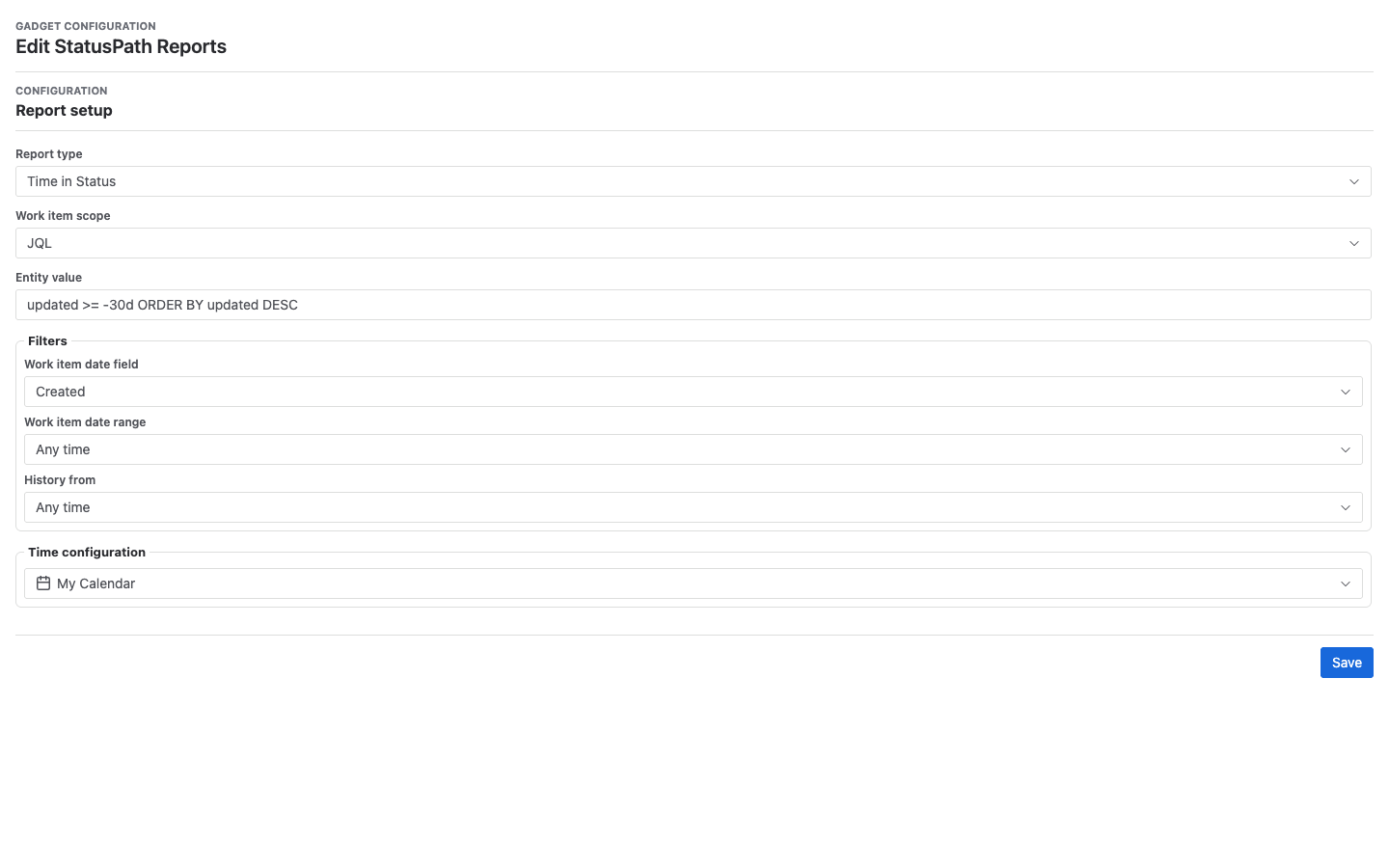
- Open the scope selector.
- Choose one of the supported scope types.
- Enter the required project, filter, JQL, sprint, or epic value.
- Set the Work item range if the report should only include issues created, updated, or resolved during a period.
- Run the report and review the included issues.
Scope types
Project
Use Project when you want a broad view of work items inside a Jira project. This is a good default for admins and team leads who are starting a first report.
The report source is converted to a Jira project JQL clause. Work item range can add created, updated, or resolved date clauses.
Filter
Use Filter when your team already maintains a saved Jira filter. Filters are useful for recurring team views, queues, or cross-project slices.
The report source is converted to a Jira filter = ... JQL clause. The app can only use filters and work items Jira allows it to read.
JQL
Use JQL when you need precise control over included issues.
project = "PAY" AND status changed DURING ("2026-01-01", "2026-01-31")The app validates JQL through Jira’s strict parse API where available. If a query contains ORDER BY, StatusPath Reports removes it and applies the report sort state so table and saved-report sorting remain consistent.
Sprint
Use Sprint when you want to analyze work associated with a specific sprint. Sprint scope is helpful for retrospectives and delivery reviews.
Sprint scope is converted to a Jira sprint = ... JQL clause. Board selection is required so the app can present sprint options.
Epic
Use Epic when you want to analyze work grouped under a larger initiative or feature area.
The current implementation builds the source around parent matching with a Jira parent = ... clause. Verify results against Jira issue search when a hierarchy looks unexpected.
Result
The report includes work items from the selected scope and excludes work items outside that scope or outside the current user’s Jira permissions.
Notes
- Project scope is simple but can be broad.
- JQL scope is precise but depends on valid Jira query syntax.
- Sprint and epic scopes depend on Jira data quality and board configuration.
Troubleshooting
If the scope returns no issues, verify the same Project, Filter, Sprint, Epic, or JQL in Jira first. Then check the report date range and the current user’s Jira permissions.