
How to Find Jira Work Items with the Longest Time in Status
Within a fixed current-status scope, filter and sort accumulated Jira Time in Status to build a review queue without calling it current status age.
To find Jira work items with the longest accumulated Time in Status, first fix the current-status population, then choose one Calendar and Format, apply a strict duration threshold to the target status column, sort descending, export the review queue, and inspect representative work items. A Time in Status cell includes every visit inside the history boundary, so the result is not automatically the age of the current open visit.
Scope the accumulated-duration review
This guide answers one operational question: within a defined set of work items that are currently in Waiting for Review, which rows have the highest accumulated Waiting for Review duration and should be checked first? The workflow bottleneck guide owns the different question of whether delay is broad and persistent enough to indicate a system-level constraint. The current-status duration guide owns the age of one open status interval.
Atlassian’s JQL fields reference documents that status supports equality and historical operators such as WAS and CHANGED, while numeric comparison operators such as > and >= are unsupported for the Status field. JQL can therefore select status = "Waiting for Review"; it cannot express “Waiting for Review duration is greater than 16 business hours” as a native Status comparison. StatusPath supplies that duration calculation and filter.
Reproducible Jira scenario: 20 items currently waiting for review
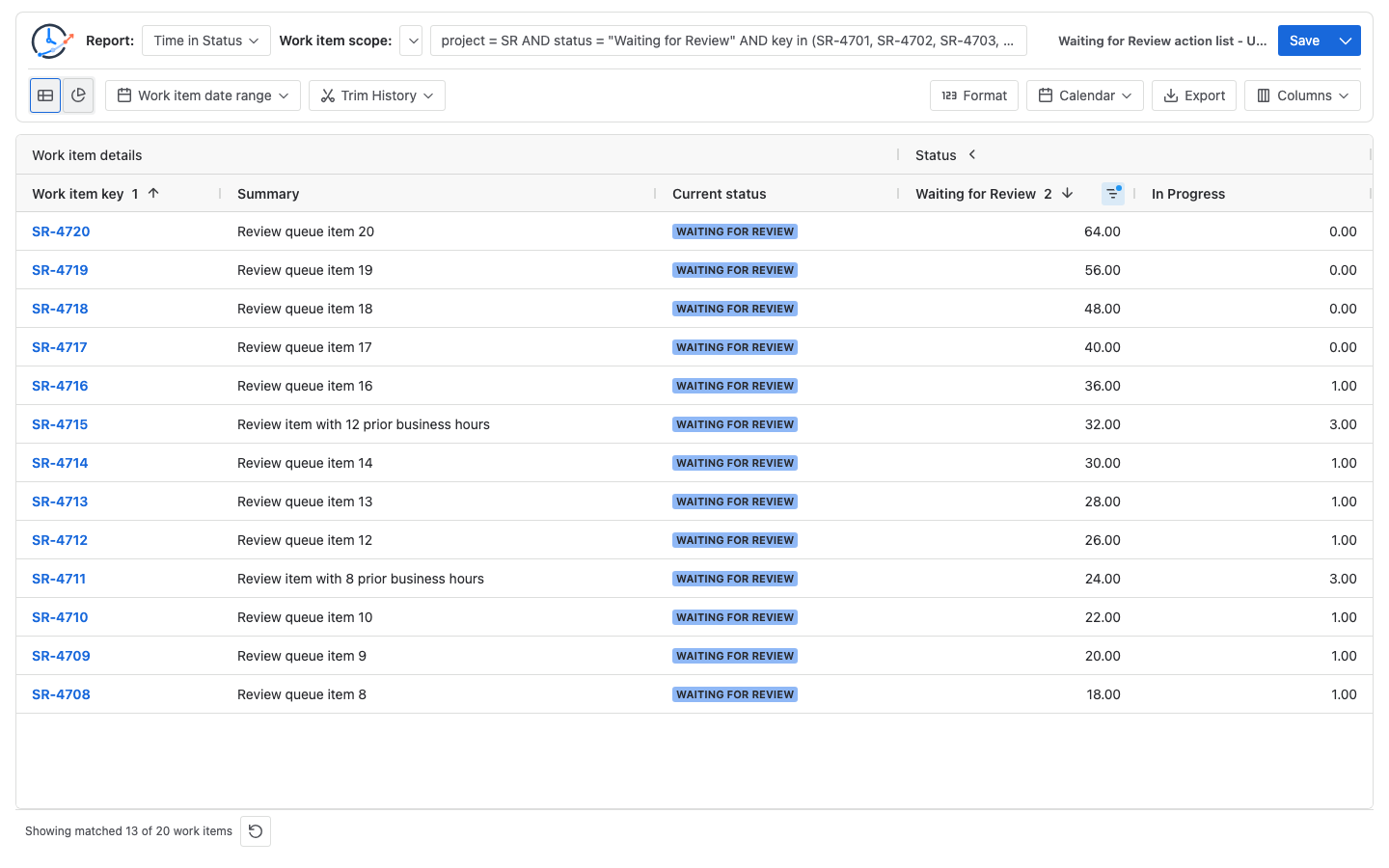
The report contains SR-4701 through SR-4720. All 20 are currently in Waiting for Review. The article screenshot uses controlled Jira test data and this fixed report definition:
| Setting | Value |
|---|---|
| Report | Time in Status |
| Work item scope | JQL limited to SR-4701–SR-4720 and current status Waiting for Review |
| Work item date range | Empty |
| Trim History | Off; include every status visit in the scenario |
| Calculation snapshot | 2026-07-31 17:00 UTC |
| Calendar | Weekdays 09:00–17:00, timezone UTC, no exceptions |
| Format | Decimal Hours |
| Visible work item fields | Key, Summary, and Current status |
| Duration columns | Waiting for Review (filter and sort) plus In Progress (auxiliary history context) |
| Duration filter | Greater than 16 Decimal Hours |
| Sort | Waiting for Review, descending |
The 16-hour threshold equals two eight-hour scheduled workdays only under this example Calendar. It does not mean two calendar days. It is a review threshold selected for this scenario, not a default, benchmark, or universal SLA.
Use this bounded JQL for the population:
project = SR
AND status = "Waiting for Review"
AND key in (SR-4701, SR-4702, SR-4703, SR-4704, SR-4705,
            SR-4706, SR-4707, SR-4708, SR-4709, SR-4710,
            SR-4711, SR-4712, SR-4713, SR-4714, SR-4715,
            SR-4716, SR-4717, SR-4718, SR-4719, SR-4720)
ORDER BY key ASC
The JQL fixes the current-status population. The app then calculates Waiting for Review from Jira history using the selected history window and Calendar.
Expected rows and the strict >16h result
The following table is already ordered from longest accumulated duration to shortest. For a one-entry item, accumulated duration and the current open interval are equal. SR-4711 and SR-4715 entered Waiting for Review twice, so the two measures differ.
| Work item | Included Waiting for Review visits | Current open interval | Accumulated duration | In accumulated >16h list? |
|---|---|---|---|---|
SR-4720 | 64h | 64h | 64h | Yes |
SR-4719 | 56h | 56h | 56h | Yes |
SR-4718 | 48h | 48h | 48h | Yes |
SR-4717 | 40h | 40h | 40h | Yes |
SR-4716 | 36h | 36h | 36h | Yes |
SR-4715 | 12h + 20h | 20h | 32h | Yes |
SR-4714 | 30h | 30h | 30h | Yes |
SR-4713 | 28h | 28h | 28h | Yes |
SR-4712 | 26h | 26h | 26h | Yes |
SR-4711 | 8h + 16h | 16h | 24h | Yes |
SR-4710 | 22h | 22h | 22h | Yes |
SR-4709 | 20h | 20h | 20h | Yes |
SR-4708 | 18h | 18h | 18h | Yes |
SR-4707 | 16h | 16h | 16h | No |
SR-4706 | 14h | 14h | 14h | No |
SR-4705 | 12h | 12h | 12h | No |
SR-4704 | 10h | 10h | 10h | No |
SR-4703 | 8h | 8h | 8h | No |
SR-4702 | 6h | 6h | 6h | No |
SR-4701 | 4h | 4h | 4h | No |
Manually verify the action list
The 20 accumulated values are:
4 + 6 + 8 + 10 + 12 + 14 + 16 + 18 + 20 + 22
+ 24 + 26 + 28 + 30 + 32 + 36 + 40 + 48 + 56 + 64
= 514 business hours
A strict greater-than filter excludes the 16-hour row and keeps the 13 values from 18 through 64 hours:
Filtered row count = 13

Filtered duration  = 18 + 20 + 22 + 24 + 26 + 28 + 30
                   + 32 + 36 + 40 + 48 + 56 + 64
                   = 444 business hours

Excluded duration  = 4 + 6 + 8 + 10 + 12 + 14 + 16
                   = 70 business hours

Check              = 514h - 70h = 444h
Filtered share     = 444h ÷ 514h = 86.38%
The 86.38% figure describes only this controlled 20-item dataset. It is not a benchmark or a performance claim. More importantly, the filter produces a queue of named work items to inspect; it does not show that the whole Waiting for Review stage is a bottleneck.
Build the review list in StatusPath Reports
1. Select items that are currently in the status
Run the bounded JQL above, or use a maintained Jira saved filter with the same current-status rule. Confirm that the result contains exactly 20 rows and that the Current status field shows Waiting for Review for every row.
Use status = "Waiting for Review", not status WAS "Waiting for Review". Atlassian’s JQL operator reference explains that WAS matches current or previous values, while CHANGED finds work items whose field changed and supports predicates such as FROM, TO, AFTER, and BEFORE. Those history predicates would admit items that already left the status unless another current-status condition excluded them.
2. Fix the calculation controls
Choose Time in Status, leave Trim History off for this full-history scenario, select the Weekdays 09:00–17:00 UTC Calendar, and use Decimal Hours. The report setup documentation distinguishes population filters from the history window. Calendars and duration explains why changing working days, hours, timezone, or exceptions can change the values without changing Jira history.
3. Keep the identity and evidence columns visible
In Columns, keep Key, Summary, and Current status. Show Waiting for Review as the filter and sort column, and retain In Progress as auxiliary history context so earlier workflow visits remain visible. Add Assignee, Priority, or another released Jira field only when it helps assign the review; do not infer the cause from a field value alone.
4. Apply the duration filter and sort
Open the Waiting for Review column filter, choose Greater than, and enter 16 using the Decimal Hours input shown by the filter. Then sort the same column descending. The Table view documentation lists the supported duration comparisons and explains that duration sorting uses the calculated values.
Verify three boundary rows before sharing the list:
SR-4708is the shortest included row at 18h.SR-4707is excluded because 16h is not greater than 16h.SR-4720is first after descending sort at 64h.
5. Review repeated entries before calling the value current age
Switch to Status Count with the same scope and history window, or inspect Issue Activity, to identify rows that entered Waiting for Review more than once. In this scenario, SR-4711 and SR-4715 each have two entries. The repeated-status calculation guide shows why entry count and accumulated duration must remain separate.
6. Export the reviewed queue
Export CSV or XLSX only after checking the filter, sort, visible fields, Calendar, and Format. The export documentation explains that supported table filters and sorting are applied to the complete report result, not only the browser viewport. Date the export because open intervals and Jira data can change after it is generated.
Current open interval versus accumulated status duration
Being currently in Waiting for Review does not make the displayed Time in Status cell a current-entry timer. The cell sums every included visit to Waiting for Review under the selected Calendar and history window.
| Work item | Accumulated filter result | Strict current-open >16h result | Why |
|---|---|---|---|
SR-4711 | Included at 24h | Excluded at 16h | Earlier 8h visit plus current 16h visit |
SR-4715 | Included at 32h | Included at 20h | Earlier 12h visit plus current 20h visit |
If the action question is “Which current items have accumulated more than 16 business hours in this status across all visits?”, the 13-row Time in Status list is correct. If the question is “Which current open visits alone are older than 16 business hours?”, validate the most recent entry timestamp in Jira History and calculate only that open interval under the same Calendar. Issue Activity can reconcile the calculated duration and entry count, but it does not display a raw event timeline. Under that second definition, this scenario has 12 rows: SR-4711 is excluded because its current visit is exactly 16h.
Do not silently replace one definition with the other. Record “accumulated status duration” or “current open interval” in the list heading and preserve the report run time. The current-status duration guide explains why an open interval can increase between runs.
Common mistakes
Calling the example threshold a universal SLA
The >16h rule is a scenario choice under one eight-hour weekday Calendar. A team SLA must come from the team’s own policy, risk, service commitments, and Calendar.
Treating accumulated duration as the current visit’s age
Repeated entries make those numbers different. Check Status Count and the last Jira History entry before using “currently waiting for” language.
Using historical JQL without a current-status condition
status WAS "Waiting for Review" can include items that have already left the status. Use status = "Waiting for Review" for this current action list.
Expecting JQL to compare status duration
Jira’s Status field does not support numeric > or >= comparisons. Use JQL to select the population and the StatusPath duration filter to apply the calculated threshold.
Changing the Calendar or Trim History between reviews
Different schedules or history boundaries can change which rows cross 16 hours. Store the configuration with the review list.
Calling a long-tail list a workflow bottleneck
Several long rows identify work to inspect. A bottleneck conclusion requires distribution, sample size, comparable periods, and corroborating workflow evidence.
Frequently asked questions
Can JQL find work items currently in a Jira status?
Yes. A condition such as status = "Waiting for Review" selects work items whose current Status matches. JQL can also query Status history with WAS and CHANGED, but the Status field does not support a numeric comparison for hours spent there.
Is more than 16 business hours the same as more than two business days?
It is in this example because the selected Calendar contains eight scheduled hours on each weekday and no exceptions. With a different schedule, timezone, holiday, or exception, the conversion can differ. A strict >16h filter also excludes exactly 16h.
Why can a currently waiting item show more time than its current visit?
Time in Status adds all included visits to the same status. If the item left and later returned, the displayed total includes the earlier completed visit plus the current open visit.
Can I export the filtered action list?
Yes. StatusPath table export applies supported filters, sorting, visible columns, Calendar, and Format to the complete result. The file is a point-in-time artifact; record its generation time and configuration.
Related Guides
- How to Calculate Time in Status in Jira Cloud
- How Repeated Jira Status Entries Affect Time in Status
- Why Current Jira Status Time Keeps Growing
- How to Find Jira Workflow Bottlenecks
Turn accumulated duration into a reviewable queue
A useful action list names the current population, accumulated-or-current boundary, threshold, Calendar, history window, and report time. It prioritizes inspection without claiming a cause. Try StatusPath Reports on the Atlassian Marketplace to filter and sort Time in Status, validate repeated entries, and export the reviewed queue.