
Jira Business Calendars for Workflow Reporting: Complete Guide
Design, validate, govern, and reuse Jira workflow-reporting calendars across working hours, timezones, holidays, and exception days.
A Jira workflow-reporting calendar defines which portions of a status or assignee interval count as business time. A reliable calendar records its timezone, weekly working intervals, holidays, working-day overrides, owner, dependent Saved Reports, and validation evidence. Treat that definition as part of the metric: changing the calendar can change reported duration even when Jira history and the work-item population stay identical. For the exact task of entering weekly hours and a holiday in StatusPath, use How to Configure Jira Business Hours and Holidays for Status Reports; this pillar focuses on ownership, reuse, approval, and change control.
A business calendar is a metric contract
“Three business hours in Review” is not reproducible unless the reader can answer:
| Decision | What must be recorded |
|---|---|
| Purpose | The workflow question the calendar supports |
| Timezone | The timezone that owns working-day and exception boundaries |
| Weekly schedule | Working weekdays and every daily interval |
| Exceptions | Non-working holidays and special working days |
| Calculation scope | Which duration reports and history window use the calendar |
| Ownership | Who approves and maintains changes |
| Baseline | One ordinary interval that proves the weekly schedule |
| Boundary validation | One known interval for each important exception rule |
| Reuse | Which Saved Reports depend on the calendar |
| Version | Effective date, reviewer, and the definition used for comparisons |
StatusPath Reports applies the selected Calendar to business-time calculations in Time in Status, Average Time in Status, and Time in Assignee. The Calendars and Duration documentation owns the current control details; this Guide owns the design, validation, and governance decisions around those controls.
Jira calendar concepts are not interchangeable
Atlassian’s Configure working days page describes a company-managed Jira Software board setting used by specified reports and gadgets, including the Sprint Report and Control Chart. It can define standard working days, non-working dates, and the board timezone.
Jira also has user and site timezone settings. Atlassian documents that a Jira administrator can set a default user timezone, while an authenticated user can override it in personal Jira settings. Those display settings do not silently choose a StatusPath working calendar.
Jira Service Management SLA calendars define working days, time slots, timezone, and holidays for SLA goals in a service space. They are not a global Jira calendar and are not the same object as a StatusPath calendar. When two metrics need to agree, document and compare both definitions rather than assuming inheritance.
Reproducible Jira scenario: govern a Shanghai support calendar
This example uses demonstration work items in a reproducible Jira report scenario.
The team approves a calendar named Shanghai Support 09:00-17:00:
| Rule | Approved value |
|---|---|
| Timezone | Asia/Shanghai |
| Standard working days | Monday-Friday |
| Standard interval | 09:00-17:00 |
| Working-day override | Saturday, 2026-07-11, 09:00-12:00 |
| Acceptance format | Decimal Hours |
| Owner | Support operations |
| Reuse register | A manually maintained list of dependent Saved Reports and report exports used in recurring operating reviews |
The Saturday override is a one-off working morning; it does not turn every Saturday into a working day. Other holidays remain part of the governed exception register, but their button-level setup belongs in the dedicated configuration Guide.
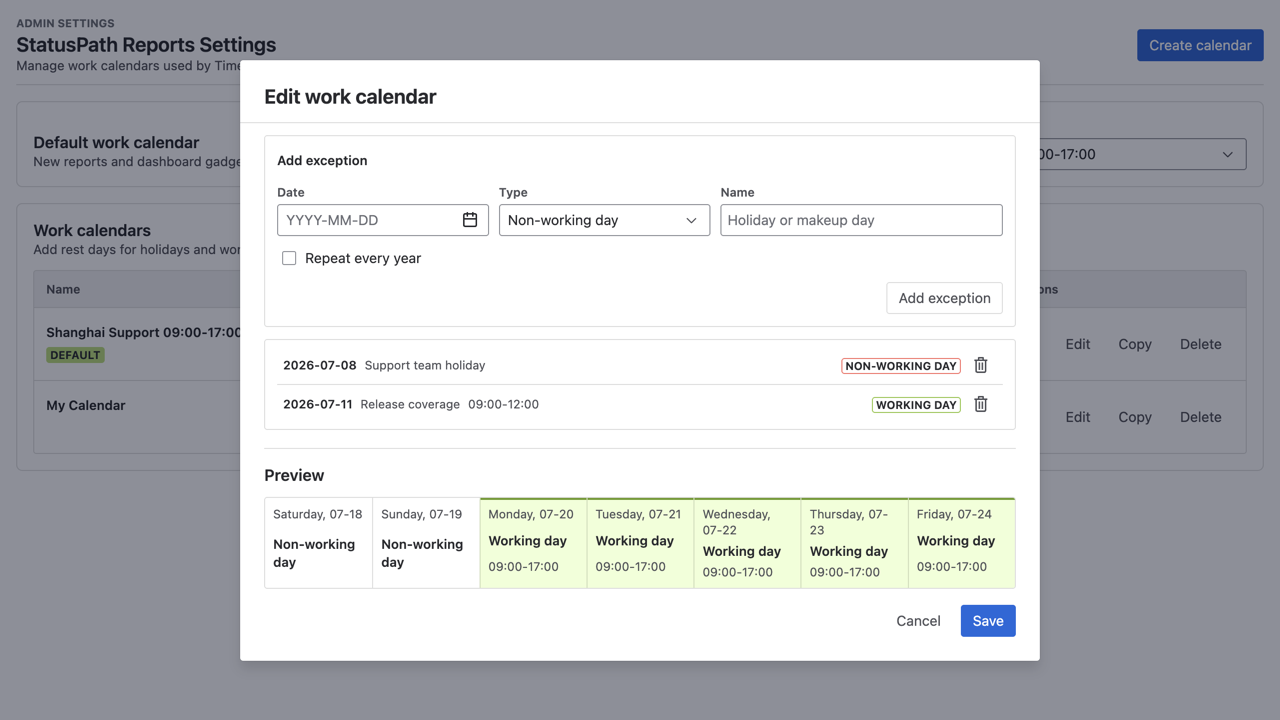
Acceptance evidence must prove the policy
A governance approval needs a normal baseline and a focused boundary test for every material change. These two cases prove the ordinary eight-hour day and the special Saturday operating window without repeating the holiday-configuration walkthrough.
Baseline: a standard workday equals eight hours
Work item SR-3401 enters In Review on Monday, July 6 at 09:00 and leaves at 17:00, all in Asia/Shanghai.
| Segment | Counted time |
|---|---|
| Monday 09:00-17:00 | 8 hours |
| Business-time total | 8 hours |
Elapsed time and business time are both eight hours. This baseline proves the standard weekday interval before an exception is evaluated; it does not prove any holiday or special-working-day rule.
Change acceptance: the Saturday override equals three hours
Work item SR-3403 enters In Review on Friday, July 10 at 16:00 and leaves on Saturday, July 11 at 11:00, all in Asia/Shanghai.
| Segment | Counted time |
|---|---|
| Friday 16:00-17:00 | 1 hour |
| Saturday 09:00-11:00 | 2 hours |
| Business-time total | 3 hours |
The elapsed interval is 19 hours. The Saturday contribution exists only because the explicit 09:00-12:00 working-day override replaces the normal non-working Saturday rule.
The validation screenshot also contains SR-3402 = 2.00. That middle row is an unchanged regression control for a previously approved holiday rule; it is not part of the Saturday calculation or a third configuration walkthrough. Its purpose here is to show that approving the Saturday override did not disturb an existing exception.
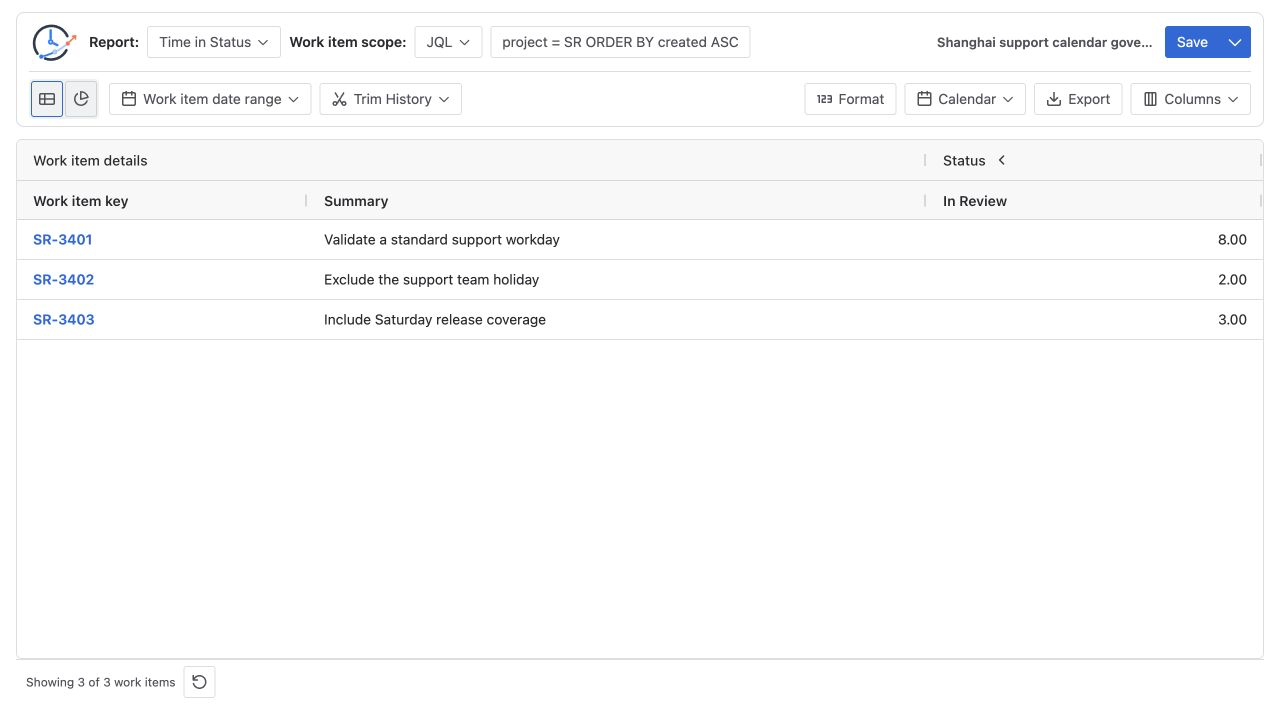
Govern the calendar through its lifecycle
Define the decision before approving the calendar
Write whether the metric represents customer elapsed time, staffed service time, or a delivery team’s planned working time. A business calendar is appropriate only for the latter two questions; keep an elapsed-time view when total waiting also matters.
The written definition must also separate population, history, and calendar. The source selects Jira work items; Trim History limits the portion of each selected item’s history used for calculation; Calendar decides which working portions inside qualifying intervals count. The date-range clipping Guide owns the history-window boundary.
Assign accountable roles
Do not leave a shared calendar under an unnamed “admin” responsibility:
| Role | Governance decision |
|---|---|
| Metric owner | Approves the business question and whether elapsed or business time answers it |
| Calendar steward | Maintains the approved timezone, weekly schedule, and exception register |
| Saved Report owner | Manually records which reusable report definitions depend on the calendar |
| Reviewer | Independently reconciles the baseline and each changed boundary |
Choose the timezone of the operating schedule, not whichever timezone is convenient for the report author. For a multi-region service, the metric owner must record whether one region, a follow-the-sun definition, or separate regional calendars governs the comparison.
Maintain a manual Saved Report reuse register
Manually retain the name, report type, work-item population, history-window policy, calendar name and timezone, business purpose, owner, and last accepted baseline for every Saved Report that relies on the calendar. If a team manually exports a report for a recurring operating review or uses dashboard evidence in a decision, add that use to the same register. This manual governance record defines the review scope when a calendar changes; StatusPath does not automatically discover downstream uses, and Jira board settings, SLA calendars, or another app do not automatically inherit the same definition.
Approve exceptions as metric changes
Non-working dates remove normal hours; working-day overrides add or replace hours on a specific date. Each material exception needs a reason, effective date, reviewer, affected-report list, and one interval that would fail if the exception were wrong. A recurring Saturday belongs in the weekly policy rather than a series of one-off records.
Review comparisons across versions
Review future holidays before a reporting period begins and record any staffing-policy change before it takes effect. Do not infer workflow improvement or regression from periods that use different calendar definitions unless the comparison labels and explains the version change.
Calendar change-control record
For every material update, retain:
| Field | Example |
|---|---|
| Calendar | Shanghai Support 09:00-17:00 |
| Owner | Support operations |
| Previous approved definition | Monday-Friday, 09:00-17:00, Asia/Shanghai |
| Change | Add Saturday 2026-07-11, 09:00-12:00 |
| Reason | Approved one-off operating window |
| Effective date | 2026-07-11 |
| Baseline acceptance | Monday 09:00-17:00 equals 8 business hours |
| Change acceptance | Friday 16:00 to Saturday 11:00 equals 3 business hours |
| Affected reports | Named Saved Reports, report exports produced manually for recurring operating reviews, and review evidence |
| Reviewer | Person responsible for confirming the calculation |
| Next review | Before the next exception or cross-period comparison |
Atlassian’s Jira reports overview shows that native report availability and scope differ by space and board. When a StatusPath result is compared with a native Control Chart, align the Jira board, selected statuses, period, working-day rules, and work-item population before interpreting the values.
Common mistakes
Calling every non-elapsed duration “business time”
A number is business time only when its working schedule and timezone are explicit.
Letting the report author’s timezone choose the metric
Jira’s personal display timezone and the selected StatusPath calendar timezone serve different purposes. Record both when date boundaries or JQL are involved.
Changing a shared calendar without a manual reuse register
Without a list of dependent Saved Reports and evidence, reviewers cannot tell which decisions need revalidation.
Adding exceptions without acceptance tests
A date may be entered in the wrong timezone, direction, or year. Keep one known interval that would fail if the rule were wrong.
Comparing periods across a calendar change
The same Jira history can yield a different business-time duration after a schedule or exception update. Label the definition used for each period.
Frequently asked questions
Should Jira board Working days and the StatusPath calendar match?
Only when the two reports are intended to model the same schedule. They are separate configurations, so compare and document them explicitly.
Is a Jira Service Management SLA calendar reusable for Time in Status?
Not automatically. The SLA calendar belongs to Jira Service Management SLA goals. Recreate and verify the intended schedule in StatusPath when a duration report should use the same operating hours.
Can a team keep both elapsed time and business time?
Yes. They answer different questions. Label both definitions and avoid comparing one period’s elapsed value with another period’s business-time value.
Do holidays affect Status Count or Transition Count?
No. Working calendars affect duration calculations. Count reports measure events, although Trim History can still change which events are included.
How often should a calendar be reviewed?
Review it before future exceptions take effect, whenever staffing rules change, and before a formal cross-period comparison. The right cadence depends on how frequently the schedule changes.
Who should own a shared business calendar?
Assign a metric owner to approve its purpose and a calendar steward to maintain the definition. Saved Report owners manually identify downstream use, while a reviewer confirms baseline and boundary calculations.
Related Guides
- Configure Jira Business Hours and Holidays for Status Reports
- How to Exclude Weekends from Jira Time in Status
- How Time Zones Affect Jira Status Duration and Trend Reports
- How to Report Jira Workflow Time Across Multiple Regions
- How to Calculate Time in Status in Jira Cloud
- Daylight Saving Time Edge Cases in Jira Workflow Reports
Make the calendar reviewable with the metric
A governed calendar preserves the meaning of every reported business-time value. Try StatusPath Reports on the Atlassian Marketplace to apply approved working calendars across duration reports and Saved Reports, then maintain a manual register of owners, downstream use, baselines, and change evidence beside every decision.