
How to Report Jira Workflow Time Across Multiple Regions
Choose a defensible Jira workflow calendar policy for global teams and compare one interval under shared UTC, Shanghai, and New York business hours.
For a multi-region Jira workflow report, choose one of three single-Calendar policies for each run: a shared-service Calendar, an assignee-region cohort with one Calendar, or a customer-region cohort with one Calendar. If the decision needs multiple regional definitions, use a split-report strategy with one separately scoped report and Calendar per region. Each run or Saved Report has one selected Calendar; StatusPath does not dynamically map Calendars by row, work item, Assignee, reporter, customer, or region.
Choose one Calendar policy—or split the reports—before calculating
The same Jira history can produce several valid business-time values because each Calendar answers a different question. The first three rows below are alternative single-Calendar policies for one run. The fourth row is a strategy that creates multiple independent runs; it does not make one report multi-Calendar.
| Policy | Question answered | Required scope | Calendar used | Comparability | Maintenance cost | When not to use |
|---|---|---|---|---|---|---|
| Shared service calendar | How much time fell inside one global service or delivery promise? | The complete agreed service population | One approved shared-service Calendar | Strong only when every compared result uses the same service policy | Low: one Calendar and one scope definition | Do not use it to represent regional staffing coverage |
| Assignee-region policy | How much time fell inside the staffed hours of one ownership region? | One Assignee-region cohort per run, built with Project or Saved Filter/JQL | The cohort’s one regional Calendar | Compare only cohorts built with the same assignment rule and report settings | Medium: maintain one scope and Calendar per region | Do not use it in one mixed-region run or expect Assignee changes to switch Calendar inside a work item |
| Customer-region policy | How much time fell inside a defined customer’s or market’s service hours? | One explicit customer-region cohort per run, normally from a Jira field in Saved Filter/JQL | The cohort’s one customer-region Calendar | Compare only equivalent customer policies and aligned report settings | Medium to high: maintain the region field, scopes, and Calendars | Do not infer region from the viewer or current Assignee |
| Separate regional reports | What do several separately defined regional views show? | One independent scope per regional report | One Calendar saved with each report | Valid only when the separate reports answer the same policy question; never add overlapping results | High: multiple Saved Reports, Calendars, and cohort rules | Do not use it when one shared-service answer is the actual decision |
The Calendars and Duration documentation describes the released Calendar controls, working intervals, timezone, exceptions, and affected duration reports. A Saved Report retains one selected Calendar ID. It does not contain a rule that chooses a Calendar from each row, work item, Assignee, reporter, customer, or region. Multiple Calendars therefore require multiple report runs.
Jira board working days and report calendars are separate settings
Atlassian’s Configure working days page documents a company-managed board setting used by specified Jira reports and gadgets. That setting includes working days, non-working dates, and a board timezone.
Jira also has display-timezone settings. A user can choose the timezone used for date and time information across Jira apps in Jira personal settings. A Jira administrator can set the default user timezone, which users can override.
Those Jira settings do not automatically select or rewrite a StatusPath Calendar. Record the Jira board settings, Jira display timezone, and selected StatusPath Calendar separately whenever a comparison depends on date boundaries or business hours.
Reproducible Jira scenario: one global support handoff
Work item SR-5101 enters In Review at 2026-07-06 06:00Z and leaves at 2026-07-07 15:00Z. The two timestamps are 33 elapsed hours apart:
Monday 06:00Z → Tuesday 06:00Z = 24h
Tuesday 06:00Z → Tuesday 15:00Z = 9h
Elapsed total                         = 33h
The controlled comparison keeps the work item, In Review interval, complete history window, and Decimal Hours format unchanged. All three Calendars use Monday-Friday 09:00-17:00 with no holidays or exceptions; only the IANA timezone changes:
| Calendar | IANA timezone | Local In Review interval | Working schedule | Counted business time |
|---|---|---|---|---|
| Shared UTC | UTC | Monday 06:00 → Tuesday 15:00 | Mon-Fri 09:00-17:00 | 14h |
| Shanghai | Asia/Shanghai | Monday 14:00 → Tuesday 23:00 | Mon-Fri 09:00-17:00 | 11h |
| New York | America/New_York | Monday 02:00 → Tuesday 11:00 | Mon-Fri 09:00-17:00 | 10h |
These results are alternatives under three policies, not three portions of work. Each value is the overlap between the same Jira interval and a different written operating schedule. They can validate policy sensitivity, but they cannot be added or compared as regional performance.
The source timestamps are UTC instants: 2026-07-06T06:00:00Z through 2026-07-07T15:00:00Z. The line-by-line intersections below are the complete manual reconciliation; every Calendar has the same Monday-Friday working days, one daily 09:00-17:00 local interval, and an empty holidays/exceptions list.
| Calendar | Local day | Jira interval present that day | Calendar working interval | Counted intersection |
|---|---|---|---|---|
Shared UTC (UTC) | Mon 2026-07-06 | 06:00-24:00 | 09:00-17:00 | 09:00-17:00 = 8h |
Shared UTC (UTC) | Tue 2026-07-07 | 00:00-15:00 | 09:00-17:00 | 09:00-15:00 = 6h |
Shanghai (Asia/Shanghai) | Mon 2026-07-06 | 14:00-24:00 | 09:00-17:00 | 14:00-17:00 = 3h |
Shanghai (Asia/Shanghai) | Tue 2026-07-07 | 00:00-23:00 | 09:00-17:00 | 09:00-17:00 = 8h |
New York (America/New_York, UTC-04:00) | Mon 2026-07-06 | 02:00-24:00 | 09:00-17:00 | 09:00-17:00 = 8h |
New York (America/New_York, UTC-04:00) | Tue 2026-07-07 | 00:00-11:00 | 09:00-17:00 | 09:00-11:00 = 2h |
Shared UTC result: 14 business hours
Under the shared UTC Calendar, Monday contributes a complete eight-hour workday and Tuesday contributes six hours:
Monday 09:00-17:00 = 8h
Tuesday 09:00-15:00 = 6h
Shared UTC total     = 14h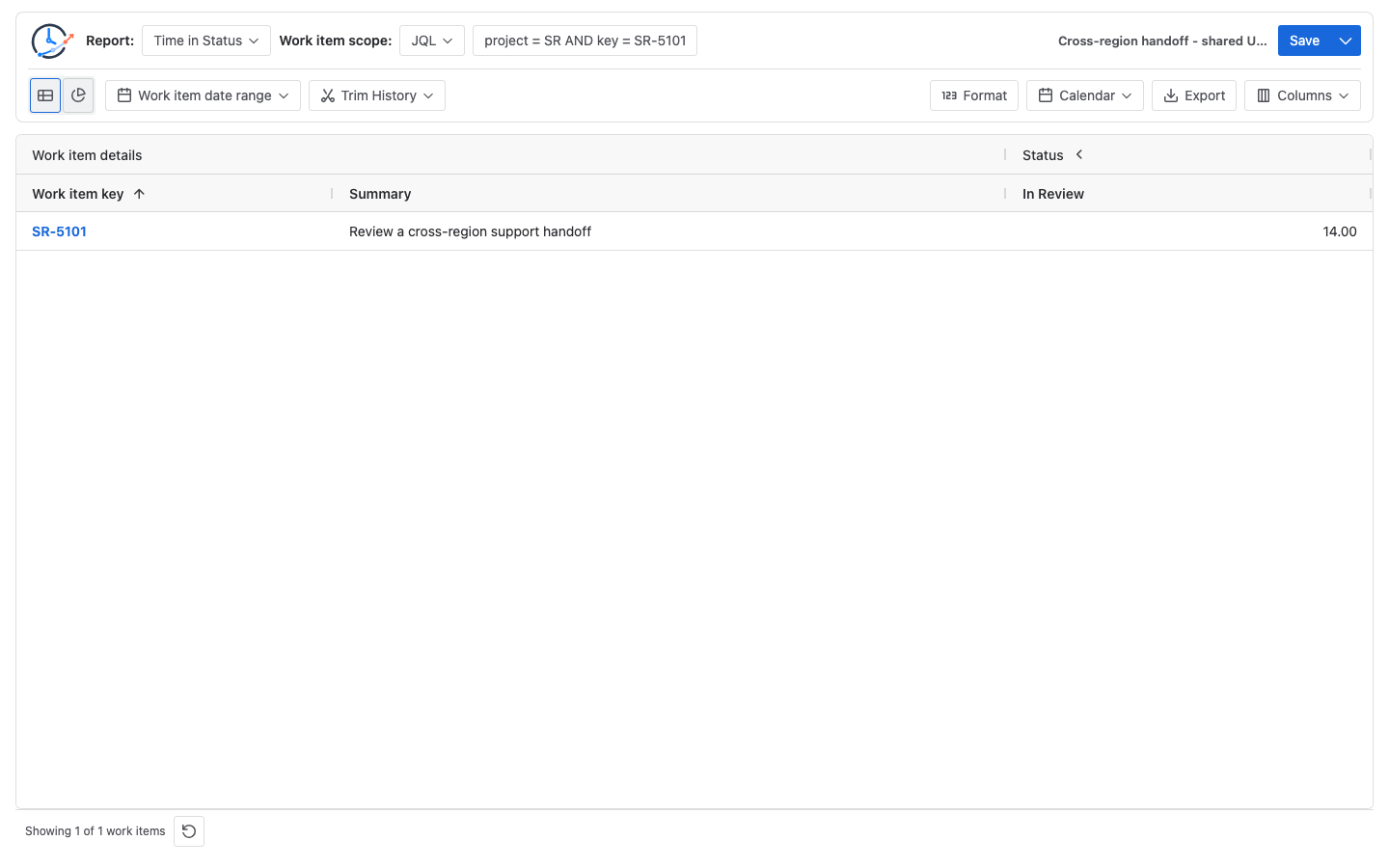
Shanghai result: 11 business hours
In Asia/Shanghai, the interval is Monday 14:00 through Tuesday 23:00. Monday contributes its final three working hours, and Tuesday contributes a complete workday:
Monday 14:00-17:00 = 3h
Tuesday 09:00-17:00 = 8h
Shanghai total       = 11h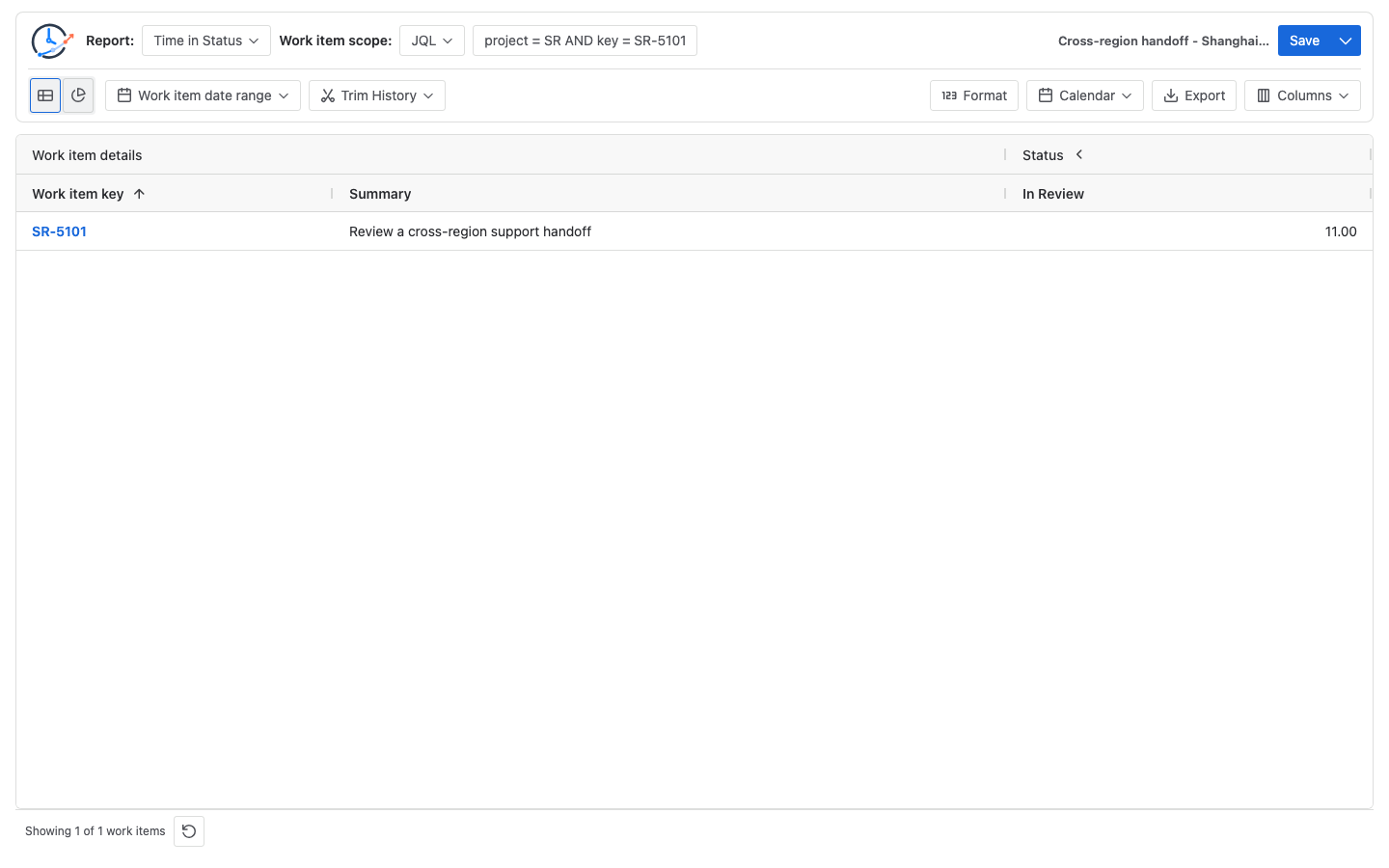
New York result: 10 business hours
On July 6-7, 2026, the IANA America/New_York zone resolves these timestamps under daylight-saving time as UTC-04:00, so the local interval is Monday 02:00 through Tuesday 11:00. Monday contributes eight working hours, and Tuesday contributes two:
Monday 09:00-17:00 = 8h
Tuesday 09:00-11:00 = 2h
New York total       = 10h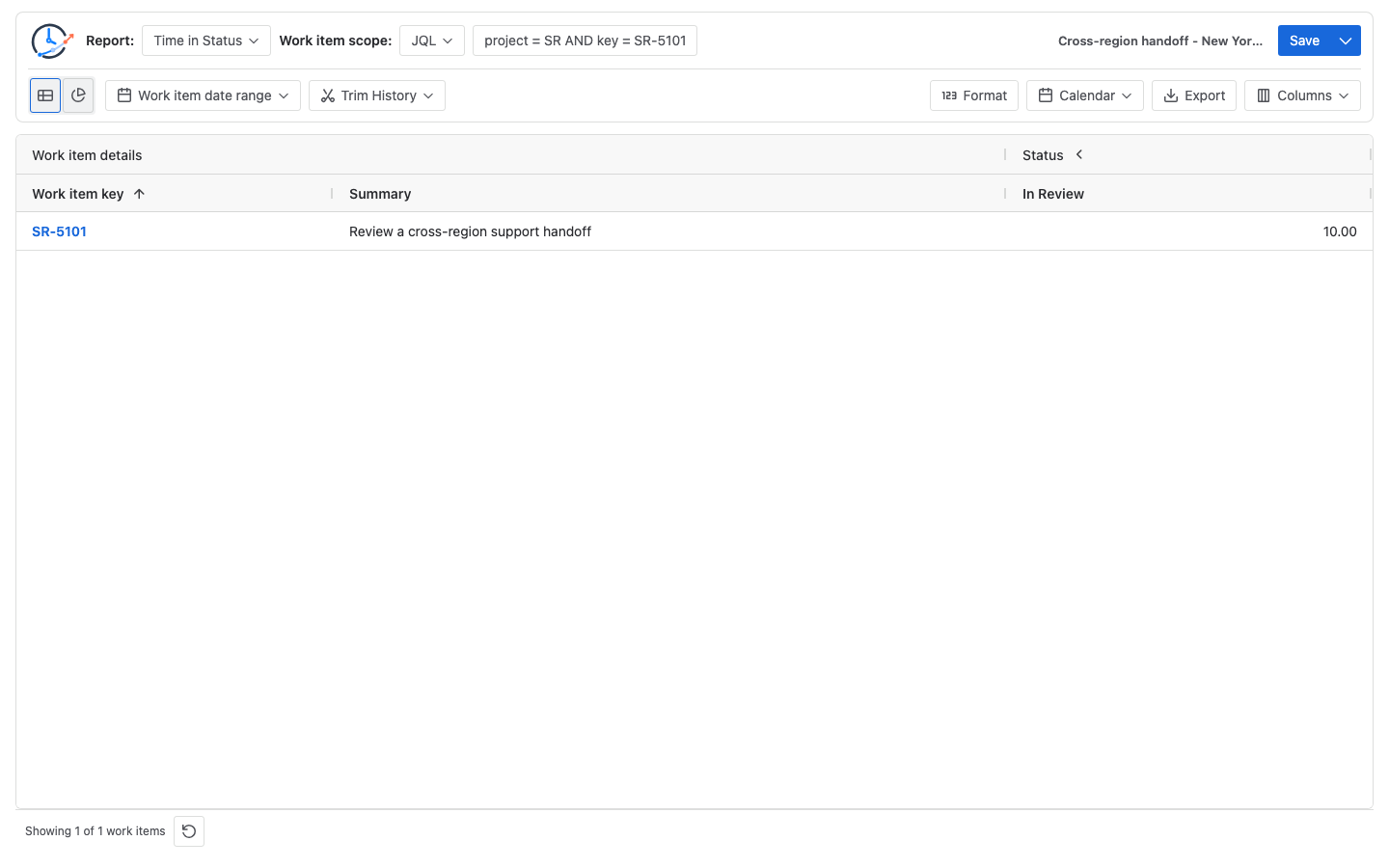
The three runs reconcile to their own policies: 14h for shared UTC, 11h for Shanghai, and 10h for New York. They are mutually exclusive answers for the same underlying interval. Do not add them, substitute one silently for another, or compare them as regional performance. An operational regional comparison is valid only when every report answers the same policy question and its cohort rules and remaining settings are aligned.
Configure a reproducible multi-region report
- Write the decision first. Choose one single-Calendar policy: shared service, assignee-region cohort, or customer-region cohort. Use the split-report strategy only when the decision requires separate regional runs.
- Define the Jira cohorts. Use Project when a project is the cohort, or use a Saved Filter/JQL query that references an explicit Jira region field. A region field is not a separate StatusPath scope control. Do not infer region from the viewer’s timezone.
- Create and validate the Calendars. Record each Calendar’s IANA timezone, working days, daily intervals, holidays, and exceptions. Reconcile one ordinary workday before using it broadly.
- Run the first policy. Select one Calendar, keep Decimal Hours and the complete history window, run Time in Status, and verify
SR-5101manually. - Save a named configuration. Include the policy and region in the Saved Report name. Each Saved Report stores one selected Calendar; it does not map Calendars by row, work item, or Assignee.
- Separate validation from operations. To validate Calendar sensitivity, keep the same work item and switch only Calendar. For an operational split-report strategy, create one regional cohort and Calendar per report, then record that both scope and Calendar differ.
- Compare only aligned questions. Put the policy, Calendar name, timezone, scope, and run date beside every value. Do not compare results across different policies or treat a Calendar difference as a regional productivity score.
If a work item moves between regions while it remains In Review, decide in advance whether the metric follows one service calendar or whether separately scoped reports answer the operational question. A single StatusPath run does not split one interval and dynamically apply a new Calendar at each assignee change.
Common mistakes
Letting the viewer’s Jira timezone choose the metric
Jira’s display timezone helps render dates and times. It does not define which operating hours a StatusPath duration report should count.
Expecting automatic per-item Calendar selection
StatusPath applies the selected Calendar to the report run. Reporter, customer, current Assignee, and assignee history do not automatically switch that Calendar.
Changing scope together with Calendar
If both the work-item population and Calendar change, the resulting difference cannot be attributed to the Calendar. Hold one input constant at a time.
Adding or ranking alternative policy results
The 14h, 11h, and 10h values describe the same Jira interval under three alternative policies. Their sum is not elapsed time, effort, throughput, or unique ownership time, and their ordering is not a regional performance ranking.
Replacing a regional timezone with a fixed UTC offset
America/New_York changes offset across daylight-saving boundaries. Use the intended IANA timezone and validate known intervals around applicable clock changes.
Frequently asked questions
Which Calendar policy is best for a global Jira team?
There is no universal best policy. Use a shared Calendar for one global promise, an operational region’s Calendar for staffed coverage, a customer-region Calendar for a defined customer commitment, or separate reports when the decision requires regional comparison.
Can StatusPath choose a Calendar from each work item’s Assignee or customer?
No. One Calendar applies to each report run or Saved Report. Build explicit Jira cohorts and run separately when different regional Calendars are required.
Is the Jira personal timezone the same as the StatusPath Calendar timezone?
No. Jira personal timezone controls date and time presentation across Jira apps. The selected StatusPath Calendar defines the working intervals counted in a business-time duration.
Can the same work item appear in more than one regional report?
Yes, for a controlled policy-sensitivity check. Label the overlap and do not add or rank those results as though each report contained unique work. For an operational regional comparison, use the same policy question and explicit cohort rules in every split report.
How should daylight-saving time be handled?
Use an IANA regional timezone such as America/New_York rather than a fixed offset. Validate one known interval on each side of a clock change and keep the Calendar version beside cross-period comparisons.
Related Guides
- Jira Business Calendars for Workflow Reporting
- How to Configure Jira Business Hours and Holidays for Status Reports
- How Time Zones Affect Jira Status Duration and Trend Reports
- How to Measure Time by Assignee in Jira
Keep the policy beside every regional result
A multi-region duration is defensible only when its question, scope, Calendar, timezone, and comparison rule remain visible. Try StatusPath Reports on the Atlassian Marketplace to run separately named regional configurations, verify one interval, and preserve the selected policy with each result.