
Jira Workflow Reports at Daylight-Saving Time Boundaries
Validate 23-hour and 25-hour Jira workflow results with completed 2025 New York DST days and a 24-hour UTC control.
A Jira workflow report can correctly count 23 elapsed hours for the New York spring transition day and 25 elapsed hours for the fall transition day. The cause is the pair of regional local-midnight boundaries, not a rule that “one business day equals 23 or 25 hours.” Use timestamp instants, a named regional Calendar, and a UTC control to prove which policy produced the result.
Four timezones must not be conflated
- The StatusPath Calendar timezone defines which local working windows intersect the status interval.
- The Jira user timezone controls how Jira renders dates and times for that viewer.
- The Jira site/system timezone can affect Jira defaults and timestamp representations.
- The trend bucket timezone defines day or week boundaries in a trend report.
This Guide isolates the first item. For broader policy, see How Time Zones Affect Jira Status Duration and Trend Reports and How to Report Jira Workflow Time Across Multiple Regions.
Atlassian explains that fixed GMT offsets do not follow daylight-saving changes, while geographic timezones do. Jira personal settings control displayed dates and times, and Atlassian’s REST timestamp documentation describes timestamps with timezone information. Preserve the source instants and offsets.
The StatusPath results below are locally verified product behavior, not an Atlassian promise about a Marketplace app’s calculation.
Real Jira scenario: identical source intervals, two Calendar policies
Both work items have a complete 29-hour In Review source interval. The interval deliberately extends beyond the tested local day, so the Calendar—not the source duration—causes the result:
| Work item | In Review entry | In Review exit | Source elapsed |
|---|---|---|---|
SR-5501 | 2025-03-09T00:00:00Z | 2025-03-10T05:00:00Z | 29h |
SR-5502 | 2025-11-02T00:00:00Z | 2025-11-03T05:00:00Z | 29h |
The report keeps JQL, status, complete history, Trim History, and Decimal Hours fixed. Only the selected Calendar changes:
| Calendar | Timezone | Working-day exceptions | Result |
|---|---|---|---|
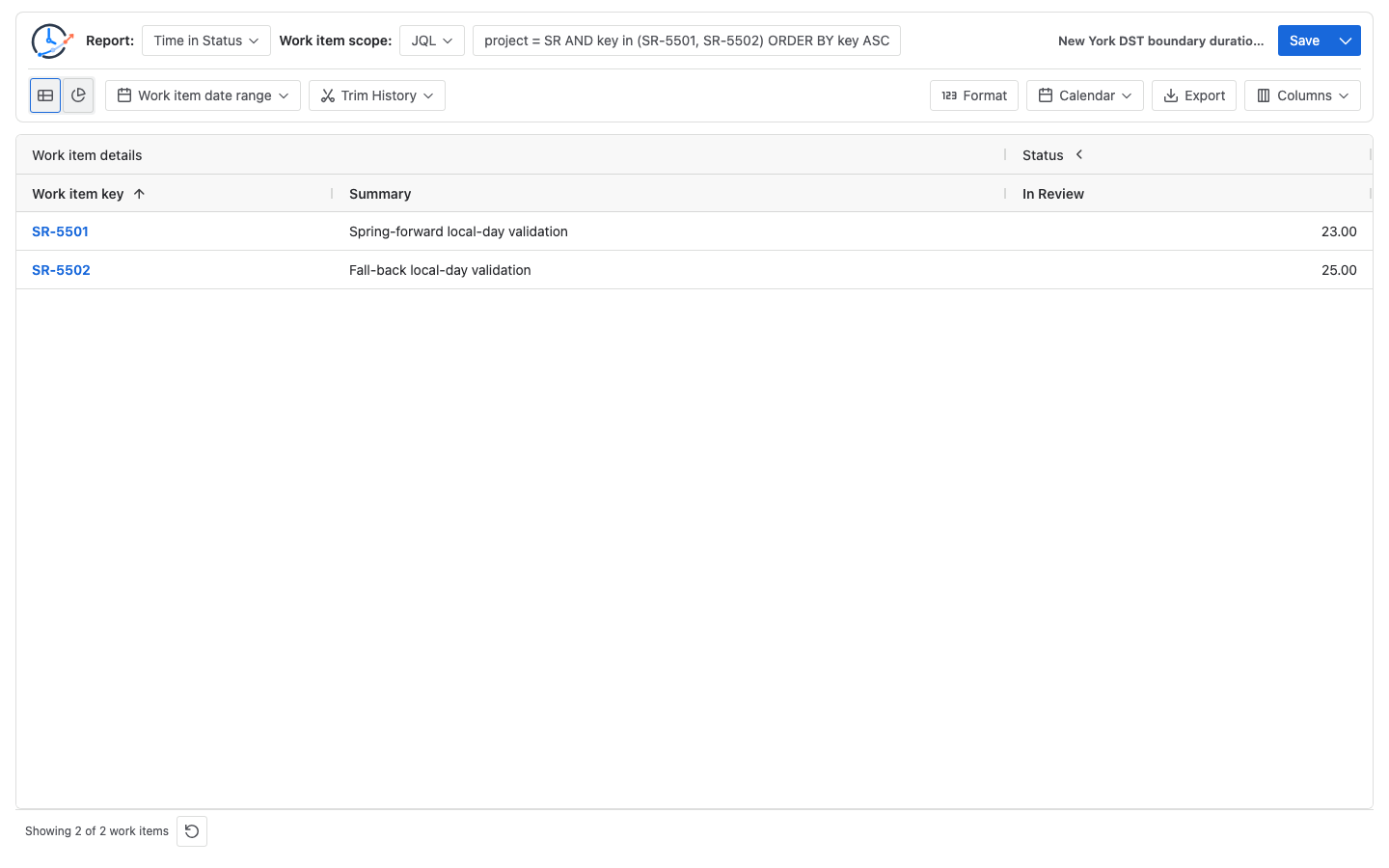
| New York DST transition days | America/New_York | 2025-03-09 and 2025-11-02, each 00:00-00:00 | 23.00, 25.00 |
| UTC 24-hour control days | UTC | the same dates, each 00:00-00:00 | 24.00, 24.00 |
In StatusPath, an interval whose start and end are both 00:00 means the full local day; it is not a zero-length interval. The article-demo calculation has an automated test for this rule. The weekly schedule is otherwise empty, so only the two explicit working-day exceptions are counted.
Manually calculate the New York intersections
For the completed 2025 spring transition:
New York local start: 2025-03-09 00:00 UTC-05:00 = 2025-03-09 05:00Z
New York local end:   2025-03-10 00:00 UTC-04:00 = 2025-03-10 04:00Z

2025-03-10 04:00Z - 2025-03-09 05:00Z = 23 elapsed hours
24h - 1h = 23h
For the completed 2025 fall transition:
New York local start: 2025-11-02 00:00 UTC-04:00 = 2025-11-02 04:00Z
New York local end:   2025-11-03 00:00 UTC-05:00 = 2025-11-03 05:00Z

2025-11-03 05:00Z - 2025-11-02 04:00Z = 25 elapsed hours
24h + 1h = 25h
These are elapsed hours inside each Calendar intersection. They do not redefine the length of a StatusPath “business day.”
Prove Calendar causality with the UTC control
Run the same two source intervals with the UTC control Calendar:
Spring control: 2025-03-10 00:00Z - 2025-03-09 00:00Z = 24h
Fall control:   2025-11-03 00:00Z - 2025-11-02 00:00Z = 24h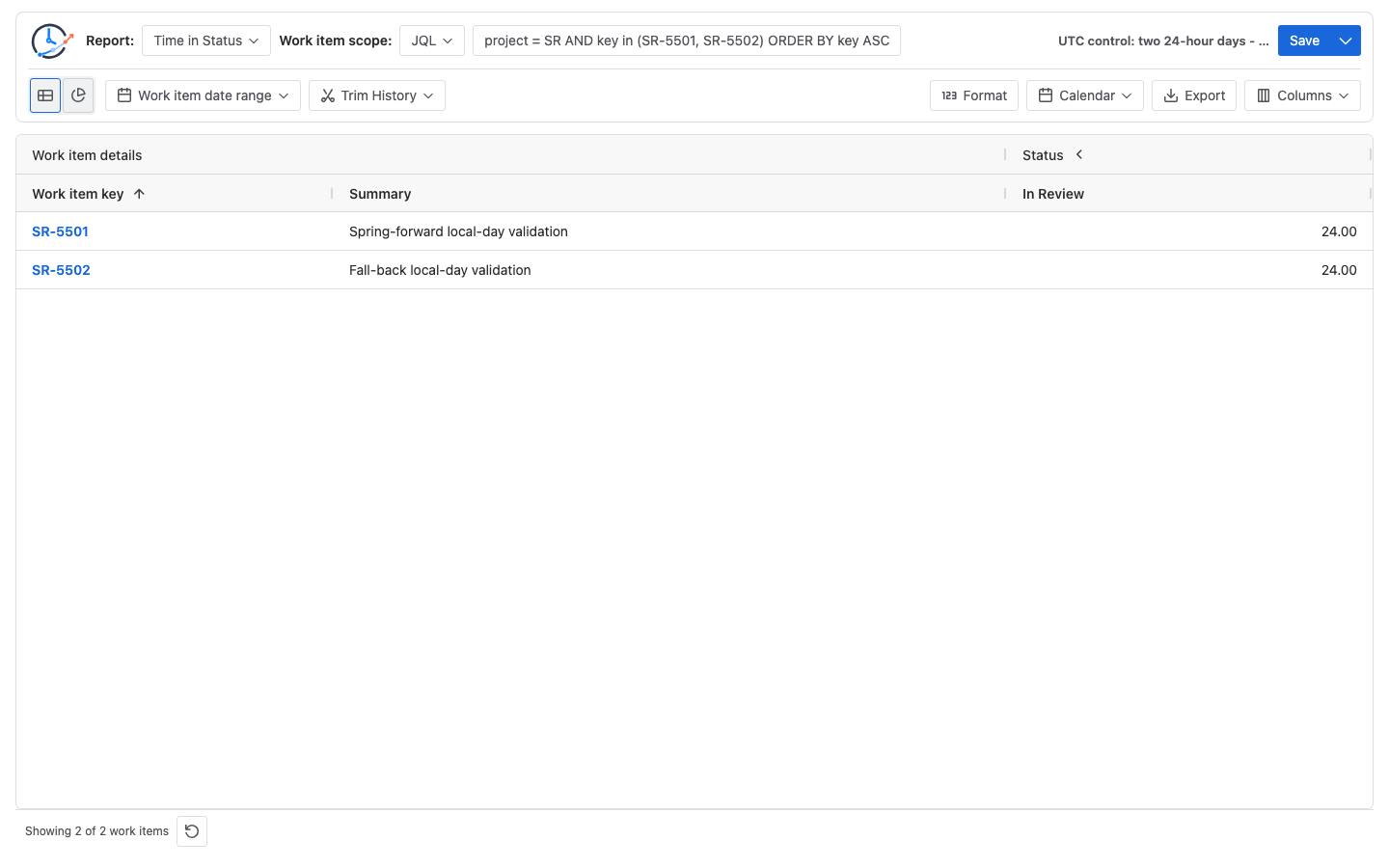
Because the source intervals and every other report input are unchanged, the 23/25 versus 24/24 contrast isolates the selected Calendar timezone and boundaries.
Configure the check
- Verify each status entry and exit in Jira Activity → History or the changelog response.
- Scope the report to
project = SR AND key in (SR-5501, SR-5502) ORDER BY key ASC. - Select Time in Status, In Review, complete history, Trim History off, and Decimal Hours.
- Use
America/New_Yorkwith only the two full-day working exceptions; confirm23.00and25.00. - Switch only the Calendar to the UTC control; confirm
24.00and24.00. - Store the Calendar name, IANA timezone, weekly schedule, exceptions, history window, and run time with the result.
For a normal office-hours Calendar, count only the exact intersection with configured local working intervals. If the clock change occurs outside those intervals, the counted business time may remain unchanged. Do not copy the full-day 23/25 result into a 09:00-17:00 policy without recalculating.
Engineering warning: do not add 86,400,000 milliseconds
To construct “next local midnight,” do not take one instant and add 86,400,000 milliseconds. That produces 24 elapsed hours and can land at 01:00 or 23:00 local time across a clock change. Construct both calendar dates at 00:00 in the regional timezone, resolve each to an instant, then compare the instants. Use a timezone-aware library or runtime with tested IANA timezone support.
Common mistakes
Using GMT-5 for a New York policy
A fixed offset does not become GMT-4. Use America/New_York when regional rules are the policy.
Treating 00:00-00:00 as zero duration
In this Calendar configuration it means a full local day. Validate that product-specific convention before copying the configuration elsewhere.
Calling 23 or 25 hours “one business day”
The values are elapsed hours in a full-day Calendar intersection. Business-day units and office-hours policies are separate definitions.
Changing source scope with the Calendar
If work items, status, history window, or source timestamps change, the comparison no longer isolates Calendar behavior.
Using Jira display timezone as the calculation policy
Record the Jira user/site display context, but verify the separate StatusPath Calendar timezone and any trend bucket timezone.
Frequently asked questions
Is every DST transition day 23 or 25 hours?
No. These values apply to the completed 2025 New York transitions and a full local-day interval. Regions, dates, historical rules, and partial intervals differ.
Does changing Jira personal timezone change the elapsed source interval?
It changes presentation for that viewer. It does not change the two source instants. StatusPath business-time inclusion is controlled separately by the selected Calendar.
Why does the UTC control show 24/24?
UTC has no daylight-saving offset transition. The control uses 00:00Z to the next 00:00Z on each date, so each intersection is 24 elapsed hours.
Why can an office-hours report still show eight hours?
If the configured 09:00-17:00 local interval does not contain the clock change, its intersection can remain eight hours. Calculate the actual working-window overlap.
What evidence should accompany a cross-period comparison?
Keep source timestamps, Calendar name, IANA timezone, schedule, exceptions, Jira display timezone, history controls, trend bucket timezone when applicable, duration format, and one manually checked boundary.
Related Guides
- How Time Zones Affect Jira Status Duration and Trend Reports
- Jira Business Calendars for Workflow Reporting
- How to Configure Jira Business Hours and Holidays for Status Reports
- How to Report Jira Workflow Time Across Multiple Regions
Keep the Calendar contrast beside the result
A defensible DST result has source instants, regional boundaries, a manually checked subtraction, and a control that changes only the Calendar. Try StatusPath Reports on the Atlassian Marketplace to reproduce the New York 23/25 and UTC 24/24 comparison before using DST-crossing workflow metrics.