
How to Save and Restore Reusable Jira Workflow Reports
Save a governed Jira workflow report configuration, restore it consistently, and distinguish a live rerun from a dated exported snapshot.
A Saved Report preset is a named, reusable report configuration—not a stored Jira result. Review its population, history window, Calendar, Format, fields, metric columns, filters, and sort order before choosing Save as. For a recurring review, choose Use, check the dependencies, and run the report again. That run calculates a current result from current accessible Jira data; use a dated CSV or XLSX export when reviewers need a point-in-time file.
A reusable definition is not a stored result
This Guide answers: how can a team govern and rerun one Jira workflow report without rebuilding it or mistaking the preset for a dated snapshot?
Use the Jira Workflow Reporting Guide to keep the saved definition tied to its question, population, metric, history window, validation evidence, and output.
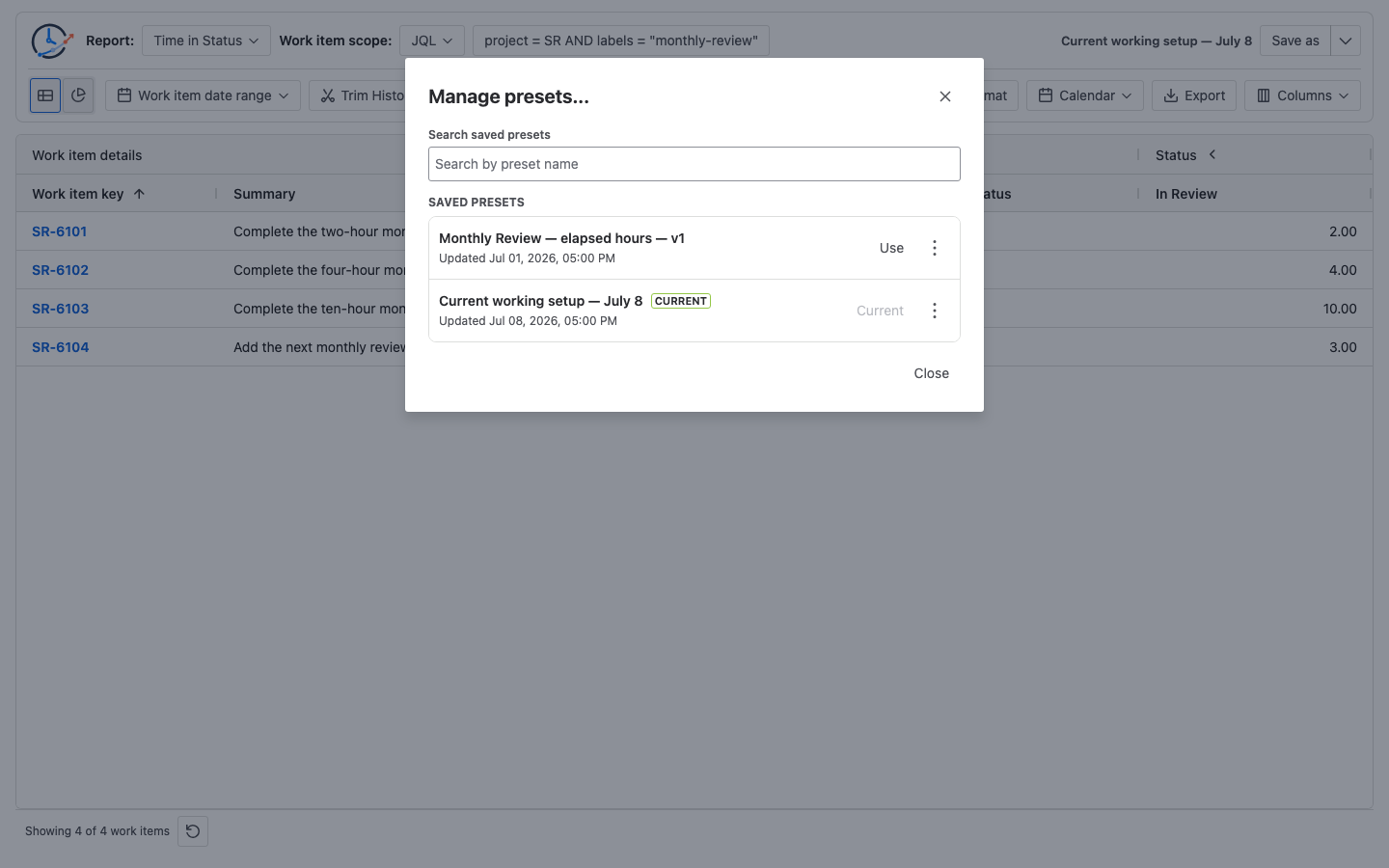
Use Saved Reports documentation for the current controls. Save as creates a named preset, while Save writes reviewed changes to the selected preset. Preset actions opens preset commands; Manage presets… marks the active row as Current, offers Use for another preset, and provides Rename, Copy, and Delete. This page owns the operating method around those controls: naming, human responsibility, acceptance checks, dependency review, rerun comparison, and the boundary between a live preset and an exported artifact.
A preset persists the report type and source; Work item date range and Trim History; Calendar ID and Format; Table/Chart mode; work-item field choices and order; selected status, assignee, or transition columns and their order; column-group open state; Status Group or Assignee Group definitions; issue and duration sort/filter models; Average Group By and week start; Time Between metric endpoints; and supported chart settings.
It does not store result rows, a Jira work-item or changelog copy, CSV/XLSX/chart export files, the referenced saved Filter’s then-current JQL definition, a Jira-permissions snapshot, a frozen Calendar definition, open menus or progress, or the table’s runtime layout. Because only the Calendar ID is persisted, editing that Calendar can change a later result.
Keep these three concepts separate:
- Named Saved Report preset: the reusable configuration selected with Use.
- Current result: the rows and calculations produced when the report queries current Jira data with the current applicable permissions and referenced dependencies.
- CSV/XLSX export: a point-in-time downloaded file that does not update when Jira changes.
Atlassian documents that Jira searches can be saved as reusable Filters with an owner and sharing rules. When a StatusPath preset references one of those Filters, the Filter remains a live Jira dependency rather than becoming a frozen query snapshot inside the preset.
Real Jira scenario: one monthly Review definition, two results
A delivery team approves this configuration:
| Setting | Approved value |
|---|---|
| Preset name | Monthly Review — elapsed hours — v1 |
| Report | Time in Status |
| Source | JQL |
| JQL | project = SR AND labels = "monthly-review" |
| Work item date range | Empty |
| Trim History | Off |
| Calendar | Always / elapsed time |
| Format | Decimal Hours |
| Visible metrics | In Review |
| Sort | In Review descending |
The team runs it on July 1 and exports a dated XLSX. On July 8, it chooses Use for the same preset and runs the report again against current accessible Jira data:
| Work item | July 1 export | July 8 live rerun | Explanation |
|---|---|---|---|
SR-6101 | 2h | 2h | Completed history unchanged |
SR-6102 | 4h | 4h | Completed history unchanged |
SR-6103 | 6h | 10h | The interval was open at the first run, then closed after four additional counted hours |
SR-6104 | — | 3h | Newly matched the maintained JQL |
| Total | 12h | 19h | Same configuration, later Jira state |
July 1 total = 2h + 4h + 6h = 12h
July 8 total = 2h + 4h + 10h + 3h = 19h
Change = 19h - 12h = 7h
       = 4h additional counted time before the interval closed + 3h new matching work
The 4h attribution holds because SR-6103 was still in In Review at the July 1 run, remained there for four Calendar-counted hours before closing, Trim History had no fixed end, and the July 8 action queried Jira and ran the report again. A fixed Trim History end or a Calendar that excludes part of that interval would change the increase.
In this controlled example, the 7h difference is evidence of a live rerun, not proof that Use changed the calculation. Compare the saved definition first, then inspect Jira changes and permissions.
Save and govern the report
1. Stabilize the definition
Run the report and record the source, Work item date range, Trim History, Calendar, Format, visible fields, metric columns, groups, filters, sorting, and chart settings. Use Project vs Filter vs JQL vs Sprint vs Epic to govern the population choice and the report setup documentation for the current controls.
2. Give the preset an auditable name
Use a name that identifies the question and time basis, such as Monthly Review — elapsed hours — v1. Do not put confidential Jira data in a preset name.
3. Save a named preset
Choose Save as, enter the approved name, and confirm that it becomes the active preset. Save writes later reviewed changes to that selected preset.
StatusPath may recover the latest unnamed Unsaved preset when the user returns. It is mutable working state, is not a named row in Manage presets…, and can be replaced by later draft edits. It is not a stable, versioned review definition.
4. Run an acceptance check
Before relying on the preset, verify:
- the expected source type and exact source value;
- the Work item date range and Trim History boundary;
- the Calendar name, timezone, work schedule, holidays, and exceptions;
- the visible metric columns, group definitions, filters, and sort;
- one ordinary row and one boundary or high-duration row against Jira History.
5. Export when a point-in-time artifact is required
Use CSV or XLSX export after the acceptance check. Record the export time and preset version with the file. The export will not update when Jira changes.
6. Restore, review dependencies, then rerun
Open Preset actions → Manage presets…, choose Use for the target preset, and confirm that its row becomes Current. Check whether its Jira saved Filter, statuses, fields, Calendar, or applicable permissions changed before comparing the new result with a dated export.
7. Version material definition changes
Copy and rename the preset when the reporting question changes materially—for example, a new JQL population, history boundary, Calendar policy, Status Group mapping, or denominator. Updating v1 in place is appropriate only when reviewers intend later runs to use the revised definition.
What can change after restore?
| Dependency | Preset preserves | Later change can affect the result |
|---|---|---|
| JQL text | The saved query | Jira work items or field values can match differently |
| Jira saved filter | The selected filter reference | Its owner, sharing, or query can change |
| Sprint or Epic | The selected source reference | Membership or visibility can change |
| Calendar | The selected Calendar ID | Working hours, holidays, or exceptions can be edited |
| Status columns/groups | The stored selection | Jira workflows or available history can change |
| Permissions | No snapshot or grant | Jira browse permissions apply to the user at each run |
| Exported XLSX/CSV | Not stored by the preset | The dated file remains a separate artifact |
Reset to default restores the report conditions to an unnamed Unsaved preset. It does not select or mark a named Saved Report preset as the default.
Common mistakes
Calling a Saved Report preset a snapshot
A preset stores the setup and reruns current accessible Jira data. Use a dated export when the review needs a point-in-time file.
Versioning only the name
v2 is useful only if the source, boundaries, Calendar, metric mapping, and acceptance evidence are also recorded.
Ignoring Calendar edits
The preset stores the Calendar ID. If an administrator changes that Calendar, the same preset can calculate a different business duration.
Treating restored rows as a permission baseline
When a user can run a given configuration, Jira browse permissions are applied at that run. A preset is neither a permissions grant nor an assumed sharing mechanism. If different tenant users will rerun it, verify preset visibility and Use access with every intended account instead of inferring sharing from the creator’s session.
Relying on the unsaved draft as a governed definition
The recovered Unsaved preset can be replaced by later draft edits and is not a named row in Manage presets…. Choose Save as when the working state is ready to become a recurring reviewed definition.
Frequently asked questions
Does a Saved Report preset freeze Jira data?
No. It preserves report configuration and queries current accessible Jira data when rerun.
Why did a restored report return different rows?
The JQL, saved filter, Sprint or Epic membership, Jira fields, permissions, or Work item date filter may now produce a different population.
Why did durations change when the preset name did not?
Open intervals, corrected Jira history, a different endpoint, or edits to the selected Calendar can change duration values.
Should I update or copy a preset?
Update when the approved definition itself is being corrected for all future runs. Copy and version it when reviewers need the old and new definitions to remain distinguishable.
What does Reset to default do?
Reset to default restores the report conditions to an unnamed Unsaved preset. It does not make the selected named preset the default.
Related Guides
- Jira Workflow Reporting Guide: From Scope to Export
- Saved Reports documentation
- Weekly Jira Workflow Report Example for Management
- Jira Workflow Review Checklist
- How to Export Jira Time in Status to Excel
Preserve the question, then compare live evidence
A governed Saved Report preset keeps one reviewed calculation definition reusable. Pair its versioned configuration with acceptance checks, and use dated exports when reviewers need frozen evidence. A later rerun may—and often should—change when Jira data or dependencies change.
Try StatusPath Reports on the Atlassian Marketplace to save a reviewed workflow report as a named preset, select it with Use for the next review, and export the dated result when a point-in-time artifact is required.