
Project vs Filter vs JQL vs Sprint vs Epic for Jira Reports
Choose the right Jira report source by comparing ownership, reuse, board dependency, expressiveness, auditability, and common population failures.
Choose Project when the base rule is project = KEY, Filter for an owner-managed Jira saved search identified by numeric Filter ID, JQL for a precise self-contained rule, and Sprint for one Sprint selected through a Board-assisted picker. Use Epic only after verifying that the picker can find the parent in the current Jira locale and work-type setup. After a valid Epic is selected, StatusPath builds parent = key; Epic source creation is blocked in the current Simplified Chinese Jira acceptance environment because the picker searches for issuetype = Epic.
The Data source establishes the base candidates, an optional Work item date range can narrow those candidates by Created, Updated, or Resolved date, and Trim History independently clips the history calculated for work items that were already selected. Calendar, Format, report type, statuses, and groups then determine how that history is measured and presented.
A source is a population contract
A workflow report starts with three separate scope layers:
- Data source: the base Jira query and its stable identity—Project key, numeric Filter ID, exact JQL, Sprint ID, or parent key.
- Work item date range: an optional Created, Updated, or Resolved condition that further filters work items.
- Trim History: the from/to boundaries applied to the histories of selected work items during calculation.
Report type, statuses, Calendar, timezone, Format, and groups are metric configuration. Changing the Data source or Work item date range can change the returned keys. Changing Trim History can change calculated values without changing those keys. A Sprint’s dates, a Filter’s date clauses, and a Project boundary do not automatically become Trim History.
The source determines which work items StatusPath analyzes and who governs that population. It does not change the duration formula. JQL finds matching work items. It does not calculate the interval between Jira status changes.
Use the Jira Workflow Reporting Guide to keep the Data source, Work item date range, Trim History, metric, Calendar, validation evidence, and output together.
This Guide owns the source-selection decision. Report Setup and Scope owns the current controls and button-level workflow.
Five reporting questions, five source choices
This worked decision record uses fictional SR and WEB Jira identities. It is a governance template, not a claim that all five populations exist in the screenshot fixture or one customer site. Each realistic reporting question has one primary source because its ownership and membership rule are different.
| Reporting question | Choose | Why this source owns the question |
|---|---|---|
How have the executing user’s visible work items in project SR moved, with Work item date range left empty? | Project | The base query is project = SR; Jira permissions still limit the visible population. |
How is the shared customer-escalation queue moving across SR and WEB? | Filter | Operations already owns and shares one saved search for the queue. |
Which unresolved High or Highest work items in release 2026.07 across SR and WEB should be analyzed? | JQL | The population needs several explicit predicates in one reviewable expression. |
How did work items in StatusPath Sprint 24 move for its retrospective? | Sprint | The Board finds the Sprint; the Sprint ID defines the StatusPath membership query. |
How did the direct child work under epic SR-6000 move? | Epic, only after picker verification | One parent key is the intended boundary, but the current picker has a known Simplified Chinese Jira localization blocker. |
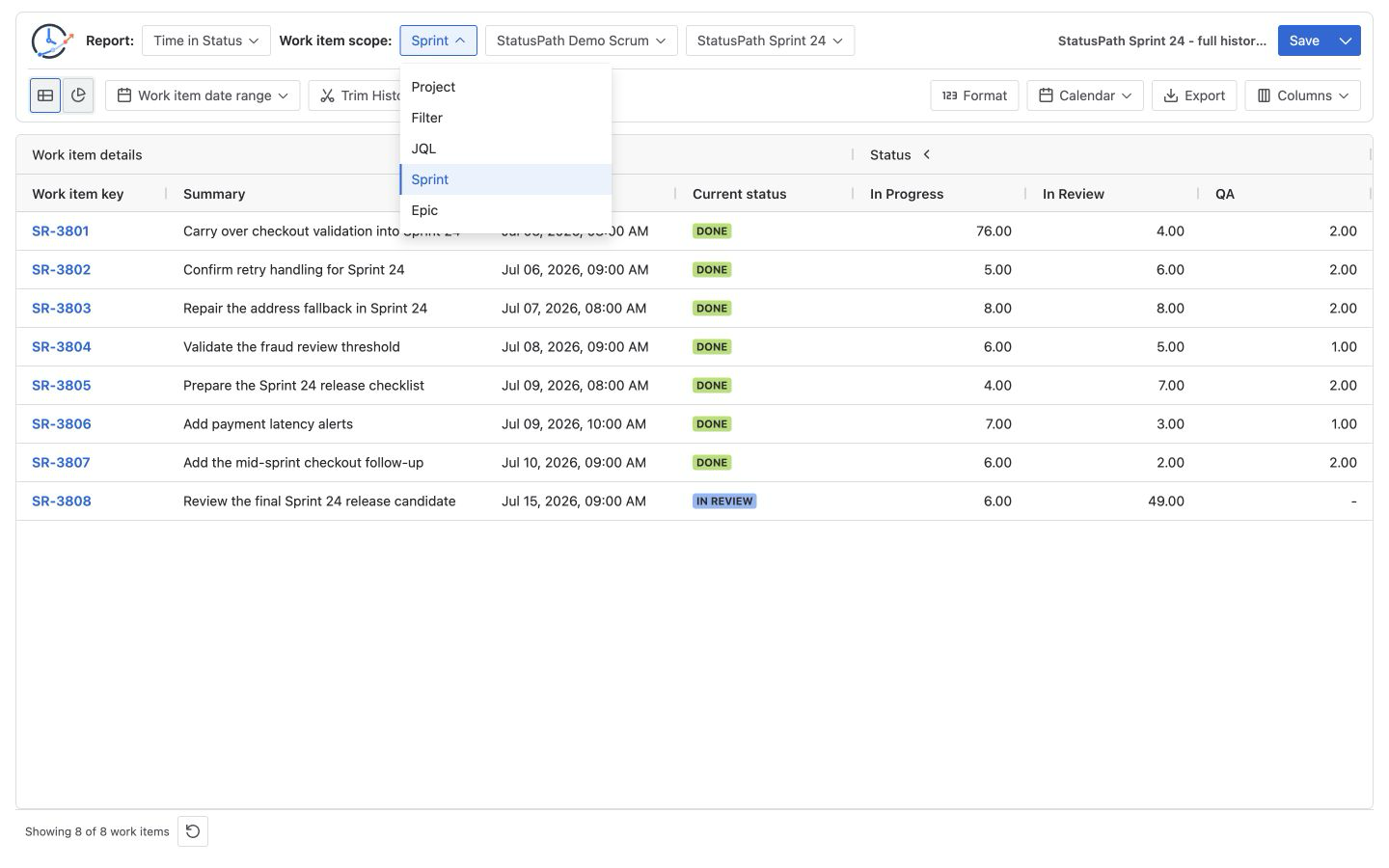
Compare the five sources as governance choices
| Source | Recommended maintenance owner | Reuse model | Board dependency | Expressiveness | Audit evidence | Common failure |
|---|---|---|---|---|---|---|
| Project | Jira project administrator or delivery owner | Stable project key | None | Low | Executing user, Project key, Work item date range, and acceptance keys | project = KEY is broader than the decision population or permissions differ. |
| Filter | Named Jira Filter owner with a review backup | Numeric Filter ID plus current name | Only when another board or process uses that Filter | Medium to high | Filter ID, name, owner, sharing, current query, executing user, and acceptance keys | A renamed or duplicate-name Filter makes a name-only record ambiguous; sharing or query changes alter results. |
| JQL | Report definition owner | Exact query stored with the review or Saved Report | None unless the query references board-related data | Highest | Exact JQL, Work item date range, report sort, validation time, result count, and acceptance keys | A query has no owner or expected-result test, or ORDER BY is mistaken for membership. |
| Sprint | Scrum Master or Sprint owner | Sprint ID plus Board selection context | Board is required only for the picker; final membership uses Sprint ID | Focused on Sprint membership | Executing user, Board ID/name, Sprint ID/name, exact sprint = ID result, and acceptance keys | A board-filtered native report is assumed to equal the Sprint-ID query. |
| Epic | Epic delivery owner | Parent key after picker verification | None | Intended for direct child membership | Locale and work-type setup, parent key, exact parent = key result, and acceptance keys | The picker cannot find the parent, or reviewers assume deeper descendants and links are included. |
These owners are governance recommendations, not Jira permission roles. StatusPath requests Jira data in the current user context, so Jira permissions still determine which projects, Filters, boards, Sprints, parents, and work items are visible. Permission-sensitive acceptance must use the same Jira user in StatusPath and Jira advanced search.
What Atlassian’s source model means for the choice
Atlassian describes advanced search as structured criteria that find Jira work items. Its JQL field reference documents fields such as sprint and parent. Those queries establish membership; they do not calculate a Time in Status duration.
ORDER BY changes row order, not membership. StatusPath separates a top-level ORDER BY from the membership predicates while constructing a run so that an optional Work item date range can be added before sorting; a report-level work-item sort can also produce a different final order. Because the installed Marketplace version has not been confirmed against the current sorting implementation, do not promise that StatusPath will preserve the same row order as Jira advanced search. Record the source JQL and report sort separately, and validate returned key sets rather than row positions.
A Jira saved search becomes a Filter with an owner. Atlassian’s saved-search documentation explains that the owner can keep it private or share it with users, spaces, or groups. StatusPath stores the selected Filter’s numeric ID and builds filter = ID; the name is a display label. Record both because a rename does not replace the stable ID, while duplicate or stale names make a name-only audit ambiguous. Owner, sharing, current query, and executing-user visibility are also part of the report definition.
The current StatusPath Sprint control uses a Board only to populate the Sprint picker, then builds membership from the selected Sprint ID. Reproduce that population with sprint = 40024 in Jira advanced search under the same user. The Board Filter is not added to the final StatusPath membership JQL, so changing it alone does not change the returned keys for the same Sprint ID and user. Atlassian explains that board Filters are based on JQL, and its Sprint Report documentation states that the native report is board-specific and includes only work items matching the Board’s Saved Filter. That native report can therefore be narrower than the Sprint-ID query. Record the difference instead of treating it as a complete StatusPath oracle.
For Epic, two product steps have different boundaries. After a valid parent is selected, StatusPath builds parent = key, matching Atlassian’s documented direct-child query. The current picker first searches issuetype = Epic; in the verified Simplified Chinese Jira environment, valid localized Epic work types are not returned, so a new Epic source cannot be selected there. Verify the picker in the target locale and work-type hierarchy before relying on this source, and do not infer deeper descendants or linked work items from parent = key.
The Jira reports overview lists native reports with different applicable scopes and questions. Selecting a StatusPath source does not replace those native scope checks; it defines the population for a history-derived StatusPath report.
Configuration examples for the controlled questions
Keep a short source record beside every reusable report. The values below are worked placeholders; replace them with identities from the Jira site being reviewed and execute each must-include and must-exclude check there.
| Source | Configuration record | Must include | Must exclude |
|---|---|---|---|
| Project | Project key SR; Work item date range empty | SR-6101 | WEB-7101 |
| Filter | Filter ID 20001; current name StatusPath Customer Escalations; owner Operations Analytics; shared with the review group; current query recorded | SR-6103, WEB-7102 | SR-6110 |
| JQL | Exact query below; Work item date range empty; report sort recorded separately | SR-6107, WEB-7105 | SR-6108 |
| Sprint | Board ID 30000, name StatusPath Demo Scrum; Sprint ID 40024, name StatusPath Sprint 24; verify sprint = 40024 | SR-6111 | SR-6112 |
| Epic | Only after picker verification: parent key SR-6000; verify parent = SR-6000 direct children | SR-6116 | SR-6117 |
The JQL configuration is:
project in (SR, WEB)
AND fixVersion = "2026.07"
AND priority in (High, Highest)
AND resolution is EMPTY
ORDER BY key ASC
Run that query in Jira advanced search under the same user before using it as the report source. Record the result count and check the must-include and must-exclude keys. ORDER BY key ASC makes the Jira-side review easier, but it does not change membership and is not a promise about StatusPath row order in an unconfirmed installed version. If a saved Filter uses the same expression, it still has a different governance model because the Filter adds a numeric identity, ownership, sharing, and a mutable saved query.
For the Epic check, Atlassian documents parent = SR-6000 as a way to find direct child work items of a parent. Compare that result with the Epic source keys only after the StatusPath picker successfully returns the parent in the target Jira locale. The current Simplified Chinese acceptance environment cannot complete that picker step because of the issuetype = Epic localization blocker.
Verify membership before calculating a metric
For each source, use this acceptance rule:
must-include keys ⊆ returned keys
must-exclude keys ∩ returned keys = ∅
For every run, record:
- the executing Jira user or governed role;
- the stable source identifier and current label: Project key, numeric Filter ID and name, exact JQL, Board ID/name plus Sprint ID/name, or parent key;
- the validation timestamp and timezone;
- the relevant Jira permission and visibility context;
- Work item date range and Trim History values, including an explicit record when either is empty;
- the returned count plus the must-include and must-exclude results.
Inspect at least one included and one excluded work item in Jira. A count alone is insufficient: the same count can hide one unexpected inclusion and one missing item.
After membership passes, keep one metric configuration fixed—for example Time in Status, Work item date range empty, Trim History empty for full available history, the same selected statuses, one UTC Calendar, and Decimal Hours. If values differ, first determine whether the returned keys changed. Only then investigate Trim History, Calendar, timezone, Format, or status configuration.
A practical source-decision sequence
- Write one population sentence. Name the work, not the control: “unresolved High-priority work for release 2026.07 across SR and WEB.”
- Identify the authority. Decide whether the boundary is a Project key, an owner-maintained Filter ID, an exact query, a Sprint ID selected through a Board, or a verified parent key.
- Choose the smallest maintainable source. Do not choose JQL merely because it is flexible; do not choose Project when the real rule is narrower.
- Name an owner and backup. Record who can approve changes to the Project convention, Filter query and sharing, JQL, Sprint membership, or parent-child rule. Treat the Board as Sprint selection context, not an automatic membership predicate.
- Test expected and excluded keys. Verify the population in Jira before interpreting StatusPath values.
- Preserve the source record. Save the stable identifier, current label, executing user, validation time, permission context, and acceptance evidence.
- Keep the remaining controls separate. Record Work item date range, Trim History, report type, Calendar, timezone, Format, statuses, and groups independently.
Common errors
Treating the broadest source as the safest
project = KEY is easy to select but can include unrelated teams, work types, or releases visible to the executing user. Use it only when the Project is the intended base population, and record any Work item date range that narrows it.
Reusing a Filter without recording ownership
A Filter can be shared and reusable, but its owner can change its query or sharing. Record the numeric Filter ID, current name, owner, sharing, query, review time, executing user, and acceptance keys. A renamed or duplicate-name Filter makes a name-only record unreliable.
Assuming a Sprint name defines the population
StatusPath requires a Board to select the Sprint, but its current membership query uses the selected Sprint ID. Record Board and Sprint identity, validate the actual keys with sprint = ID, and treat the board-filtered native Sprint Report as corroborating evidence that may show a narrower intersection.
Using JQL as a duration calculation
JQL finds matching work items. It does not calculate the interval between Jira status changes. Keep population selection separate from Time in Status configuration.
Treating ORDER BY as membership evidence
Sorting does not add or remove work items. Validate key sets, record the StatusPath report sort separately, and do not promise Jira and StatusPath row order parity until the installed Marketplace version is verified.
Assuming an Epic source means every related work item
First confirm that the picker returns the parent in the target Jira locale and work-type setup. The current Simplified Chinese Jira acceptance environment is blocked by the picker’s issuetype = Epic search. After a valid selection, validate the parent = key direct-child population; links, deeper hierarchy levels, and work items that merely mention the Epic are not automatically included.
Comparing reports whose source definitions changed
A stable Calendar and status selection do not make two reports comparable when a Filter query, Work item date range, Sprint membership, parent-child relation, or Jira permissions changed. A Board Filter change alone affects the picker or Jira native Sprint Report evidence; it is not added to the final StatusPath sprint = ID membership query.
Frequently asked questions
Is a Jira Filter the same as JQL?
No. A Filter stores a Jira search and adds a numeric identity, ownership, and sharing. Inline JQL is a self-contained expression. They can contain equivalent criteria while still having different maintenance and access risks.
Can JQL calculate Time in Status?
No. JQL and the optional Work item date range select matching work items. Trim History chooses which part of their history is calculated. Time in Status then requires status-history timestamps, Calendar, timezone, and report configuration.
Should I use a Sprint source or sprint = 123 in JQL?
Use Sprint when the Board-assisted picker and one Sprint ID are the clearest governed definition. The current Sprint source is equivalent to the base sprint = ID membership query under the same Jira user. Use inline JQL when you need additional predicates, and expect those added conditions—not the source label—to explain any key difference.
Does the Epic source work in every Jira locale and include every descendant?
No. The current picker searches issuetype = Epic, and the verified Simplified Chinese Jira environment does not return its localized Epic work types, so source creation is blocked there. If the picker succeeds in the target site, StatusPath builds parent = key; verify those direct-child keys and do not assume deeper descendants, links, or custom hierarchy types are included.
Does a Saved Report freeze the source population?
No. It preserves reusable configuration. A later run can return different work items when Jira data, Filter criteria, Sprint membership, Epic children, permissions, or source visibility changes.
Related Guides
- Jira Workflow Reporting Guide: From Scope to Export
- How to Create a Jira Time in Status Report with JQL
- How to Create a Jira Time in Status Report by Sprint
- Why a Jira Status Column Is Missing from a Time in Status Report
Keep population governance beside the result
A defensible workflow report identifies who owns its population, which keys must be included or excluded, and which source version was used. Try StatusPath Reports on the Atlassian Marketplace to compare Project, Filter, JQL, and Sprint sources. Before relying on Epic, verify that its picker works in the target Jira locale and confirm the selected parent’s parent = key result. Keep the source record beside the independent Work item date range, Trim History, and metric configuration.