
How to Create Custom Assignee Groups for Jira Workflow Reports
Create custom Product, Engineering, and QA reporting groups, keep Unassigned separate, and control overlapping members with a verified 102-hour example.
An Assignee Group is a custom StatusPath reporting configuration. It does not assign work items to Jira groups, inherit historical organization membership, or automatically mirror Atlassian group changes. To create the mutually exclusive view in this example, start with one workflow question, select the Jira user columns whose history you want to summarize, map each user once to Product, Engineering, or QA, and keep Unassigned as a separate Time in Assignee column.
What an assignee group means in this report
A StatusPath Assignee Group combines selected Jira user-duration columns in a Time in Assignee report. The result answers a workflow question such as, “How much recorded ownership time accumulated under Product, Engineering, and QA in this work-item population?” It does not prove active effort, individual productivity, or organizational performance.
The Time in Assignee guide owns the underlying interval calculation: each person’s column adds the periods during which the Jira Assignee field held that user. This Guide starts after those person-level columns exist and focuses on designing a reusable reporting view. The current Columns and grouping documentation describes the released Columns Manager and Assignee Group controls.
Keep these three objects separate:
| Object | Purpose | Boundary |
|---|---|---|
| Jira Assignee field and history | Records the current and previous owner of a work item | Does not define a StatusPath reporting group |
| Atlassian group or team membership | Helps Jira and Atlassian administrators manage users, access, or query membership | Does not automatically synchronize a StatusPath Assignee Group |
| StatusPath Assignee Group | Combines selected Jira user-duration columns in one report configuration | Reclassifies the visible user columns; it does not reconstruct who belonged to a team at each historical timestamp |
Real Jira scenario: review ownership by workflow function
A release program has six Jira work items that pass through Product, Engineering, and QA ownership. The report uses Time in Assignee, the same six work items, a Monday-Friday 09:00-17:00 UTC calendar, and Decimal Hours. The analytical question is:
Across this release scope, how much recorded business-time ownership accumulated under each workflow function, and how much time remained unassigned?
The selected Jira users and their manually documented group mapping are:
| Selected Jira user | Reporting group | Time in Assignee across six items |
|---|---|---|
| Ana Ruiz | Product | 12h |
| Maya Patel | Product | 12h |
| Ben Lee | Engineering | 24h |
| Noah Kim | Engineering | 24h |
| Priya Shah | QA | 9h |
| Sofia Chen | QA | 9h |
| Unassigned | Keep as a separate column | 12h |
The group totals are directly reproducible:
Product     = Ana 12h + Maya 12h       = 24h
Engineering = Ben 24h + Noah 24h       = 48h
QA          = Priya 9h + Sofia 9h      = 18h
Unassigned  = separate ownership state = 12h
Grand total = 24h + 48h + 18h + 12h   = 102h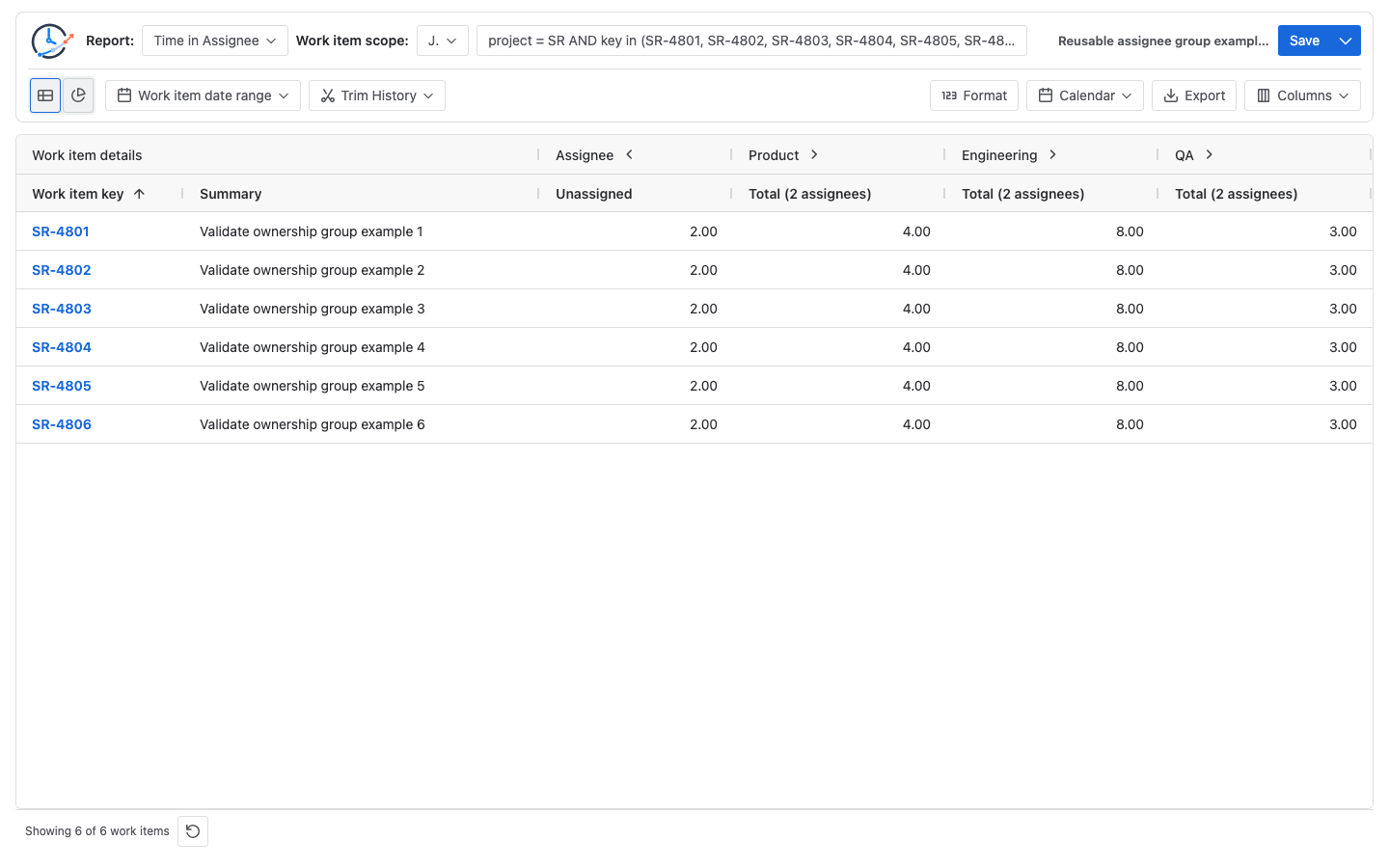
The report makes a long person-level table easier to review, but the labels are an analytical mapping. They should travel with the user list, calendar, scope, and effective date.
Configure a reusable assignee-group report
1. Write one group-level question
Use a question about workflow responsibility or routing, not individual performance. Examples include “Where does release ownership accumulate?” and “How much ownership time is unassigned before triage?”
2. Hold the Jira work-item population constant
For this reproducible example, use one explicit JQL population:
project = SR
AND key in (SR-4801, SR-4802, SR-4803, SR-4804, SR-4805, SR-4806)
ORDER BY key ASC
JQL controls which work items enter the report. It does not calculate Time in Assignee or build the group columns. If a recurring report needs a maintained source instead, document the saved filter or JQL owner in the workflow reporting guide definition.
3. Calculate Time in Assignee before grouping
Choose Time in Assignee, select the same Calendar and Format for every run, and first inspect the person-level values. Confirm that Ana and Maya each total 12h, Ben and Noah each total 24h, and Priya and Sofia each total 9h. Keep the Unassigned duration visible.
4. Create only the three user groups
Open Columns, create Product, Engineering, and QA Assignee Groups, and select the mapped Jira users for each. The current member picker works with Jira user results. A true Unassigned value has no user account to select, so keep it as its own column rather than presenting it as a user group.
5. Reconcile before saving
Add the underlying user values and confirm that each group total matches. For this mutually exclusive mapping, verify that the three groups plus Unassigned still equal 102h. A grouped view is not valid if it silently drops a user, hides Unassigned, changes the calendar, or changes the work-item population.
6. Save the definition with ownership metadata
Save the reviewed column and group configuration when it will be reused. In a nearby runbook or report description, record the group owner, user mapping, source, calendar and timezone, effective date, and next review condition. Saved Reports restore configuration; they do not freeze Jira data or turn a report mapping into an Atlassian directory rule.
Test a person moving between groups
Suppose Maya moves from Product to Engineering. Editing the current report mapping and rerunning the report produces this view:
| Reporting column | Version 1 | Version 2 after remapping Maya | Change |
|---|---|---|---|
| Product | 24h | 12h | -12h |
| Engineering | 48h | 60h | +12h |
| QA | 18h | 18h | 0h |
| Unassigned | 12h | 12h | 0h |
| Grand total | 102h | 102h | 0h |
The second configuration assigns all 12 of Maya’s calculated historical ownership hours to Engineering:
Product V2     = Ana 12h = 12h
Engineering V2 = Ben 24h + Noah 24h + Maya 12h = 60h
QA V2          = Priya 9h + Sofia 9h = 18h
Reconciliation = 12h + 60h + 18h + 12h Unassigned = 102h
This is a configuration-view reclassification, not a reconstruction of Maya’s historical team membership. If a review must preserve the organization as it existed during an earlier period, keep a dated Version 1 configuration or export and a Version 2 configuration separately. Do not overwrite the definition and then describe the new group totals as historical organization truth.
Make overlapping membership an explicit design choice
StatusPath currently allows one Jira user to appear in more than one Assignee Group. Each group independently includes that user’s full calculated duration. The product does not force groups to be mutually exclusive, so totals from overlapping groups must not be added as though they partition one population.
For example, if Maya remains in Product and is also added to Engineering, her 12h appears in both groups:
Product      = 24h
Engineering  = 60h
QA           = 18h
Unassigned   = 12h
Group sum    = 114h
Unique underlying Time in Assignee total = 102h
Overlap      = 114h - 102h = 12h from Maya
This Guide deliberately uses a mutually exclusive mapping: every selected user appears in exactly one of Product, Engineering, or QA, and Unassigned remains separate. Under that documented rule—and only with complete user coverage and the same scope, Calendar, history boundary, and calculation time—the three group totals plus Unassigned reconcile to 102h.
Reusable group templates and guardrails
These patterns are starting points, not built-in groups:
| Pattern | Example labels | Appropriate question | Guardrail |
|---|---|---|---|
| Workflow function | Product, Engineering, QA | Where did recorded ownership accumulate across the delivery flow? | Map only selected users who perform those functions in the review scope. |
| Operational role | Triage, Resolution, Review | Which operating role held work at each stage? | Do not infer a role from title or current directory membership; document the user list. |
| Region or shift | AMER, EMEA, APAC | How is queue ownership distributed across an explicitly defined operating model? | Keep the calendar and timezone visible; avoid demographic interpretation. |
| Delivery boundary | Internal, Vendor | How much ownership time crossed a managed delivery boundary? | Record the contract or operating definition and avoid individual ranking. |
| No owner | Unassigned | How much time had no Jira Assignee? | Preserve it as a separate column; it is not a selectable Jira user group. |
Within one comparison, give every selected user one documented analytical home. If a second view needs a different mapping—for example region instead of workflow function—save it as a separately named configuration. Do not add totals from overlapping analytical views as if they were one population.
What Atlassian’s Jira sources verify
Atlassian’s JQL fields reference documents the Assignee field and supported operators such as =, IN, WAS, and CHANGED. Those operators help select or audit work items; they do not calculate ownership duration.
Atlassian’s JQL functions reference documents membersOf() for matching users in a group and the id:<teamId> form for a team. For example, an administrator can use a maintained group in a population query:
project = SR AND assignee in membersOf("your-group-name")That query matches the Assignee field for work-item selection. It is not evidence that the same membership automatically creates or updates StatusPath Assignee Groups, and it does not classify past ownership intervals by historical membership.
Atlassian’s group-management documentation covers creating and maintaining Atlassian user groups. Treat that directory object and a StatusPath report grouping as separate definitions. The current StatusPath Marketplace listing identifies Time in Assignee and grouping within the product’s reporting scope.
Common mistakes
Assuming the report group automatically follows Jira groups or teams
The report mapping uses selected Jira user columns. Review and update it deliberately when the operating model changes; do not claim automatic synchronization without released-product evidence.
Rewriting history when someone changes teams
Moving Maya to Engineering in the current configuration reclassifies all 12h in the current view. It does not determine when she joined Engineering. Preserve dated definitions when historical organizational context matters.
Turning Unassigned into a person or hiding it
Unassigned has no Jira user account in the current picker. Keep its 12h as a separate ownership column so time with no recorded Assignee remains visible and the unique total reconciles.
Grouping before validating person-level values
A clean 24h Product total can still conceal a missing user or wrong calendar. Reconcile the member columns first, then the group and grand totals.
Comparing differently scoped or timed reports
Group labels alone do not make runs comparable. Hold the Jira population, Trim History, calculation time, Calendar, timezone, and Format constant.
Using ownership duration to rank people
Time in Assignee includes waiting while a work item is recorded under someone. It is workflow evidence, not proof of active labor, quality, or productivity.
Frequently asked questions
Is a StatusPath Assignee Group the same as an Atlassian group or Jira team?
No. An Atlassian group or team is a user-membership object. A StatusPath Assignee Group is a report configuration that combines selected Jira user-duration columns. No automatic synchronization is implied.
Does moving a person to another group preserve their old team membership?
No historical membership reconstruction is implied. The current mapping classifies that person’s calculated duration in the current view. Preserve separately dated configurations or exports when an earlier organizational definition must remain auditable.
Can Unassigned be added to an assignee group?
Not as a real Jira user in the current member picker because Unassigned has no user account. Keep it as an independent Time in Assignee column and include it in the reconciliation.
Can one person belong to multiple Assignee Groups?
Yes. StatusPath currently permits overlapping membership, and each group independently includes that person’s full calculated duration. Do not add overlapping group totals. Use a mutually exclusive mapping when the intended acceptance rule is “group totals plus Unassigned equal the unique underlying total.”
Can JQL membersOf() create the report groups?
No. membersOf() can help select work items whose Assignee matches an Atlassian group or team membership rule. It does not create StatusPath group columns or calculate time from Assignee history.
Should assignee groups be used for individual performance comparisons?
No. Assignment duration can include queueing, dependencies, customer waiting, or scheduled delays. Use the groups to investigate workflow ownership patterns, then inspect Jira history and operational context before making a process decision.
Related Guides
- How to Measure Time by Assignee in Jira
- Jira Workflow Reporting Guide: From Scope to Export
- Jira Workflow Review Checklist
- Jira Business Calendars for Workflow Reporting
Keep the mapping beside the result
A reusable assignee-group report is a documented lens over Time in Assignee: named user membership, one Jira population, one calendar, an effective date, and a reconciliation back to person-level and Unassigned values. Recheck the mapping whenever people, scope, or the operating model changes, and retain dated versions when past organizational context matters.
Try StatusPath Reports on the Atlassian Marketplace to build the Product, Engineering, and QA view from selected Jira users, keep Unassigned visible, and validate the 102-hour reconciliation before saving the report configuration.